Key Takeaways
- Look for structural misfit, not isolated annoyance. If normal deals need repeated workarounds, skipped stages, manual routing or off-system approvals, the CRM is no longer reflecting how sales actually happens.
- Separate process problems from platform problems. Weak stage definitions, unclear ownership and inconsistent field use point to redesign work, while sound logic trapped in a poor setup may only need reconfiguration or better integration.
- Treat reporting trust as a decision test. When forecasts rely on manager memory, quotes sit elsewhere, or key context lives in inboxes and chat, the issue is bigger than admin burden because commercial visibility is already compromised.
- Do not scope custom build from the visible workflow alone. Permissions, approval logic, integrations, reporting definitions and migration constraints usually carry more delivery risk than the pipeline diagram suggests.
If your CRM needs five workarounds to represent one real sales process, the software is now the bottleneck – not the team.
The short answer: A sales process outgrows its CRM – and custom CRM development in London becomes the right call – when normal deals require constant exceptions, routing logic breaks against real ownership rules, approvals live outside the system, and reporting no longer reflects how revenue actually moves. Reconfiguration and integration resolve many of these gaps. When they cannot do so without compounding technical debt, a custom build is the justified next step.
That is the point where “the team needs to use it properly” stops being a serious diagnosis. If you are forcing non-linear B2B or service sales into tidy demo stages, the hidden cost is not just admin. It is weak reporting, brittle routing, poor adoption, and technical debt that spreads into the rest of your stack. We see the same pattern with our Custom Software development services: once the system stops matching how work really moves, the overhead lands on people, and the system quietly becomes a liability rather than an asset.
This guide is for sales leaders, RevOps leads, founders, and operations teams weighing process redesign, CRM changes, or custom build scope before a buyer-selection decision. It is not a feature comparison. It is a diagnostic for teams who already know something is wrong and need to identify exactly what.
Signs your CRM no longer fits the way sales actually works
The clearest signal is not one missing feature. It is repeated friction around normal work. If one real sales journey needs five manual fixes to get through the system, treat that as structural misfit, not a training issue.
In my experience, the pattern is consistent: CRM frustration almost always comes from process mismatch, reporting gaps, and manual admin burden – not from teams using the system wrongly. That distinction matters, because it means discipline and additional training will not fix it. The business logic and architecture behind the workflow need attention.
Watch for stages that exist mainly to make reports look tidy, while deals actually move through exceptions, loops, approvals, and side conversations. Also check where critical context lives. If account history, pricing detail, or risk notes sit in free text, inboxes, or chat threads, your reporting is already compromised – and any forecast built on top of it is built on a partial picture.
The subtler signal is when managers start compensating. If pipeline calls rely on personal knowledge rather than CRM data, if you have a senior rep who “just knows” where everything is, or if the weekly forecast is essentially a verbal override of what the system says, the CRM has already lost. People have filled the gap with judgement because the data cannot be trusted.
- Lead routing needs manual intervention because the real ownership rules – by territory, product line, account tier, or relationship history – are more complex than the CRM’s workflow automation allows.
- Quoting happens outside the CRM – in Excel, in a CPQ tool, in email – and someone rekeys the outcome later. The gap between when a quote is sent and when the CRM is updated is a standing accuracy problem.
- Approval steps live in email or Slack, so deal status is always slightly behind reality. Discount approvals, legal sign-offs, and commercial exceptions leave no trace in the pipeline.
- Pipeline stages are skipped, duplicated, or reinterpreted by different reps. The same deal looks different depending on who owns it, because the stages do not map cleanly to how the actual sale moves.
- Forecast confidence depends on manager judgement because the underlying data is thin, inconsistently entered, or structured around what the CRM can capture rather than what the business needs to know.
- New joiners take longer to onboard than they should, not because of product complexity, but because the CRM requires institutional knowledge to navigate. The workarounds are tribal, not documented.
If you are seeing three or more of those together, do not assume more discipline will fix it. Inspect the business logic and architecture behind the workflow. The issue is structural, and adding enforcement on top of a broken structure tends to increase resistance without improving data quality.
Where process misfit usually shows up first
Misfit usually appears where the clean demo breaks. London B2B and service sales often involve handoffs, exceptions, multi-contact buying groups, pricing nuance, and approval logic that does not move in a straight line. Map those edge cases first, because that is where the CRM starts lying.
A common example is a team that thinks the problem is pipeline hygiene, when the real issue is that qualification, solution design, quoting, legal review, and commercial approval are split across different tools with no reliable handoff. The visible symptom is poor adoption, but the actual failure mode is fragmented business logic – the CRM represents one version of a deal, the quoting tool holds another, and the legal inbox holds a third.
The failure compounds at the reporting layer. If stage progression data is unreliable, win-rate analysis is unreliable. If time-in-stage is not trusted, you cannot identify where deals actually stall. If source attribution stops at lead creation and does not follow revenue through to close, you cannot make informed decisions about where to invest. These are not reporting preferences – they are the operational information a sales leader or RevOps lead needs to make decisions with confidence.
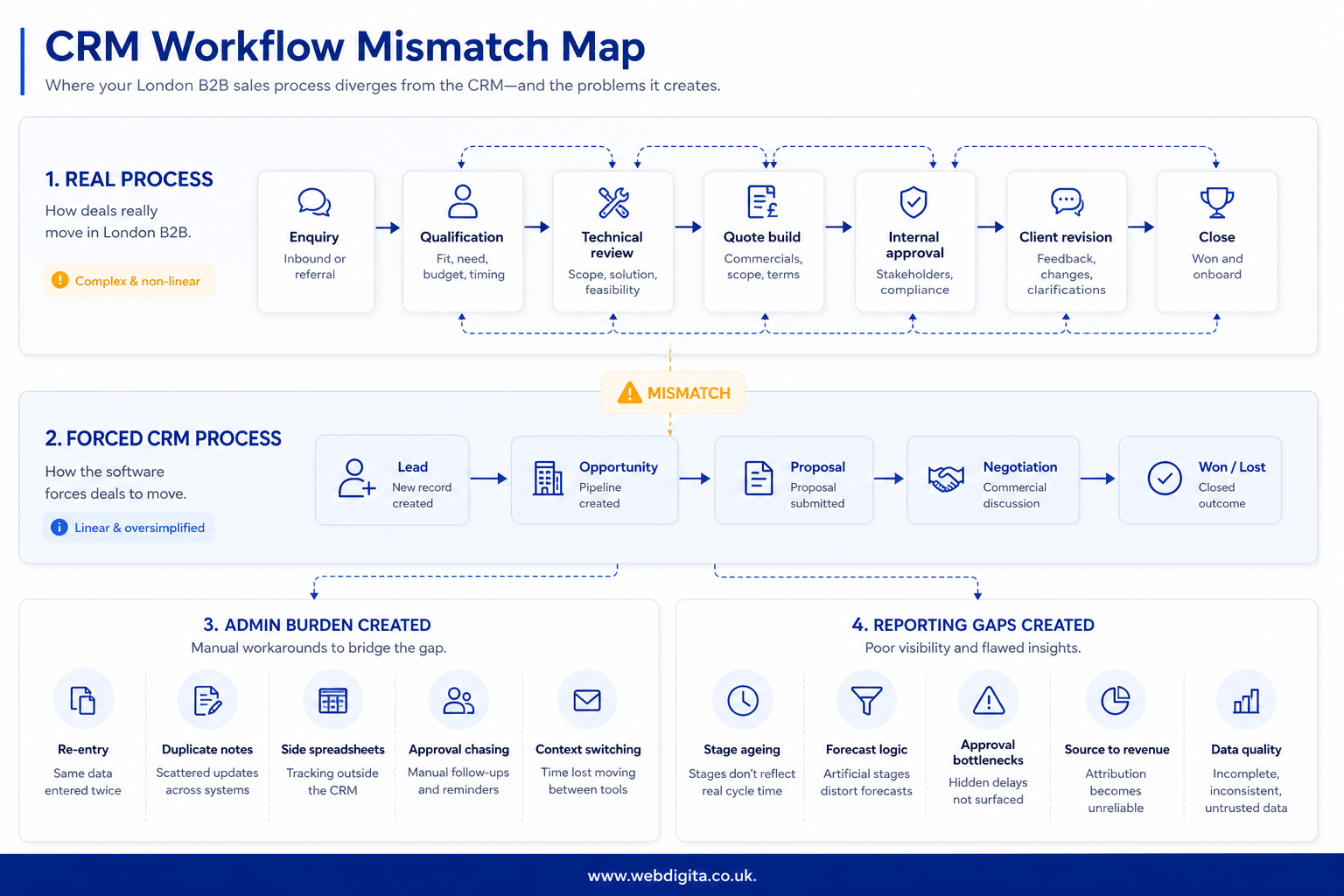
CRM workflow mismatch map: use this to compare how deals really move against how the software forces them to move.
- Real process: enquiry, qualification, technical review, quote build, internal approval, client revision, close.
- Forced CRM process: lead, opportunity, proposal, negotiation, won or lost.
- Admin burden created: manual re-entry, duplicate notes, side spreadsheets, approval chasing.
- Reporting gaps created: unclear stage ageing, weak forecast logic, missing approval bottlenecks, poor source-to-revenue visibility.
The mismatch between those two columns is where adoption breaks down. Reps are not lazy – they stop updating the CRM because updating it accurately requires more effort than the system returns in value. That is a design problem, not a behaviour problem.
Ask where routing rules break, where approvals disappear, and where reps stop trusting the fields. If you use HubSpot, this is often the point to bring in a HubSpot consultant before you jump to a rebuild, because some problems are configuration strain and some are deeper platform-fit issues. The distinction matters for budget, timeline, and risk.
Fix the process, extend the CRM, or scope a custom build?
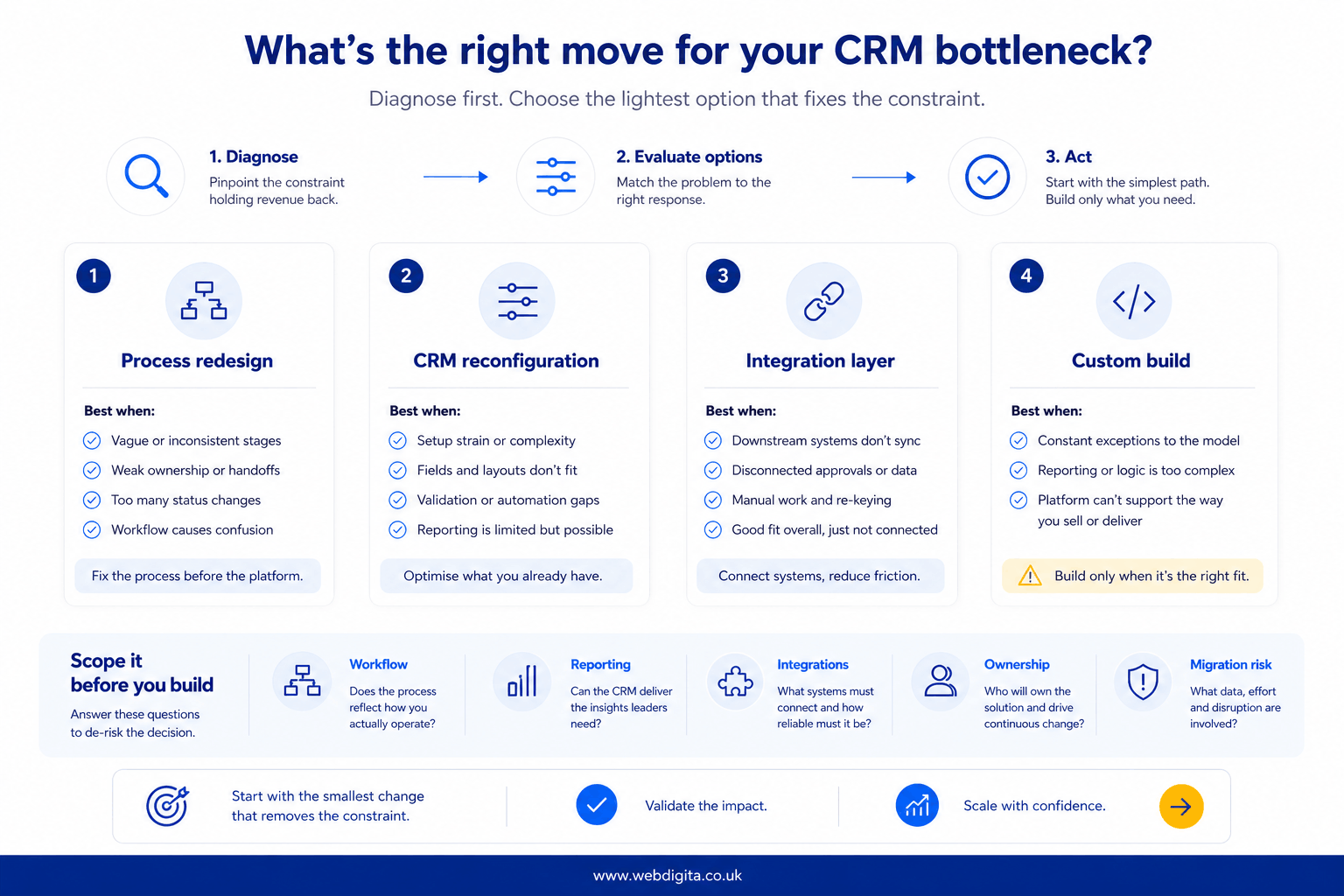
You have four real options: redesign the process, reconfigure the CRM, add an integration layer, or build custom CRM functionality. The wrong move is to skip straight to custom software because the team is frustrated. First ask whether the process itself is clear, owned, and worth encoding.
This is a more uncomfortable question than it sounds. Teams that have been running workarounds for 18 months often have process logic that is informal, inconsistently applied, and genuinely contested. Building custom software on top of that does not resolve the ambiguity – it hardens it into code. Before any build conversation, the process needs to be documented, challenged, and agreed by the people who will actually use it.
Process redesign is the right move when stages are vague, field ownership is weak, or different teams use different definitions for the same commercial events. This is also the right starting point if you have recently changed go-to-market motion – new segments, new channels, or new service lines – and the CRM was never updated to reflect it.
CRM reconfiguration is enough when the business logic is sound but the setup is poor – wrong stage definitions, missing required fields, broken automation rules, or pipeline views that do not reflect how management wants to report. This is often underestimated. A properly reconfigured CRM can resolve a surprising amount of friction without any custom build work.
Integration work makes sense when the CRM is broadly right but quoting, approvals, or downstream systems are disconnected. A well-scoped API integration – connecting the CRM to a CPQ tool, a finance system, or a project delivery platform – often resolves what looks like a platform-fit problem. The CRM does not need to do everything; it needs to be the reliable source of truth for commercial status, with clean handoffs to the systems that handle adjacent work.
Custom CRM development London becomes reasonable when normal work depends on constant exceptions, awkward workflow automation, or reporting logic the platform cannot hold cleanly – and when reconfiguration and integration have been genuinely tested and found insufficient, not just skipped because a rebuild looks exciting.
If your CRM needs constant exceptions to represent normal sales behaviour, the architecture is already fighting the business. That usually gets more expensive, not less.
My view, having reviewed these situations repeatedly, is that maintainability is the question most teams underweight at the point of decision. A clever workaround can look cheaper this quarter and still create long-tail cost through broken reporting, unstable workflow automation, and operational overhead that accumulates across databases and downstream integrations. The teams that end up in the worst positions are usually those that layered workarounds on top of workarounds for two or three years before forcing a decision. By that point, the technical debt is substantial and the rebuild scope is much larger than it would have been earlier.
Do not buy another layer of technical debt because the demo looked neat.

Not sure if this is a CRM issue or process issue
We can review your workflow, routing logic, approvals and reporting gaps to see whether you need redesign, reconfiguration, integration work or a custom build.
Useful before you commit to a rebuild
What to check before you commit to custom CRM development
The visible pipeline is rarely the hard part. Hidden complexity usually sits in permissions, reporting definitions, approval rules, APIs, and downstream dependencies. You need to check those before anyone estimates scope – otherwise you are pricing a diagram, not a working system. Estimates produced without this groundwork tend to shift significantly once the real complexity surfaces during build, which is the worst time to be renegotiating scope and budget.
WEBDIGITA CRM Misfit Checklist: use this to test whether you are scoping a real platform-fit problem or about to rebuild messy process logic in code.
- Check who owns each stage, field, and approval rule. If ownership is contested or unclear, resolve it before any technical scoping. Code does not resolve ambiguity – it enforces whatever you give it.
- List every integration that creates, updates, or consumes CRM data – including cloud hosting dependencies, database connections, and any downstream systems that pull pipeline or account data for reporting, billing, or project management.
- Define what reporting must be trusted on day one. “We will sort reporting later” is how projects ship a working pipeline and broken revenue visibility. Agree the reporting requirements before build starts, not after go-live.
- Review RBAC and permission edge cases before workflow design. Multi-team or multi-region setups regularly produce permission logic that is more complex than the initial brief suggests. Surface it early.
- Ask what cannot go down during migration or cutover. If the answer is “nothing can go down”, that is a migration architecture question, not just a timing preference. It affects build cost and cutover design significantly.
- Challenge any requirement that exists only because the current setup is broken. Some requirements on a CRM rebuild brief are genuine business needs. Others are workarounds that have been normalised over time. The difference matters – you do not want to encode today’s workarounds into tomorrow’s custom build.
We have seen projects where the visible brief was “replace the CRM workflow”, but the real risk sat in quote approvals, duplicate account records, and reporting definitions nobody had agreed. Those issues did not appear in the original scope – they appeared three months into build, when it became clear that the new system needed to take a position on contested business logic. Treat ambiguity before build as a warning sign. If ownership is fuzzy, custom code will only harden the confusion.
You also need to ask how data moves between systems, where it is stored, and what happens when an API fails. That is not engineering theatre. It determines whether the system is stable in production and whether your reporting can be trusted when you need it most.
How to tell whether a provider understands your actual problem
Do not start with a rebuild decision. The right first step is a short scoping review that tests the real workflow, reporting requirements, integration dependencies, and ownership model. You need clarity on whether the answer is redesign, reconfiguration, extension, or a custom build – and that clarity should come before any cost or timeline estimate.
The scoping review is also where you learn whether the provider is asking the right questions. A provider who is genuinely diagnosing your situation will want to understand your current data model, your downstream integrations, your reporting structure, and your ownership and approval logic before they say anything about technology. A provider who leads with platform recommendations before understanding those things is selling, not diagnosing.
A good scoping review for custom CRM work should surface:
- Whether the problem is process, configuration, integration, or genuine platform-fit – and the honest answer is sometimes “more than one of those, in sequence”.
- Which approval and routing rules are genuinely complex versus just poorly configured – this is often where the biggest gap between brief and reality sits.
- Where reporting definitions are contested or undefined across sales, finance, and operations – this is the most common cause of post-launch dissatisfaction on CRM projects.
- What migration or cutover risk looks like given current data structures, API dependencies, and any systems that cannot tolerate downtime.
- Whether the team’s process is stable enough to build on – if go-to-market motion is likely to change significantly in the next 12 months, that affects build scope and architecture decisions.
How a provider behaves during that diagnostic tells you a great deal. If they challenge your workflow assumptions before estimating, ask about downstream APIs and data flows, distinguish process problems from platform problems, and push back on requirements that look like normalised workarounds, that is a good sign. If they jump straight to build without establishing what is currently broken and why – or if they validate every requirement without questioning it – treat that as a red flag.
The goal of the scoping review is not a prettier promise. It is fewer assumptions going into build, a cleaner brief, and a realistic sense of what the project actually involves before anyone commits budget.
If you want that diagnostic done properly, a project discovery workshop is the natural next step. It gives you a structured scoping review you can act on – whether the outcome is a reconfiguration brief, an integration spec, or a full custom build case.
Questions buyers ask about custom CRM development in London
These are the practical questions teams usually ask when the CRM has become a sales bottleneck rather than a useful system of record.
1. How do you know if a CRM problem is really a software fit problem?
A CRM problem is usually a software fit problem when normal sales work depends on repeated workarounds, manual re-entry, off-system approvals or reporting nobody fully trusts. One missing feature is not the main signal. The stronger sign is that the team has to bend the process to fit the tool, and the data no longer reflects how deals actually move.
2. When is custom CRM development in London the right option?
Custom CRM development in London is the right option when normal work depends on constant exceptions, awkward automation or reporting logic the platform cannot support cleanly. It should come after process review, CRM reconfiguration and integration options have been tested. If the process is still unclear, custom build usually hardens confusion rather than solving it.
3. Can better CRM training fix these issues?
Better CRM training can help, but it will not fix structural mismatch. Training improves adoption when the workflow already makes sense and the setup is basically sound. It does not solve broken routing rules, disconnected quoting, hidden approvals or pipeline stages that exist mainly to make reports look tidy.
4. What should be checked before scoping a custom CRM build?
Before scoping a custom CRM build, check stage ownership, field ownership, approval rules, integrations, reporting definitions, permissions and migration risk. You also need to know what data must be trusted on day one and what cannot fail during cutover. Without that, any estimate is based on a simplified diagram rather than the real operating model.
5. Is poor CRM adoption always a user discipline problem?
Poor CRM adoption is not always a user discipline problem. It is often a symptom of fragmented business logic, duplicated admin or a workflow that does not match real sales behaviour. When reps stop trusting fields or avoid the system to get work done, the issue is often architectural rather than behavioural.
6. What is the safest next step if the CRM is now slowing sales down?
The safest next step is a short scoping review before any rebuild decision. That review should test the real workflow, reporting needs, integration dependencies and ownership model. A good review reduces assumptions and helps you decide whether the answer is process redesign, CRM reconfiguration, integration work or custom development.
Conclusion
The useful question is not whether your team dislikes the CRM. It is whether the system can represent normal sales behaviour without constant exceptions, hidden admin and unreliable reporting. If it cannot, you are no longer dealing with a training issue. You are dealing with an operating model that the software cannot hold cleanly.
Before you approve a rebuild, force a proper scoping conversation around workflow reality, reporting requirements, integration dependencies and ownership. That will tell you whether to redesign the process, rework the setup, add an extension layer or commission custom CRM development in London for the parts that genuinely need it.
Explore our London custom software service for complex CRM workflow problems
If your sales process depends on exceptions, disconnected approvals and reporting workarounds, our custom software team can scope the right fix before unnecessary build cost gets locked in.
View custom software serviceNeed a faster diagnostic route first