Key Takeaways
WooCommerce development cost in the UK depends less on the platform and more on custom work, integration depth, and how much the store deviates from standard checkout and catalogue logic. Most quotes that look cheap are either light on scope or heavy on plugin dependencies that create technical debt later.
- Budget bands matter more than single numbers: a light theme-led store may cost a few thousand pounds, while a custom build with B2B logic, ERP sync, and performance work usually moves into a lower five-figure budget.
- Custom work drives cost faster than platform choice: two WooCommerce stores can have wildly different budgets depending on whether the build is mostly configuration or effectively bespoke functionality with WordPress underneath.
- Migration and integration work slip most often: moving messy legacy data, syncing stock systems, and handling account-specific pricing create hidden dependency chains that rarely fit a one-line allowance.
- Post-launch costs are part of the real budget: hosting, maintenance, performance tuning, and plugin compatibility work do not stop at go-live, and weak architecture starts charging rent quickly.
If you are comparing quotes, ask what is being configured, what is being customised, what is being deferred, and who owns the logic on each side of an integration. The best proposals show exclusions, dependency risks, and where scope may expand rather than pretending everything fits a neat estimate.
I’ve stopped being surprised by WooCommerce budgets that blow up. It is almost never WooCommerce itself that does it. It is the quiet parts of the build that get waved through before anyone scopes them properly: Custom checkout rules, an awkward plugin stack, ERP sync, migration clean-up, and the support work nobody priced because the quote was built around a neat demo rather than the store’s real operating model.
In the UK, WooCommerce development cost usually runs from a few thousand pounds for a light, configuration-led store to a lower five-figure budget, and sometimes beyond, for a custom, revenue-critical build. The platform label barely moves that number. What moves it is custom theme and UX work, B2B pricing or account logic, third-party integrations, migration complexity, performance engineering, and how much ongoing support the store needs after launch.
This guide is for founders, commercial leads, and eCommerce teams who need a realistic budgeting view before a new build, rebuild, eCommerce store migration, or integration-heavy quote review.
Typical WooCommerce development cost in the UK
Forget the bands for a second – you already have those above. What actually separates a low-thousands build from a lower five-figure one is how much of the store is configuration versus how much is custom code, and most quotes blur that line on purpose.
Configuration-led work means a ready-made or lightly customised theme, the standard WooCommerce Blocks checkout, off-the-shelf extensions for shipping, tax and payments, and a catalogue that fits WooCommerce’s data model without a fight. This is genuinely cheap to build and quick to ship.
Custom work starts the moment any of that breaks down: a checkout flow built outside WooCommerce Blocks, B2B pricing or account logic that needs custom PHP, a catalogue structure that needs changes at the MySQL level rather than just more product attributes, or extensions patched so they will actually talk to each other. None of this shows up in a demo. All of it shows up on the invoice.
If you are comparing WooCommerce development quotes, do not ask for a single number. Ask which parts of the build are configuration, which parts are custom, and which parts have quietly been pushed to “phase two.” That last category is where most budget overruns actually live.
A common trade-off follows from this: a configuration-led store launches faster and cheaper, while an integration-heavy custom build costs more upfront but avoids manual order handling, stock errors, and rework later. Neither approach is wrong. Pretending you can have the second at the price of the first is.
The cost driver matrix: what changes WooCommerce development price the most
If you want a faster way to self-qualify, use the matrix below before you ask for proposals. It is not fake precision. It is a reality check on which scope choices move you into a different budget band.
WEBDIGITA WooCommerce Cost Driver Matrix: Use this to place your project into a realistic band before you compare agency quotes.
| Project type | Complexity signals | Typical UK price range |
|---|---|---|
| Light brochure-plus-commerce build | Theme-led setup, standard checkout, limited plugins, no major integrations | A few thousand pounds |
| Growth-stage custom store | Custom theme work, stronger UX, checkout changes, more extension setup, moderate catalogue complexity | High four figures to lower five figures |
| Revenue-critical custom WooCommerce build | Custom functionality, B2B pricing or account rules, ERP or CRM sync, migration work, performance engineering | Lower five figures and up, depending on scope |
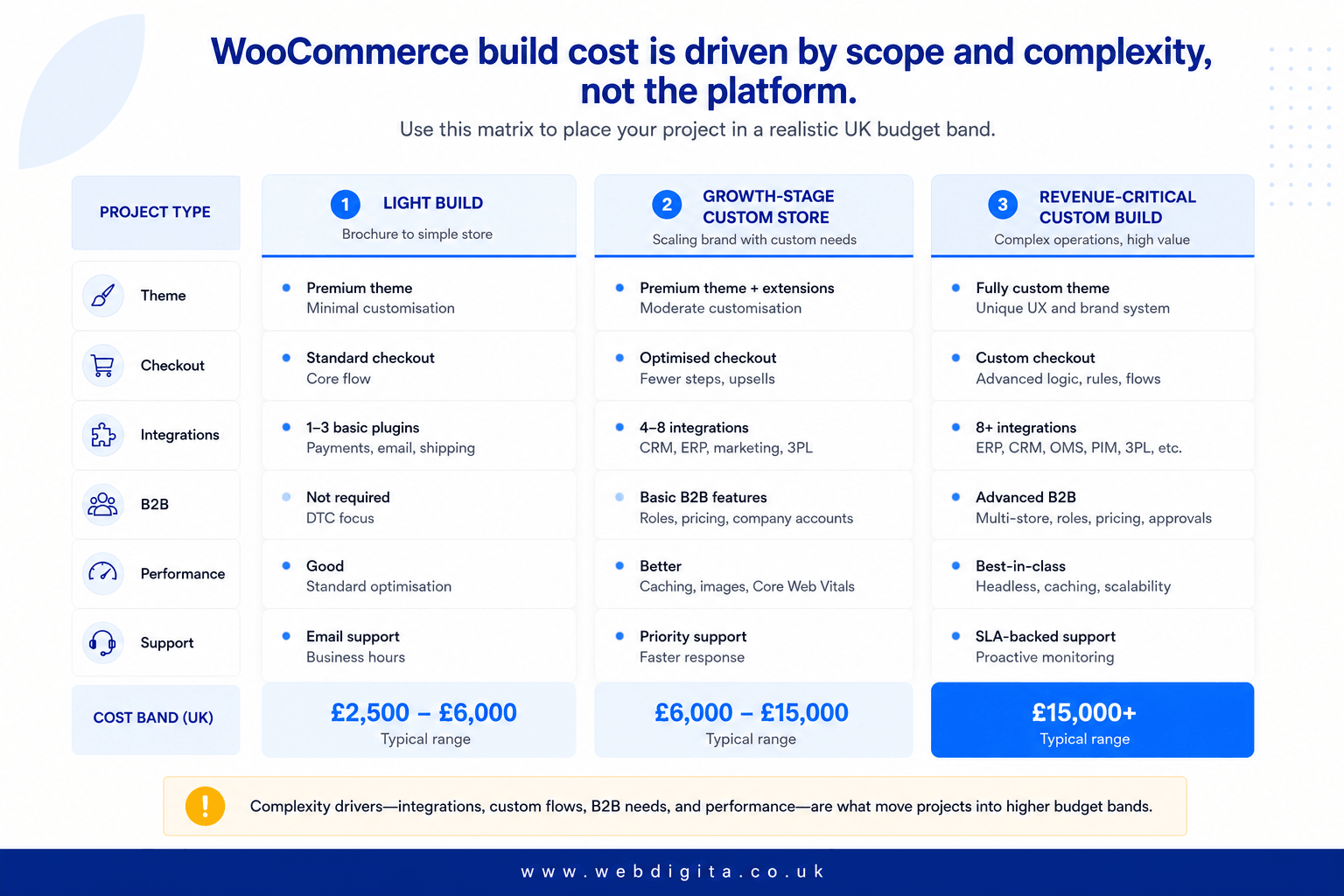
The Biggest Budget Movers: Custom theme, UI/UX decisions, plugins, bespoke functionality, B2B logic, and integration depth. Performance work also matters more than many buyers expect, especially when the store has traffic pressure, heavy plugins, or poor hosting underneath.
In my experience scoping WooCommerce builds around performance, the plugin-heavy briefs are the ones that come back to bite. They look cheap on paper because the brief leans on plugins for everything instead of custom code. Six months later, the real cost shows up in plugin conflicts, a slower checkout, updates that quietly break something else every time, and nobody quite knowing which dependency broke what. I treat a plugin-heavy plan as a technical debt question, not an automatic saving.
Edge cases usually cost more than homepage design. If your store has account-specific pricing, shipping exceptions, trade ordering, or approval flows, you need to surface that early. If you want help tightening those assumptions before build, a WooCommerce project discovery workshop is often where the quote stops being fiction.

Not sure where your WooCommerce project sits on the cost spectrum?
Most budgets break because the scope was never properly mapped. We help you identify the real complexity drivers before you commit to a build, so you can set a realistic budget that holds.
Quick diagnostic call. No sales pitch. Just clarity on what you actually need.
Costs clients miss after the website build & launch
The quote is rarely the whole budget. Hosting, database load, maintenance, and later performance work often sit outside the initial build, and that is where weak architecture starts charging rent.
Hosting and Infrastructure: Costs depend on traffic, product volume, search behaviour, background jobs, and how hard MySQL is working under WooCommerce’s product and order queries. A small store can live on modest shared hosting. A busier WooCommerce store with frequent stock updates, layered search, and a heavy plugin stack needs enough PHP workers and database headroom to survive a sale spike, not just survive a demo. Ask whether the hosting recommendation is based on real load assumptions or guesswork.
- Ask whether hosting, backups, and monitoring are included or separate.
- Check what the maintenance retainer covers: updates, security, bug fixing, plugin compatibility, and small change requests.
- Ask whether performance optimisation is part of launch scope or a separate engagement later.
- Watch for vague warranty language that leaves checkout bugs or plugin conflicts outside support.
Maintenance and Performance: A modest WooCommerce monthly support package is normal if the store matters commercially. You need to know who owns updates, incident response, and regression checking after launch. Do not assume performance tuning is a one-off task either. If the store grows, the work often returns in a different form.
If you are reviewing a WooCommerce development cost UK quote, push on what happens after month one. That answer tells you a lot about delivery maturity.
Migration and integration work: where budgets usually slip
This is where early estimates usually go wrong. Migration and integration work look tidy in a proposal, then turn messy when real data, brittle APIs, and half-owned business rules finally show up.
Migration Cost: Moving from another platform is not only about products. You may need customer records, order history, redirects, SEO continuity, tax settings, shipping logic, and old data that was never structured properly. If you are migrating, ask what is being moved, what is being cleaned, and what is being left behind. Do not accept a one-line migration allowance if the legacy setup is messy.
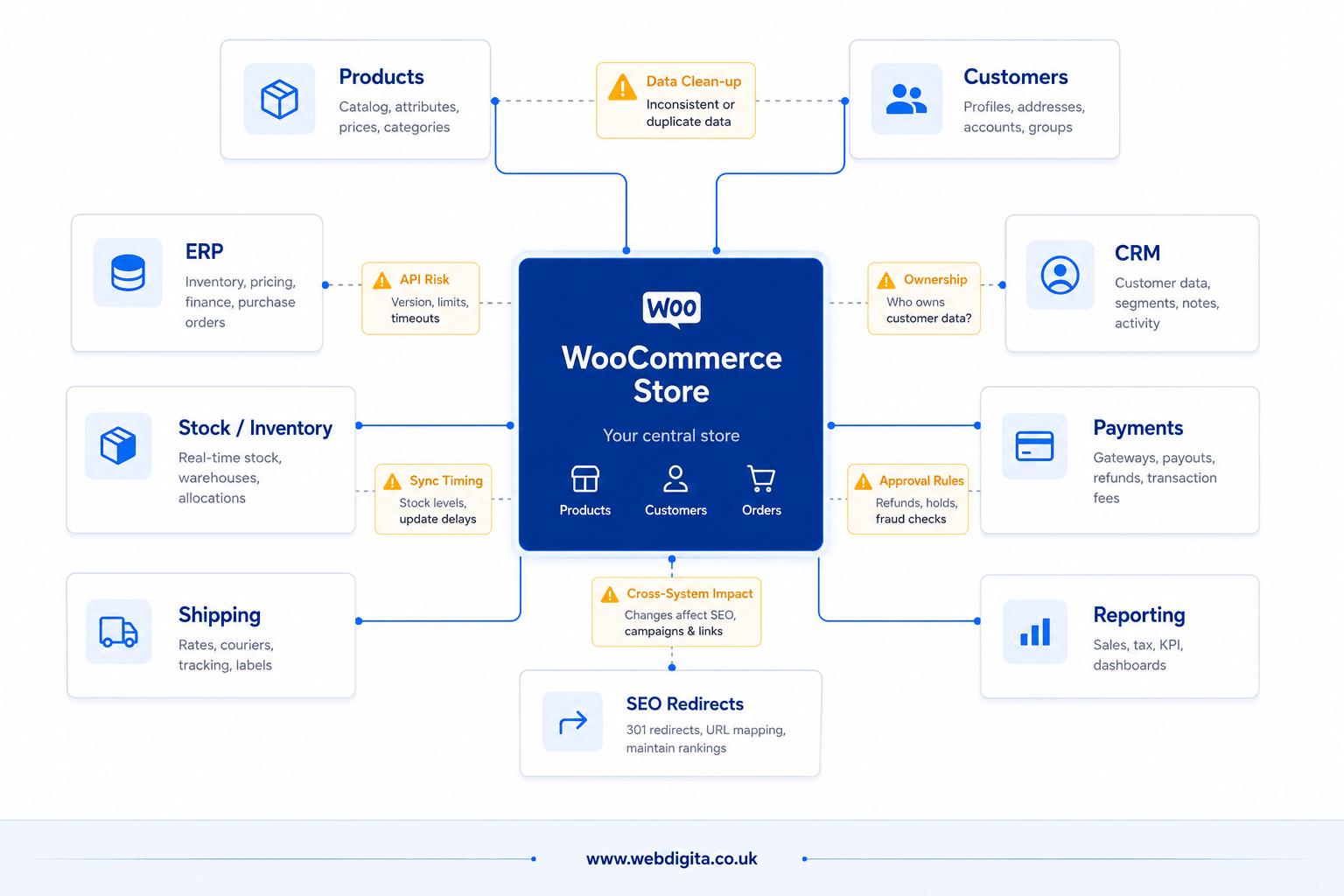
Integration cost: ERP systems, stock platforms, CRMs, payment gateways such as Stripe or PayPal, shipping platforms, and middleware create the biggest hidden dependency chains. Most of this runs through the WooCommerce REST API, and the real cost is rarely the integration itself – it is everything the API does not tell you about the other system’s edge cases. A common example is a store that looks standard until account pricing, stock sync timing, and approval-based B2B ordering appear halfway through scoping. That is not a small change. It is a different architecture.
You should also ask who owns the logic on each side of the integration. This often becomes visible when the storefront team assumes the ERP is the source of truth, while the operations team is still fixing data manually in spreadsheets. If you want to avoid that, map the ownership before development starts and be wary of any quote that prices integrations without clear assumptions.
A good proposal should show exclusions, dependency risks, and where scope may expand. It should also explain what happens after launch, whether through a eCommerce website maintenance service or another support model, because integration and plugin issues don’t stop at go-live. If you need a wider benchmark beyond WooCommerce, you can also review eCommerce development cost in the UK.
Questions buyers ask before budgeting a WooCommerce build
Common questions about scoping, pricing, and what changes the cost most in UK WooCommerce projects.
1. What is the typical WooCommerce development cost in the UK?
WooCommerce development cost in the UK usually ranges from a few thousand pounds for a light theme-led store to a lower five-figure budget for a custom build with deeper functionality, integrations, and performance work. The biggest cost drivers are custom theme and UX work, B2B pricing logic, third-party integrations, migration complexity, and ongoing support needs. Two stores on the same platform can have very different budgets depending on whether the build is mostly configuration or effectively bespoke functionality.
2. Why do WooCommerce quotes vary so much between agencies?
Quotes vary because agencies scope differently. Some price only the visible storefront work and defer integration, migration, and performance tasks. Others include discovery, testing, post-launch support, and realistic allowances for custom logic. A low quote may ignore awkward parts such as ERP sync timing, account-specific pricing, or legacy data clean-up. Always ask what is included, what is excluded, and what happens after launch before comparing numbers.
3. What are the biggest hidden costs in a WooCommerce build?
The biggest hidden costs are migration work, integration complexity, plugin compatibility issues, performance tuning, and post-launch support. Migration often involves cleaning messy legacy data, preserving SEO, and handling order history. Integrations with ERPs, CRMs, or stock systems create dependency chains that rarely fit a one-line estimate. Hosting, maintenance, and plugin updates also add ongoing costs that many buyers miss when reviewing initial quotes.
4. How much does WooCommerce migration cost?
WooCommerce migration cost depends on what you are moving and how clean the legacy data is. A simple product catalogue move may cost less, while migrating customer records, order history, tax settings, shipping rules, and SEO redirects from a messy legacy platform usually adds significant work. If the old system has poor data structure or custom logic, expect higher costs. Always ask what is being moved, what is being cleaned, and what is being left behind.
5. Do I need a custom WooCommerce theme or can I use a bought theme?
You can use a bought theme if your store fits standard eCommerce patterns and you do not need custom checkout logic, B2B pricing, or tailored UX. Custom themes cost more but give you control over performance, design flexibility, and future changes. Bought themes are faster and cheaper upfront but may create technical debt if you need heavy customisation later. The decision depends on your commercial model and how much the store deviates from standard retail.
6. What does WooCommerce maintenance cost after launch?
WooCommerce maintenance usually costs a modest monthly retainer depending on store complexity, plugin count, and support scope. Maintenance should cover WordPress and plugin updates, security monitoring, bug fixing, and small change requests. Performance tuning, integration fixes, and feature additions are often priced separately. Ask what the retainer includes and whether incident response, regression testing, and plugin compatibility checks are covered or billed as extras.
7. How much do WooCommerce integrations cost?
WooCommerce integration cost depends on the system, API quality, data volume, and business logic complexity. Simple integrations such as payment gateways or email tools may be included in the build. Complex integrations with ERPs, CRMs, or stock systems often cost more because they involve custom middleware, sync timing logic, and error handling. Always clarify who owns the logic on each side of the integration and what happens when the external system changes.
8. Is WooCommerce cheaper than Shopify or Magento?
WooCommerce can be cheaper for light builds because there are no platform fees, but total cost depends on custom work, hosting, and support needs. A heavily customised WooCommerce store with integrations and performance engineering may cost more than a standard Shopify build. Magento is usually more expensive upfront but may suit larger catalogues or complex B2B logic better. Compare total cost of ownership, not just platform labels, and ask what each option includes.
Conclusion
The real WooCommerce development cost question is not what the platform costs but what your operating model needs and whether the build can handle it without constant rework. A cheap quote that ignores integration timing, migration clean-up, or B2B logic is not a saving. It is a deferral that shows up later as manual workarounds, plugin conflicts, and support bills nobody budgeted for.
| Decision point | What to check before committing |
|---|---|
| Scope clarity | Ask what is being configured, what is being customised, and what is being left for later. Vague scope creates vague budgets. |
| Integration ownership | Clarify who owns the logic on each side of the sync. If the ERP team and the storefront team have different assumptions, the integration will break. |
| Post-launch support | Check what the maintenance retainer covers and whether performance work, plugin updates, and bug fixing are included or priced separately. |
| Migration assumptions | Ask what is being moved, what is being cleaned, and what is being left behind. Do not accept a one-line migration allowance if the legacy setup is messy. |
Ready to scope a WooCommerce build that matches your commercial model?
We work with founders and commercial teams who need a realistic WooCommerce development plan before the quote becomes fiction. Our approach starts with proper scoping, not guesswork, so you know what you are buying and why it costs what it does.
See our WooCommerce development workOr if you need scoping help first,