Key Takeaways
Most Shopify agency timelines fall between 4 and 14 weeks, but the real schedule depends on integrations, metafield design, UAT quality and how quickly your team can approve decisions. A lean theme-led build can move in 4 to 6 weeks. A typical mid-market project usually takes 8 to 10. Once you add migration complexity, ERP or 3PL integrations, Shopify Flow automation or checkout extensibility, 12 to 14 weeks is entirely normal.
- Discovery and architecture matter more than design speed. Weak discovery creates rework later when metafields, app logic or operational rules were never properly mapped.
- Integrations are the usual delay culprit. ERP stock rules, 3PL dispatch logic and API reliability often take longer than the visible storefront build.
- Your internal team controls the pace. Product data, content, approvals and UAT usually sit client-side, and slow sign-off delays launch even when the build is complete.
- App selection affects performance and timeline. A weak app choice can create Core Web Vitals drag, duplicate functionality or awkward workarounds that need fixing before launch.
If an agency gives you a very fast timeline without asking about integrations, data structure or approvals, treat that as a warning sign. The shortest promise is rarely the safest one.
Shopify projects that run over budget do so at integration, not at theme development. I have seen this pattern enough times that I have stopped being surprised by it: a business signs off a clean-looking proposal built around design rounds and page count, then spends the final month firefighting ERP stock sync rules, Shopify Flow automation gaps and checkout extensibility decisions that nobody pinned down in week one.
For UK Shopify agency engagements, the realistic range is 4 to 14 weeks. Lean theme-led builds with a clear brief can close in 4 to 6 weeks. Typical mid-market projects land at 8 to 10. Add migration complexity, metafield data model design, third-party integrations or checkout extensibility requirements on Shopify Plus, and 12 to 14 weeks is where serious projects realistically sit. The schedule risk is almost never in the design phase – it is in the dependencies, the testing and the speed of internal decisions.
This guide is written for founders, eCommerce leads and project owners who need to set realistic expectations before shortlisting agencies, committing to launch dates or resourcing internal teams.
A realistic UK Shopify agency timeline is usually 4 to 14 weeks
If you want the short version for planning purposes, use that range. If an agency gives you a precise number without first asking about your integration stack, metafield structure, Shopify Markets configuration or internal approval process, treat that as a warning sign. They are pricing optimism, not complexity.
A lean build can move quickly when it involves a proven theme approach, limited custom functionality and a small, clean catalogue with no migration requirement. That is the kind of brief where a credible Shopify development services engagement can actually deliver in four to six weeks – and it is a relatively rare brief in practice. Most serious projects are not only theme work. They involve content gaps, app decisions, Shopify Markets configuration for international trading, metafield design across multiple product types and testing that does not appear in any homepage mock-up.
Push agencies on the assumptions behind their timeline. Ask specifically whether their estimate includes migration, order simulation, UAT and launch readiness, or whether those phases have been quietly excluded from the scope they have priced.
| Project scenario | Likely duration | What usually pushes it up |
|---|---|---|
| Lean theme-led build | 4 to 6 weeks | Slow sign-off, content delays, late app changes |
| Typical mid-market Shopify engagement | 8 to 10 weeks | Metafield design, custom sections, UAT, performance fixes |
| Complex build, migration or Shopify Plus | 12 to 14 weeks | ERP or 3PL integrations, Shopify Flow automation, checkout extensibility, data mapping |
Where the time actually goes in a Shopify engagement
Discovery, architecture and QA get compressed because they are less visible than design. That is the pattern I see on projects that slip. The team makes progress on Figma frames while the data model, integration specification and checkout approach remain undecided. Those deferred decisions arrive in the build phase, and everything slows down.
The phase order matters. Discovery and requirement mapping come first, and they take longer when the brief involves Shopify Markets, custom metafields, app rationalisation, Shopify Flow automation rules or third-party system integrations. Then comes design direction and theme architecture, followed by the Liquid build, data model work, integrations, QA, UAT and launch readiness checks. Each phase has dependencies on the ones before it, and compressing the early phases typically adds at least that time back – with interest – in the later ones.
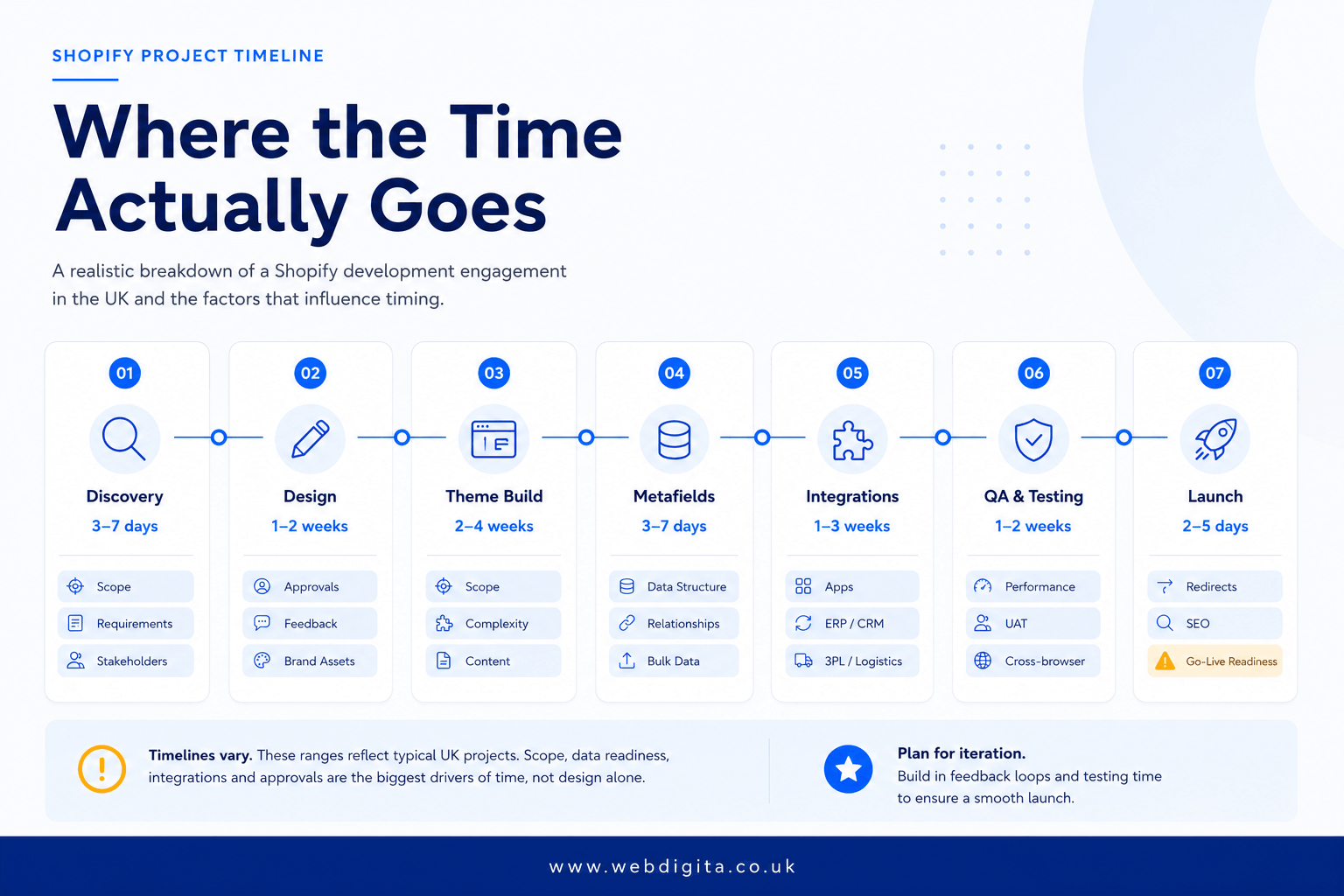
| Phase | Typical range | What changes it |
|---|---|---|
| Discovery and requirements | 3 to 7 days | Stakeholder alignment, undocumented business rules, integration scope |
| Design direction | 1 to 2 weeks | Approval rounds, template count, brand maturity |
| Theme architecture and Liquid build | 2 to 4 weeks | Custom sections, Liquid standards, performance targets, maintainability choices |
| Metafields and data model | 3 to 7 days | Catalogue complexity, variants, Shopify Markets content, migration logic |
| Integrations and Shopify Flow automation | 1 to 3 weeks | ERP, 3PL, PIM, automation rules, API reliability |
| QA and UAT | 1 to 2 weeks | Device coverage, edge cases, payment and fulfilment testing |
| Launch readiness | 2 to 5 days | Redirects, tracking, permissions, rollback planning |
When comparing quotes, use this phase view. If a timeline looks short, ask which of these phases has been compressed, skipped or left as a client dependency.

Not sure whether your Shopify brief is ready for a credible timeline?
Most timeline problems start in discovery, not delivery. We can help you map dependencies, integration scope and decision ownership before you brief agencies or commit to a launch date.
Quick call to check whether your brief is timeline-ready.
Theme architecture and Liquid standards
The theme architecture decision affects every phase that follows it. I have reviewed Shopify builds where a developer built bespoke components without using Shopify CLI for local development, without consistent section schema conventions and without version control discipline. The result looked acceptable at handover. Twelve months later, adding a new product type meant touching nine templates, and no agency was willing to take on the work without a rewrite budget.
Liquid has real constraints – section schema structure, render tag scoping, metafield output syntax, Online Store 2.0 block architecture. Experienced developers work within those constraints by design. Less experienced ones work around them and create technical debt the client inherits. When I assess a Shopify agency’s technical approach, the first question is whether they use Shopify CLI-based local development with version control, and whether their section architecture can accommodate metafield-driven content without rebuilding templates every time a new product type is added. If there is no clear answer to that question, you have your answer.
App selection and performance impact
Every app added from the Shopify App Store carries an overhead cost that almost nobody quantifies at the point of selection. I have reviewed stores where a single loyalty app added four JavaScript execution layers, two redirect chains and a two-second delay to Largest Contentful Paint – on a store that was supposed to hit Core Web Vitals targets. The app did exactly what the product page said it would. The performance impact was never tested before the decision was made.
The question for each app in scope is not whether it does the job. It is what happens to Total Blocking Time, Largest Contentful Paint and layout stability once it is live in production across real devices on real networks. That test needs to happen in a staging environment before launch, not as a post-launch investigation. Any estimate that lists ten Shopify App Store integrations but does not include a performance testing phase is an incomplete estimate.
App audit and rationalisation is worth budgeting time for even in new builds. Most eCommerce businesses arrive with an existing app list assembled over years. Removing overlapping apps, eliminating redundant scripts and replacing performance-heavy tools with lighter alternatives is often where significant Core Web Vitals gains come from – before a single line of theme code is written.
Metafield data model design
Metafields are consistently the most underestimated timeline item in a Shopify engagement. The decisions made here – which data lives in metafields versus metaobjects, how it maps to catalogue structure, how it surfaces in Liquid templates, how it handles Shopify Markets content variants for international trading – affect template design, filter behaviour, migration logic and content management workflow simultaneously.
I have reviewed projects where metafield architecture was deferred to mid-build because it looked like a configuration task rather than a design task. The result was a data model that required two rounds of template rework to accommodate product types that were in the brief from day one. Get the metafield structure agreed and documented before any significant Liquid work begins. This is a discovery phase deliverable, not a later-stage decision.
Checkout extensibility approach
Checkout extensibility on Shopify Plus deserves its own timeline conversation before the project starts. The checkout customisation landscape changed significantly when Shopify deprecated checkout.liquid and replaced it with UI extensions and checkout blocks. If the brief includes custom upsells at checkout, custom field collection, loyalty point redemption, Shop Pay flow modifications or brand-consistent checkout design, you need clarity upfront on what is achievable natively, what requires a checkout app extension build and what requires a Shopify Plus subscription to unlock.
I have reviewed briefs where checkout requirements were listed as minor customisation and turned out to require a Plus upgrade, a checkout UI extension build and a UAT cycle testing real order flows end to end – adding three weeks to a project estimated as a standard Shopify build. Confirm the checkout extensibility scope in discovery, not halfway through the build when the cost of recalibrating has already multiplied.
Shopify Flow automation requirements
Shopify Flow is more capable than most buyers realise and more complex to specify than most agencies budget for in initial scoping. If the business relies on automated order tagging, customer routing, notification logic, risk-based exception handling or post-purchase segmentation, those workflows need to be fully documented before development starts. A Flow rule that tags orders for manual review based on risk scoring, shipping zone and product type can sound like a simple admin configuration. In practice, it requires careful condition logic, edge case testing and UAT using real order data across every scenario the business actually encounters.
The failure mode I see most often: Flow logic written on the assumption that the existing process is simple, then discovered mid-build to have five exceptions that were never mentioned in the brief. Treat every Shopify Flow requirement as a mini-specification task. It is cheaper to document it properly in week one than to rebuild it in week ten.
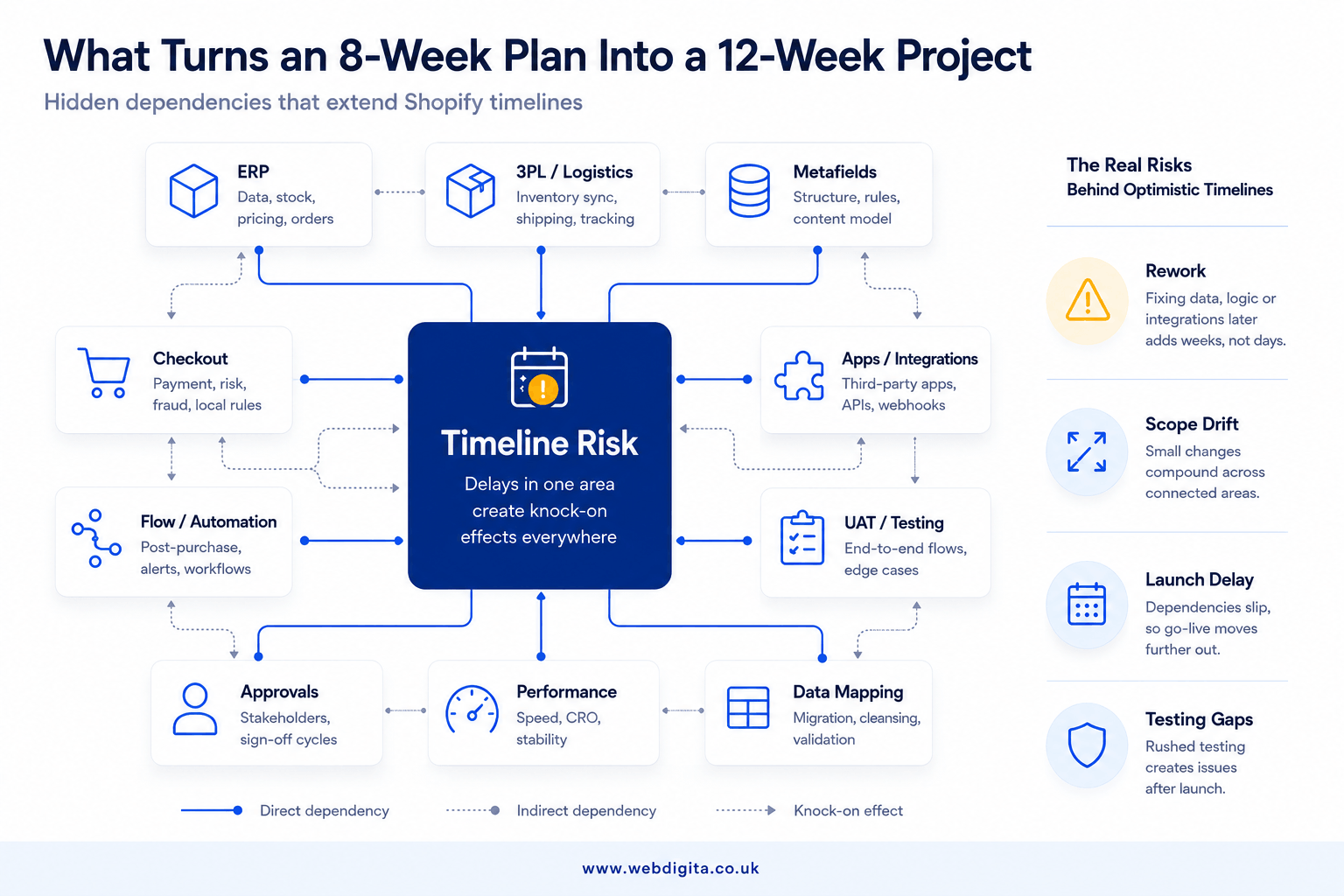
The hidden dependencies that turn an 8-week plan into a 12-week project
This is where most timeline optimism collapses. The storefront looks nearly done, design has been approved, and then the real schedule risk surfaces: stock sync rules that were never documented, fulfilment logic that depends on a 3PL API with reliability problems, or subscription app constraints that require rethinking the checkout approach entirely.
Integrations are the usual cause. I have reviewed Shopify projects where the brief looked tidy until ERP stock rules, 3PL dispatch logic and metafield mapping were properly examined. The issue was not the theme work. The operational logic had never been documented in a form that a build team could implement without guesswork. Discovery that only covers front-end requirements and ignores back-end operational data flows has not done its job – it has deferred the problem to a point in the project where it is significantly more expensive to fix.
Push hard on the third-party integration approach before accepting any estimate. Ask how each integration will be built, whether it uses a native Shopify App Store connector or a custom API implementation, and who owns the integration specification document. Do not assume Shopify Flow automation is light scope. If the business depends on workflow logic, those rules need proper specification before the build starts.
On checkout extensibility, ask explicitly what is achievable without Shopify Plus, what requires Plus and what requires a checkout UI extension build. Then ask whether the estimate includes performance testing after each app installation, because app interaction effects are a common way to fail Core Web Vitals and generate rework after launch at the most expensive possible moment.
- Discovery covered front-end requirements but not data mapping, integration logic or operational rules.
- The timeline assumed integrations would be straightforward before any technical review was done.
- Metafield and metaobject decisions were deferred to mid-build.
- UAT was compressed into a few days at the end without covering fulfilment edge cases or order simulation.
- Checkout extensibility scope was discussed without agreeing platform tier or extension approach.
- Internal client approvals were not built into the plan as explicit time allocations.
If you want those assumptions tested before they become expensive change requests, a proper project discovery workshop is where weak briefs get stress-tested – not mid-build when the cost of changing direction has already multiplied.
How much time your internal team will need to give the project
Agencies do not carry the whole timeline. In my experience, the client team controls the schedule more than it expects – particularly once product data preparation, content decisions, metafield approvals and UAT start competing with the normal day job.
You need clear ownership for product information, metafield content decisions, Shopify Markets localisation requirements, redirect mapping, order simulation and final launch sign-off. If nobody owns those areas with a defined deadline, the project stalls even when the build team is executing efficiently. This is most visible in founder-led businesses, where the same person is approving design direction, reviewing operational logic and trying to run a company simultaneously.
The approval chain is a consistently underestimated delay. Feedback from sales, operations and marketing arrives in separate rounds on different timescales. What looked like a one-week review cycle becomes three. Decide early who can approve what and by when – and build that into the project schedule as an explicit commitment, not an assumption.
| Work area | Agency-led | Client-led | Delay effect if client input slips |
|---|---|---|---|
| Theme build | Yes | No | Build continues briefly, then blocks on feedback |
| Product data and content | Support | Yes | Migration and QA slow down quickly |
| Metafield and catalogue rules | Guide and implement | Approve | Rework across templates and filter logic |
| UAT and order simulation | Prepare | Execute with business input | Launch confidence drops, issues surface late |
| Final sign-off | Recommend | Yes | Go-live date moves even if build is complete |
Ask for a delivery plan that shows client-side responsibilities with explicit deadlines, not only agency tasks. If that ownership map is missing from the proposal, the timeline is flattering someone – and it is probably you.
A quick checklist before you ask an agency for a timeline
Better estimates start with better briefs. The shortest promise is rarely the most accurate one, and a brief that forces an agency to price assumptions will produce an estimate that will not survive contact with the real project.
Shopify Timeline Readiness Checklist: Use this to test whether your brief is ready for a credible timeline, or whether you are still asking agencies to quote against their own guesses.
- Define whether this is a lean theme build, a replatform or a complex operational project with integration dependencies.
- Confirm catalogue size, variant complexity and whether migration includes metafields, metaobjects or Shopify Markets localisation requirements.
- List every Shopify App Store app you expect to keep, replace or review – with performance impact on Core Web Vitals considered explicitly.
- State any ERP, 3PL, PIM, subscription or custom workflow integration dependencies.
- Clarify checkout extensibility requirements and whether Shopify Plus is in scope or required to achieve them.
- Document Shopify Flow automation rules in full, even the ones that seem operationally minor.
- Set Core Web Vitals performance expectations and confirm whether app impact testing is included in the quoted scope.
- Name internal approvers for design, data, operations and launch sign-off – with realistic availability and decision authority.
- Be honest about launch date constraints, trading blackout periods and internal bandwidth.
Use that checklist to compare agency estimates on scope quality, not just delivery speed.
If you are asking how long Shopify development takes in the UK, the honest answer is not one number. It is whether your project is genuinely lean, typically mid-market or carrying hidden dependency risk. Work that out first, and the timeline conversation with any agency becomes considerably more useful.
Questions buyers ask before setting a Shopify project timeline
Common questions about what controls delivery speed, where delays happen, and how to plan realistically.
1. How long does a typical Shopify agency project take in the UK?
Most UK Shopify agency engagements take between 4 and 14 weeks. A lean theme-led build with a clear brief can move in 4 to 6 weeks. A typical mid-market project usually takes 8 to 10 weeks. Once you add migration complexity, third-party integrations, Shopify Flow automation or checkout extensibility decisions, 12 to 14 weeks is entirely normal. The real timeline depends on integrations, metafield design, UAT quality and how quickly your team can approve decisions.
2. What usually makes a Shopify project take longer than expected?
Integrations are the usual culprit. ERP stock rules, 3PL dispatch logic, PIM connections and API reliability often take longer than the visible storefront build. Weak discovery also creates rework when metafields, app logic or operational rules were never properly mapped. Slow internal approvals delay launch even when the build is complete. App selection matters too, because a weak app choice can create performance drag or awkward workarounds that need fixing before go-live.
3. How much time will my internal team need to give the project?
Your team usually controls the pace more than it expects. You need clear ownership for product data, metafield decisions, market-specific content, redirects, order simulation and final sign-off. A common delay is a project owner with no final authority, where feedback arrives from sales, operations and marketing in separate rounds. If nobody owns those decisions internally, the project slows even when the build team is moving well. Decide early who can approve what, and by when.
4. Can a Shopify project be done in less than 4 weeks?
A very lean theme-led build with a small catalogue, limited custom functionality and fast approvals can sometimes move in 3 to 4 weeks. But most serious projects involve content gaps, app decisions, metafield design, market-specific logic and testing that do not show up in a homepage mock-up. If an agency gives you a very fast timeline without asking about integrations, data structure or approvals, treat that as a warning sign.
5. What should I ask an agency before accepting their timeline?
Ask which assumptions sit behind their estimate. Check whether the timeline includes migration, QA, order simulation and launch readiness, or whether those awkward bits have quietly been pushed off the page. Ask how they handle metafield design, app selection, third-party integrations and UAT. Push hard on the integration approach before accepting any estimate. You should also ask for a delivery plan that shows client-side responsibilities, not only agency tasks.
6. Does Shopify Plus make the project faster or slower?
Shopify Plus does not automatically make a project faster. It adds capabilities such as checkout extensibility, Shopify Flow automation and wholesale channels, but those features often require more planning, testing and operational logic. If your project relies on custom checkout behaviour, advanced automation or multi-market complexity, expect the timeline to sit at the higher end of the 8 to 14 week range, not the lower end.
7. How long does the migration part of a Shopify project take?
Migration time depends on catalogue size, variant complexity, metafield mapping and whether you are moving market-specific content or custom data structures. A simple product migration might take a few days. A complex replatform with ERP integration, custom metafields and operational rules can take 2 to 3 weeks. The real risk is not the data transfer itself, but the operational logic that was never documented properly before the move.
8. What happens if the project runs late?
If the project runs late, ask why before accepting a revised timeline. The issue is usually integrations, unclear operational rules, slow approvals or weak discovery. A good agency will show you which phase is delayed and what dependency is blocking progress. If the delay is client-side, you need to fix internal ownership or approvals. If the delay is agency-side, you need to understand whether the original estimate was realistic or optimistic.
Conclusion
The real question is not how long Shopify development takes in the UK. It is whether your project is genuinely simple, typically mid-market, or carrying hidden dependency risk that nobody has documented yet. Work that out first, and your timeline conversation with any agency gets much more honest.
| If your project includes | Then expect |
|---|---|
| Lean theme build, small catalogue, limited custom work | 4 to 6 weeks with clear approvals |
| Typical mid-market build with metafields, custom sections, app decisions | 8 to 10 weeks if discovery is solid |
| Migration, ERP or 3PL integrations, Shopify Flow automation, checkout extensibility | 12 to 14 weeks, sometimes longer if operational logic is undocumented |
| Weak discovery, unclear approvals, late integration scope | Add 2 to 4 weeks to any estimate |
Ready to start a Shopify project with realistic timeline expectations built in?
We build Shopify stores with proper discovery, integration planning and QA built into the timeline from the start. No optimistic promises. No hidden dependencies surfacing late. Just honest planning and delivery you can trust.
See our Shopify Development ServicesOr start with