Key Takeaways
Choosing a WordPress agency well means testing judgement, not just portfolio confidence. The answers that matter most reveal how they make architecture decisions, handle integrations when things get awkward, protect performance under real traffic, and define ownership after launch.
| Decision area | What strong answers reveal |
|---|---|
| Theme and plugin choices | Clear logic for custom build vs plugin-led delivery tied to editor needs and long-term maintenance |
| Custom development standards | Code isolation, update safety, documentation and how custom logic stays separate from core |
| Integrations and REST API | Auth, data mapping, error handling and what happens when third-party systems change or fail |
| Post-launch ownership | Named responsibility for updates, backups, rollback and recovery, not vague support promises |
We reviewed a WordPress project four months after its launch. The client had spent £18,000. The agency had disappeared and the child theme’s parent was deprecated – nobody had noticed all this for the past six months. All custom PHP sat in functions.php, no naming standards, no documentation. Backups existed but nobody had ever run a restore test. Core Web Vitals had cratered. They were about to pay to rebuild properly.
The questions that reveal genuine WordPress agency expertise force the agency to explain decisions, not showcase work. Ask how they choose between Gutenberg blocks, ACF fields, and Custom Post Types for your content model. Ask how custom PHP is isolated from core and plugin updates. Ask who owns staging environments, backup verification, and rollback responsibility after launch. Specific answers mean real delivery capability. Vague answers are scope risk disguised as openness.
Most WordPress agencies can build a site. Fewer can maintain one properly for three years. That gap is exactly what the right shortlist questions expose.
This guide is for founders and commercial leads at shortlist stage – particularly if you have had budget burned before and need clearer answers before committing again.
Ask how they make WordPress decisions before they write code
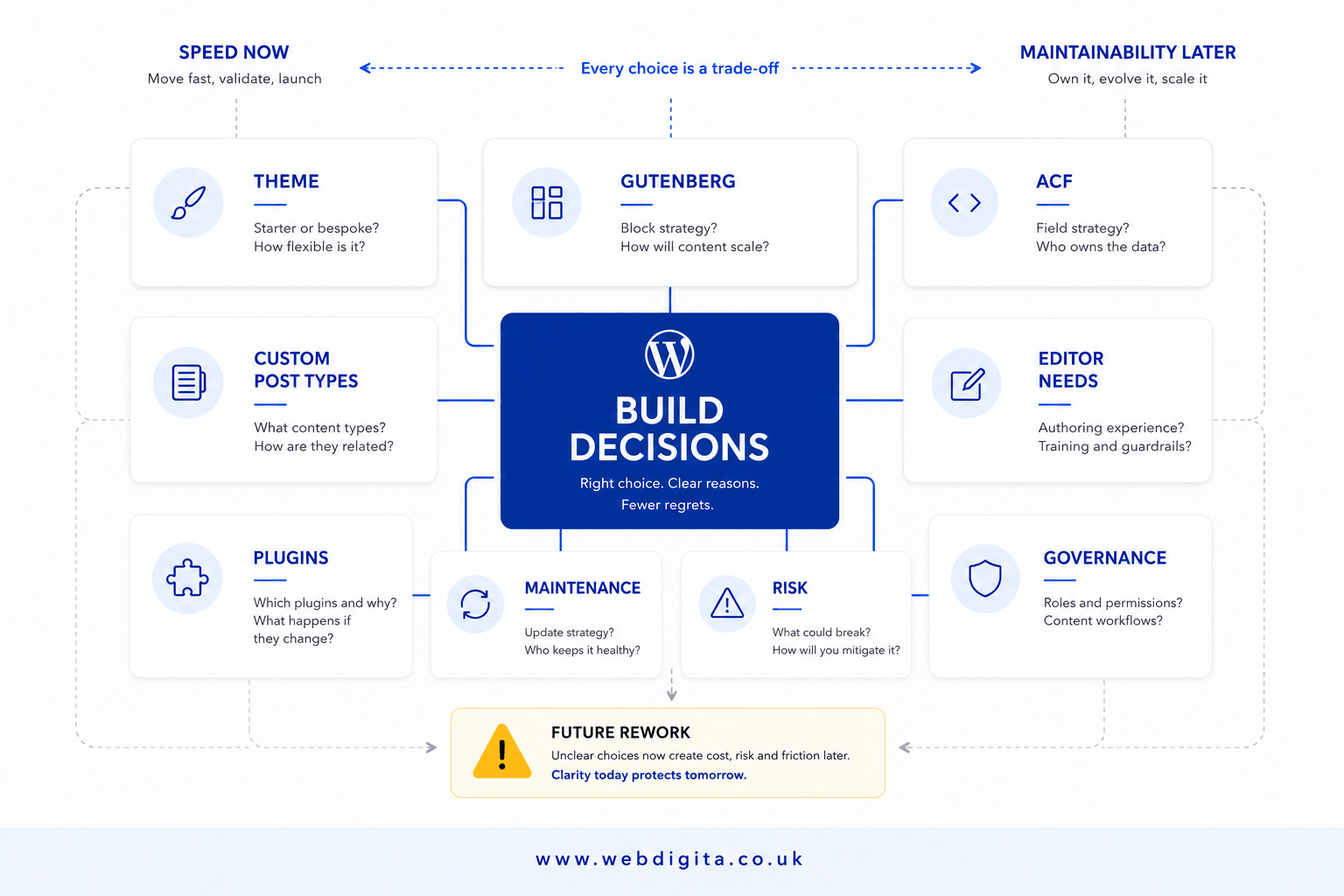
The first thing to test is not taste. It is judgement. Ask how they decide between a custom theme, Gutenberg blocks, ACF fields, Custom Post Types, and off-the-shelf plugins – for your specific project, not as a general preference.
Strong answers explain the logic. A credible WordPress development agency talks about editor needs, content governance, and long-term maintenance before it reaches for tools. They explain when Gutenberg is sufficient, when ACF gives content editors the structured custom fields they actually need, and when Custom Post Types solve a taxonomy or relationship problem that standard post types cannot. They should also have a clear view on when Elementor or another page builder suits a landing-page requirement and when it creates a front-end dependency that becomes unmaintainable once the team scales or the brand evolves.
I have seen too many builds where the agency defaulted to what its developers were already comfortable with, not what the content model actually required. That decision gets made in week one and surfaces as rework in month eighteen.
The technology layer matters here too. Ask how PHP is structured across the codebase. Ask whether custom database queries are built to handle MySQL load at scale, or whether they are unoptimised calls that degrade under real traffic. Ask how they separate front-end template logic from back-end data handling. These are not trick questions. They are the difference between a codebase someone can extend and one that has to be explained from scratch every time a new developer joins.
Weak answers stay too open. “We can build it however you want” is not flexibility. It means no one is protecting the admin experience, the publishing workflow, or the support burden the internal team inherits at handover. I have sat through enough agency pitches to know that the most dangerous answer in a WordPress shortlist call is not the wrong answer – it is the answer that sounds right but explains nothing.
Ask this directly: when do you choose custom build over plugin-led delivery, and what delivery risk are you reducing by making that choice? If they cannot answer that clearly, you are not really comparing agencies yet.
The technical questions that expose real delivery depth
This is where surface confidence usually starts to wobble. Most agencies can talk fluently about tools. Fewer can talk clearly about what happens when things get complicated – or when something breaks six weeks after launch.
You do not need to run a developer interview. You need questions that force honest answers in territory most shortlist calls politely avoid.
Take these into every shortlist call
- Custom PHP and plugin architecture: How do you structure custom PHP so core updates and plugin updates do not break bespoke functionality? What naming conventions and code isolation standards do you apply across every build?
- REST API and third-party integrations: How do you handle authentication, data mapping, error logging, and the impact of changes in third-party systems? What is the plan when an API endpoint changes or goes offline?
- Performance at launch and under load: What do you test before go-live for Core Web Vitals, MySQL query performance, asset loading, caching, and script bloat? Do you use synthetic testing, real-user monitoring, or both? Is Yoast SEO configured to reflect the correct site architecture before the site is indexed, or is that left for a post-launch audit?
- Security hardening: What specific hardening steps are standard on every build – file permissions, brute-force protection on login, XML-RPC status, REST API endpoint exposure, and role-based access controls? Who reviews plugin risk before and after launch?
- Multilingual and complex taxonomy: If the site needs to support multiple languages, how do you manage WPML integration alongside custom ACF fields and Custom Post Types without creating translation sync conflicts that editorial teams spend months untangling?
- Staging and release process: How do changes move from development to staging to production? What does the release checklist include? What is the rollback plan if a release fails, and who executes it?
- Post-launch ownership: Who owns the update cadence, backup verification schedule, and recovery responsibility after launch – and is that defined in the contract, not just assumed?
On custom PHP and plugin architecture. What you are listening for is a clear explanation of how bespoke logic is isolated from WordPress core and from third-party plugin updates. Code dropped into a parent theme or scattered across functions.php is a technical debt position, not a delivery standard. You want to hear about child themes, isolated plugin structure, naming conventions, and update safety tests. If you hear “we keep it tidy,” that is not a standard – it is a comfort claim.
On REST API integrations, the failure mode is the test. Confident answers cover authentication method, data structure, error logging, and – critically – the plan when a third-party system changes or stops responding. If the agency only describes the happy path, the risk lives with you when the integration breaks in production.
On security hardening, thin answers are the most expensive failure. I have seen WordPress builds go live with XML-RPC enabled, no two-factor authentication on admin accounts, and user roles that gave editors more database access than they needed. Ask for a named hardening checklist, not a general reassurance. If the answer is “the host handles security,” that is an open gap, not a resolved one.
On WPML and multilingual requirements, the combination of WPML, ACF fields, and Custom Post Types creates synchronisation complexity that under-resourced builds ignore until editorial teams start complaining about content appearing in the wrong language or translation fields missing entirely. Ask whether they have handled exactly this before and what the specific failure mode looks like when sync breaks.
On performance and post-launch operations, staging, backup verification, and rollback ownership should be standard delivery items, not things you negotiate for separately. If post-launch support boundaries are vague at shortlist stage, ask what is included in the warranty period and what moves to a retained website maintenance service arrangement once that period closes.

Not sure if your shortlist agencies can actually deliver what they promise?
We help commercial buyers run structured agency evaluations that test technical depth, ownership clarity and delivery risk before budget gets committed. Our discovery process surfaces the constraints, dependencies and support gaps that most agencies skip in the sales call.
No pitch deck. Just a clear view of what works and what breaks.
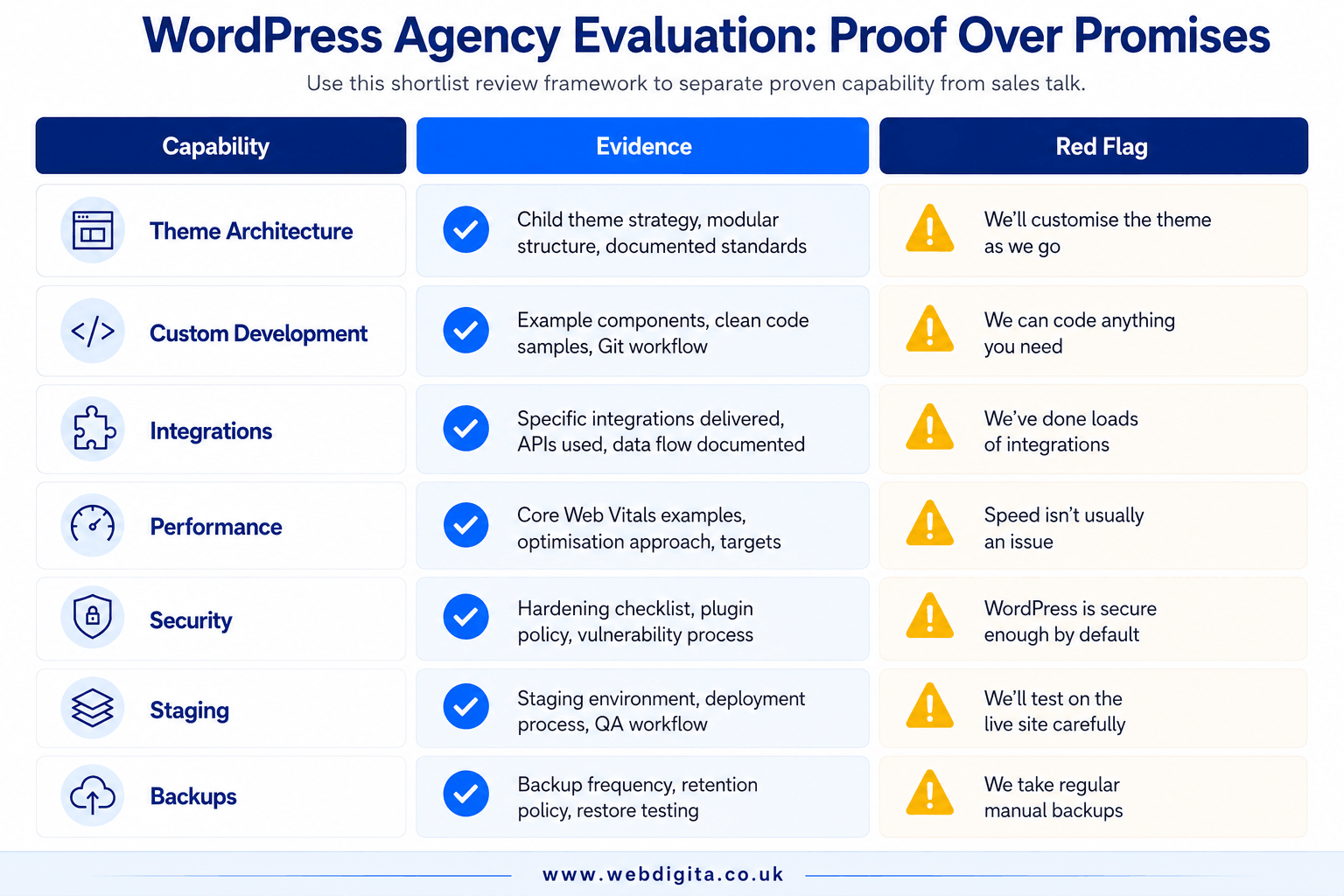
Agency evaluation scorecard: capability vs evidence vs red flags
If you are comparing more than one agency, score the answers. Impression management is cheap. This is a buyer tool, not a technical exam – use it to record what you actually heard, not what you remember feeling at the end of the call.
| Capability area | Evidence to ask for | Red flag answer |
|---|---|---|
| Theme and content architecture | Clear reasoning for Gutenberg, ACF, CPT, or Elementor choice based on your content model and editor workflow | “We usually use the same setup for every site” |
| Custom PHP and plugin standards | Named coding standards, update isolation approach, documentation practice per build | “We can just add a quick plugin or snippet” |
| REST API and integrations | Authentication method, data mapping approach, error logging, change management plan | “We have done integrations before” |
| Performance | Specific pre-launch tests: Core Web Vitals, MySQL query load, caching strategy, asset pipeline | “We optimise at the end” |
| Security hardening | Named checklist: XML-RPC status, login protection, role-based access controls, plugin risk review | “The host handles security” |
| Multilingual (WPML) | Named experience with WPML alongside ACF and Custom Post Types, specific approach for preventing sync conflicts | “We can look at that if it comes up” |
| Staging and deployment | Named process: staging environment ownership, approval gates, release checklist, rollback plan | “We test before it goes live” |
| Post-launch ownership | Written responsibility: update cadence, backup verification, recovery owner, support scope | “Support is available if needed” |
If you want to tie these capability questions back to budget impact, it helps to understand what actually changes the cost of a WordPress development project in the UK. The short version: proper architecture costs more upfront and less over three years. Rework always costs more than doing it right once.
The answers that mean rework later
Some answers are not just weak. They are expensive. In my experience reviewing WordPress agency shortlists, four patterns almost always lead to rework, unplanned cost, or both.
No clear post-launch owner. The agency delivered. Nobody in the contract owns updates, security patches, or backup verification. Within six months, everything is manual, ad hoc, and reactive. When a PHP update breaks a plugin dependency, nobody knows whose responsibility it is. The client ends up paying hourly rates to fix something that should have been planned into the support arrangement from day one.
Vague maintenance promises. “We will be available if anything breaks” is not a support model. It is an ambiguity. Ambiguities get resolved after something breaks, at rates and timescales nobody budgeted for. A credible agency names what is included in post-launch support, what the response time is for critical issues, and what moves to billable work outside that scope.
No explanation of testing or rollback. If an agency cannot explain how changes move from staging to production – with a named checklist and a named rollback procedure – it means one of two things. Either they do not have a properly isolated staging environment, or they have one and no consistent process for using it. Both outcomes become your problem when a release fails on a Monday morning.
No real justification for tool and architecture choices. If they cannot explain why they chose Gutenberg over Elementor for your content model, or ACF over native custom fields, or a plugin over custom PHP – the choice was driven by habit, not design. Habit-driven architecture is the most consistent source of avoidable rework I have seen across projects of all sizes.
The question that surfaces all of this quickly: who owns this build after launch, what is the first thing to break if requirements change in six months, and what would you do now to reduce that risk? A serious team gets more specific when pressed. A weak one gets more general.
If the agency answers these questions well, the next conversation should not be another broad capability pitch. It should be a focused scoping review: constraints, dependencies, ownership, support model, delivery risk. If your site sits inside a wider trading platform, subscription model, or complex product catalogue, you may also need an eCommerce development conversation rather than a standard WordPress brief.
For a broader view of how to evaluate an agency when the build is more complex, it helps to read how to assess an agency for a more complex build. The principle is the same: confidence is cheap. Clarity about decisions, ownership, and risk is not.
Questions buyers ask before choosing a WordPress development agency
Clear answers to the questions that usually stay vague during agency shortlisting
1. What is the difference between a custom WordPress theme and using a page builder?
A custom theme is built specifically for your content structure, brand and editor workflow, giving you full control over performance, security and future changes. A page builder offers faster setup but often adds plugin dependencies, performance overhead and layout constraints that limit flexibility later. The right choice depends on editor capability, content complexity and long-term maintenance ownership.
2. How do I know if an agency can handle WordPress integrations properly?
Ask how they manage authentication, data mapping, error logging and what happens when a third-party API changes or fails. Strong agencies explain the failure path, not just the happy path. They should describe how they isolate integration logic, handle rate limits, log errors and plan for version changes in external systems.
3. What should I ask about WordPress security before signing a contract?
Ask what hardening steps are standard in every build, not just optional extras. This includes user role restrictions, plugin vetting, file permission controls, login protection and update discipline. Also clarify who owns security monitoring and patching after launch, especially if the agency is not providing ongoing support.
4. How much does a custom WordPress development project cost in the UK?
A straightforward custom WordPress build with a tailored theme, basic integrations and standard functionality typically starts around a few thousand pounds. More complex projects involving custom post types, advanced integrations, membership systems or eCommerce features often sit in the lower five-figure range. Enterprise-level builds with bespoke architecture, multiple integrations and strict compliance needs can reach higher budgets depending on scope and technical depth.
5. What is the biggest risk when choosing a WordPress agency?
The biggest risk is unclear ownership after launch. Many agencies deliver a polished site but leave updates, backups, security patching and rollback responsibility undefined. If something breaks six months later and no one knows who owns the fix, you are stuck with downtime, rework costs and no clear escalation path.
6. Should I choose an agency that specialises in WordPress or one that offers multiple platforms?
It depends on your project complexity and future platform needs. A WordPress specialist usually offers deeper expertise in theme architecture, plugin standards and WordPress-specific performance tuning. A multi-platform agency may offer broader technical capability if you need integrations, custom applications or are comparing WordPress against other CMS or eCommerce platforms.
7. How do I evaluate an agency's WordPress performance claims?
Ask what they test before launch for Core Web Vitals, asset loading, caching strategy and script bloat. Strong agencies describe specific tools, thresholds and pre-launch checks rather than vague promises to optimise later. Also ask how they handle performance under real traffic, not just on a staging server with no plugins or content.
8. What questions should I ask about post-launch WordPress support?
Ask who owns updates, backup verification, rollback and recovery after the warranty period ends. Clarify what sits inside the build contract versus ongoing support, and whether support is reactive or includes proactive monitoring. Also confirm response times, escalation paths and whether the agency or your hosting provider owns uptime responsibility.
Conclusion
The agencies that answer these questions well do not just sound confident. They explain trade-offs, justify architecture decisions, and define ownership clearly before scope or budget gets locked. That clarity usually means fewer surprises, less rework, and a build that editors can actually use without breaking things six months later.
If an agency keeps the answers vague, tool-led, or portfolio-heavy, treat that as delivery risk. The real test is not whether they have done WordPress before. It is whether they can explain why they would make one choice over another for your specific constraints, and who owns the outcome when things shift after launch.
If your WordPress build needs tighter governance, cleaner architecture and lower long-term risk
WEBDIGITA builds WordPress sites with clear ownership, structured content models, performance discipline and post-launch support that actually works. We handle custom themes, Gutenberg blocks, REST API integrations, security hardening and staging processes as standard delivery work, not optional extras.
See our WordPress development workOr talk to us about