Key Takeaways
A professional eCommerce UX audit should assess the full buying journey, not just visual design. That means checking how people move from homepage to category, compare products, build confidence on PDPs, and complete checkout on mobile and desktop. The useful output is not a long list of opinions, but a clear view of where trust drops, where friction compounds, and whether the issue is journey design, tracking weakness, app clutter, or deeper platform constraints.
The real decision value comes from prioritisation. Strong audits separate quick revenue-impact fixes from issues that need testing and from structural problems that point to redesign or rebuild work. If friction sits close to add to basket or checkout and the evidence is clear, it should move fast. If the same problems appear across templates or devices, the smarter question is no longer whether the UI looks dated, but whether the underlying setup is holding the journey back.
Most eCommerce stores do not need a full redesign first. They need clarity on where trust and conversion are already leaking.
A professional eCommerce UX audit should review the complete buying journey – navigation, search, filters, product listing and product detail pages, cart, checkout, and mobile flow – alongside trust cues, plugin and app behaviour, and analytics gaps. The goal is to separate structural blockers from cosmetic issues, and tell you whether you need targeted fixes, deeper platform work, or a full rebuild before committing more budget.
Too many stores pay for a redesign, or push harder on traffic, while the current journey is still leaking trust in obvious places. More visits will not fix weak discovery, hesitant product pages, or a checkout that asks for confidence before it has earned it.
A serious eCommerce UX audit is not a design opinion deck. It is triage. It should show where the flow breaks, where trust drops, and whether you need targeted fixes, deeper platform work, or a full rebuild with the help of a eCommerce website development agency in London.
This guide is for founders, eCommerce leads, and digital teams weighing redesign, CRO, migration, or traffic growth before committing more budget.
What a professional eCommerce UX audit should review
A proper audit reviews the buying journey end to end – not just how the interface looks. Grounded in information architecture and conversion UX principles, it draws on user research, analytics, and session behaviour to cover navigation, on-site search, filters, PLP structure, PDP clarity, cart, checkout, mobile flow, trust cues, and the reassurance signals placed near key actions.
It should also look behind the interface. App and plugin drag can slow pages, clutter layouts, or create inconsistent behaviour across templates. Analytics blind spots matter too, because weak tracking can make a journey problem look like a traffic problem.
The real value is in separating structural blockers from cosmetic issues. If the audit cannot explain what is broken, why it matters, and what should happen next, it is not giving you much to work with.
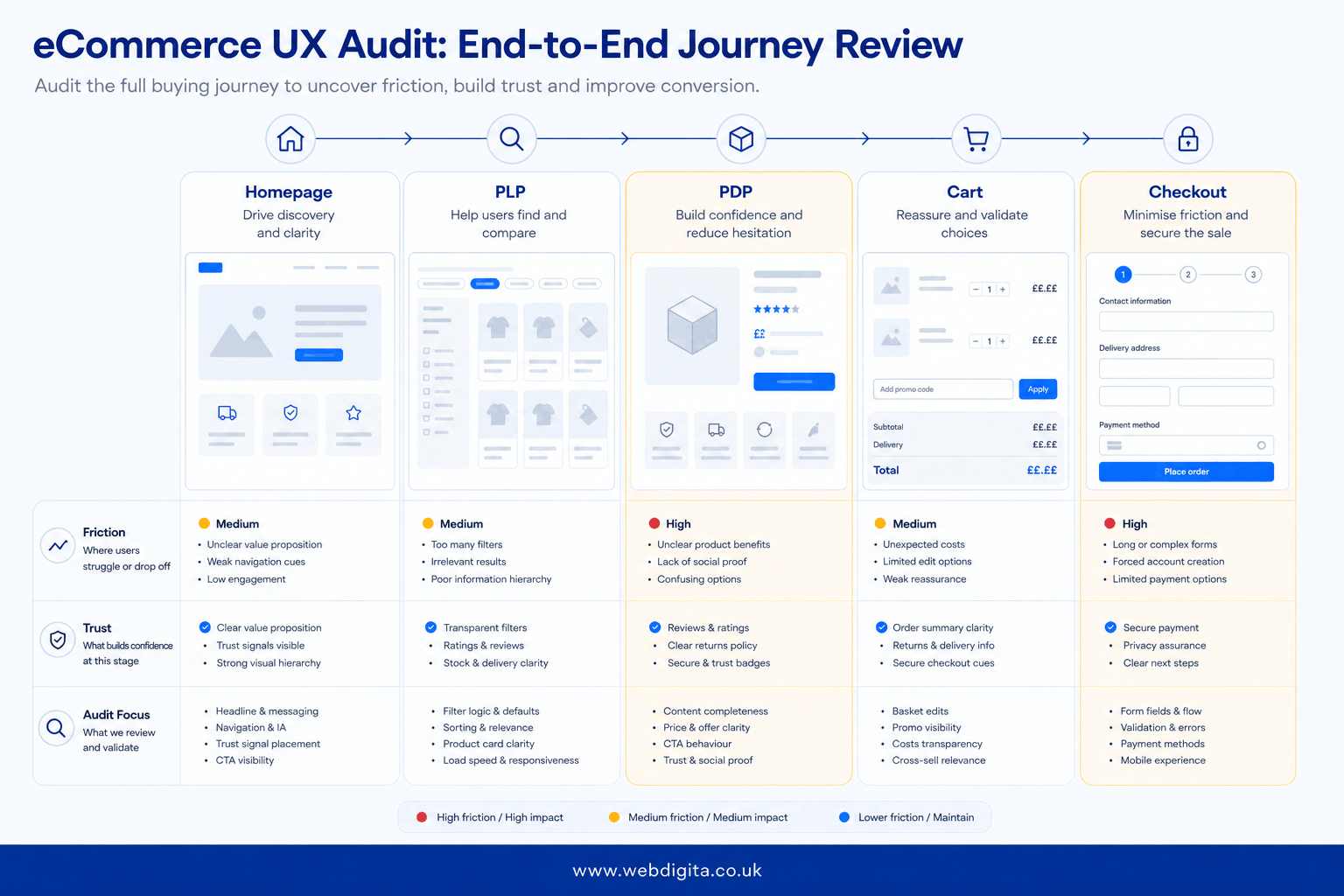
eCommerce UX audit view across homepage, PLP, PDP, cart, and checkout
| Journey stage | Likely friction | Trust check | Audit focus |
|---|---|---|---|
| Homepage | Weak hierarchy, unclear paths, noisy messaging | Brand credibility, offer clarity | Entry routes, intent match, navigation signals |
| PLP | Poor filters, weak sorting, hard comparison | Range confidence, findability | Discovery flow, filter logic, merchandising |
| PDP | Missing detail, poor information order, weak CTA support | Product confidence, delivery and returns reassurance | Content hierarchy, hesitation points, add-to-basket readiness |
| Cart | Hidden costs, weak edit controls, distraction | Price confidence, order visibility | Drop-off triggers, friction before checkout |
| Checkout | Forced steps, form friction, mobile difficulty | Payment trust, fulfilment clarity | Completion flow, reassurance, device-specific blockers |
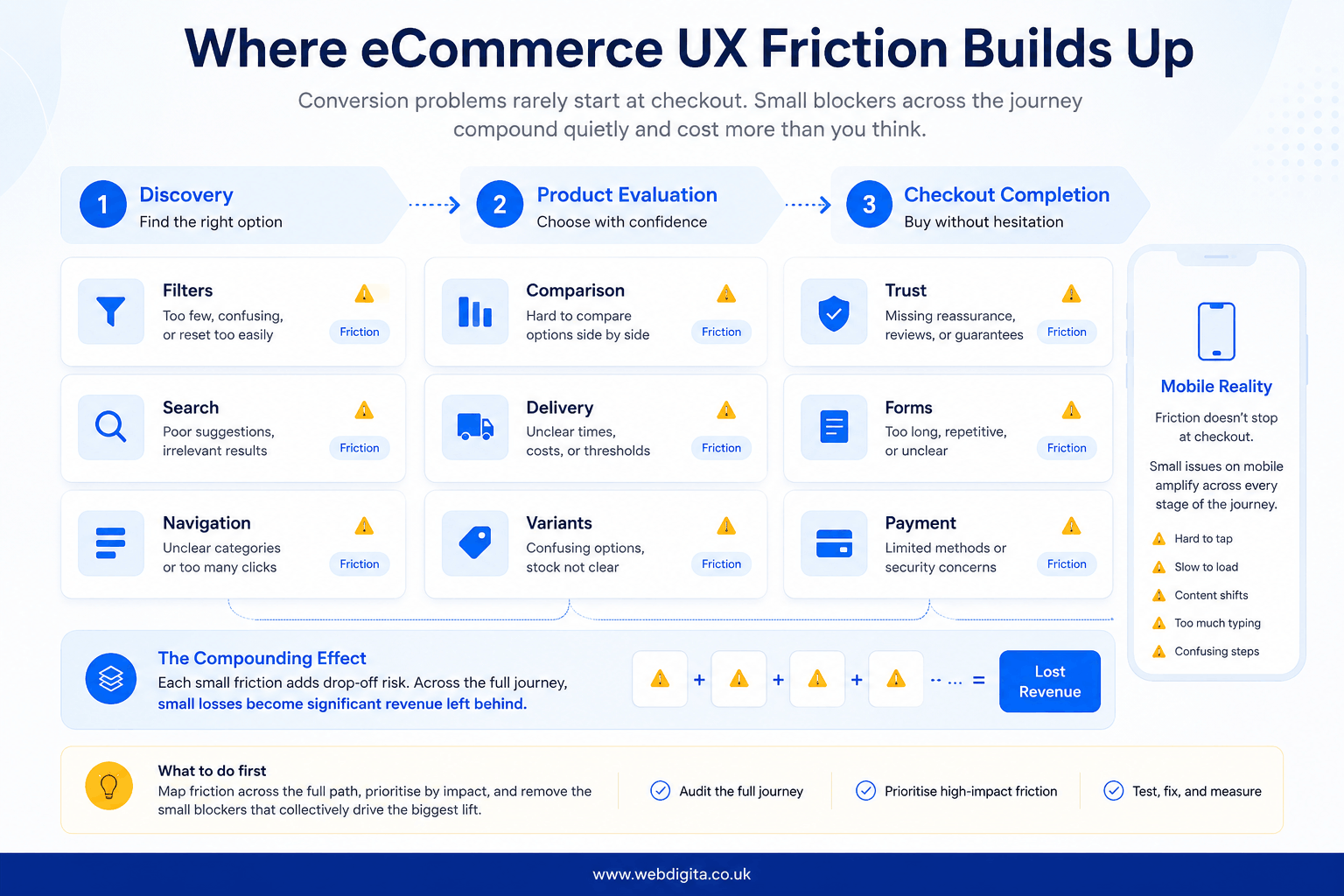
Where the biggest friction usually shows up first
The first break is rarely dramatic. It is usually a chain of small losses across discovery, product evaluation, and checkout – where clarity fades and confidence drops.
Journey mapping consistently shows discovery going first. If buyers cannot move from homepage to category to product without stopping to work things out, the journey is already under strain. Thin filters, noisy search results, and category pages that do not support comparison can waste paid traffic before the product page has a chance.
On PDPs, the friction is about trust rather than style. Missing delivery detail, unclear returns, weak information order, or too little reassurance near add to basket can make a product feel riskier than it is.
More traffic makes journey friction easier to see. It does not make it cheaper.
In our experience auditing eCommerce buying journeys for trust, clarity, and decision friction, the pattern is consistent: most stores carry five to ten obvious UX blockers before any redesign is needed. A common assumption is that conversion is low because traffic quality is poor – then usability testing reveals that mobile users cannot compare variants properly, trust delivery timing, or finish checkout without friction. The blockers were structural. The traffic was fine.
Checkout should not be reviewed on its own. Hidden charges, forced account creation, payment hesitation, and mobile form strain often start earlier in the journey. If the same issues appear across several templates, that usually points beyond surface UX and into platform constraints, app behaviour, or ownership gaps. That is where bringing in Fractional CTO support early can save rework.

Not sure if you need fixes or a full redesign
We can review the current journey and show where trust, clarity, and conversion are leaking before you commit more budget to CRO, traffic, or a rebuild.
Useful if the blockers are not yet obvious
How audit findings should be prioritised – and when to redesign
A serious audit should not leave you with fifty notes and no decision. It should help you sort findings by four things: impact on revenue, closeness to purchase, confidence in the evidence, and effort to fix.
In our experience reviewing audit findings across eCommerce buying journeys, the stores that stall are usually the ones that conflate cosmetic issues with structural blockers – treating a messaging problem as a platform problem, or a trust gap as a traffic problem. The question every audit must answer clearly is: where does friction sit closest to purchase, and what is the evidence behind it?
In practice, that means this: if an issue sits near add to basket or checkout, shows up clearly in usability testing or behaviour data, and is relatively quick to fix, it should move first. If the issue is less certain – messaging order, reassurance placement, content hierarchy – test before redesigning around it.
This is also where the audit-versus-redesign line becomes clearer. A few high-friction points across PDPs or checkout may call for targeted quick wins first. Repeated inconsistency across templates, app sprawl, weak tracking, or platform debt across several stages is more likely to justify structural UX work or a rebuild. If you are trying to understand what actually changes the cost of an eCommerce rebuild, this is usually where the answer becomes concrete.
- Fix now: blockers near add to basket or checkout, broken filters, missing trust cues, mobile form friction.
- Test first: messaging order, CTA wording, content hierarchy, reassurance placement.
- Redesign later: older templates that still perform once key blockers are removed.
- Pause scaling or escalate: platform debt, app conflicts, inconsistent template logic, or tracking gaps affecting multiple stages.
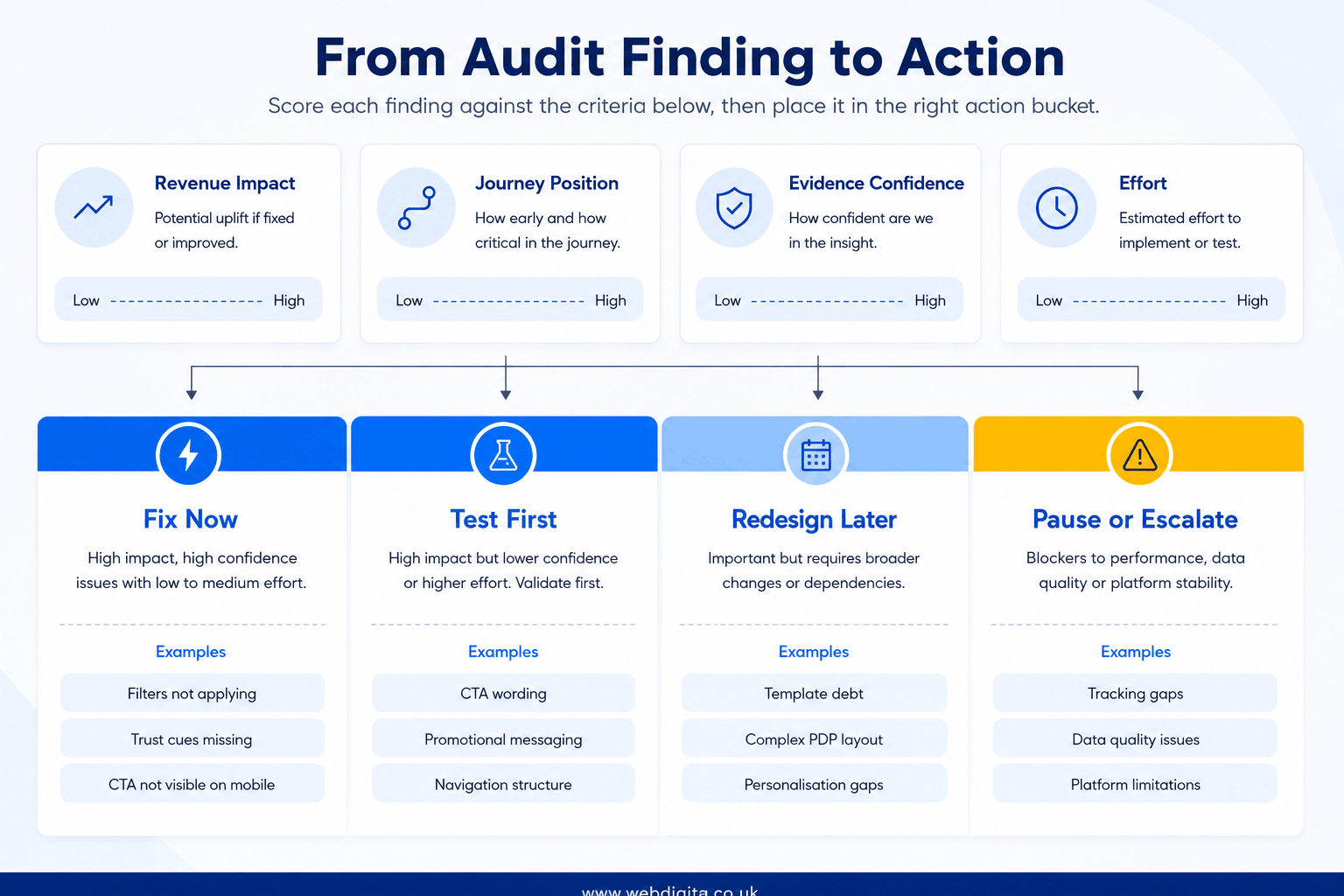
That is the shift a good audit should create: from “we probably need a redesign” to “we know what to fix, what to test, and what genuinely needs rebuilding”. A worthwhile free audit should give you a prioritised view of blockers, the evidence behind them, and a clear recommendation on whether to fix, test, or redesign – with the help of a proper UX UI design agency in London.
Common questions about a professional eCommerce UX audit
These are the questions teams usually ask when they are trying to decide whether they need fixes, testing, or a bigger rebuild.
1. What should a professional eCommerce UX audit include?
A professional eCommerce UX audit should include the full buying journey from homepage through checkout. That usually means reviewing navigation, search, filters, PLPs, PDPs, cart, checkout, mobile usability, trust signals, and reassurance near key actions. A strong audit also checks for tracking gaps, app or plugin friction, and repeated issues across templates that may point to deeper platform problems.
2. How is a UX audit different from a redesign?
A UX audit is a diagnostic exercise, while a redesign is a delivery decision. The audit should show where friction exists, how serious it is, and whether targeted fixes, testing, or structural change are needed. A redesign changes the interface. The audit should help you avoid redesigning too early when the biggest blockers may be specific and fixable.
3. Where does eCommerce UX friction usually show up first?
eCommerce UX friction usually shows up first in discovery, product evaluation, and checkout confidence. Buyers often struggle with weak navigation, poor filters, noisy category pages, missing delivery or returns detail, and mobile checkout strain. The pattern is rarely one dramatic failure. It is usually several smaller points where clarity drops and hesitation builds.
4. Can a UX audit show whether we need a rebuild or just targeted fixes?
Yes, a good UX audit should help make that distinction. If the main issues are concentrated around PDPs, cart, or checkout and are relatively contained, targeted fixes may be enough. If problems repeat across templates, devices, and journey stages, or are tied to app conflicts, tracking gaps, or platform debt, the case for deeper structural work becomes stronger.
5. Should checkout be audited on its own?
No, checkout should not be audited in isolation. Many checkout problems start earlier when buyers lose confidence on category or product pages, encounter hidden costs, or reach checkout without enough reassurance. Reviewing checkout on its own can miss the upstream issues that create hesitation before the final step.
6. How should UX audit findings be prioritised?
UX audit findings should be prioritised by revenue impact, closeness to purchase, confidence in the evidence, and effort to fix. Issues near add to basket or checkout with clear behavioural evidence usually move first. Less certain findings, such as messaging order or reassurance placement, are often better tested before larger design changes are approved.
Conclusion
If you are weighing redesign, CRO, migration, or more traffic, the audit should help you make a cleaner decision rather than create more noise.
- Look for diagnosis, not commentary: the audit should explain what is breaking, why it matters, and what kind of intervention fits.
- Check how evidence is used: findings should be tied to behaviour, hesitation points, and journey stage, not just taste or convention.
- Be wary of redesign-first thinking: many stores have fixable blockers that can be removed before larger UX or platform work is justified.
- Use the output to frame next steps: if the audit cannot tell you what to fix now, what to test next, and what may need rebuilding, it is not strong enough to guide budget.
Need a clearer view of what your store should fix next
Our UX UI design service helps eCommerce teams turn audit findings into practical changes across discovery, product pages, mobile flow, and checkout without guessing what needs rebuilding.
Explore UX UI designNot ready for that yet