Key Takeaways
- Field data on mobile matters more than lab scores. Check real-user performance on category and product templates first, especially on mobile, because that is where organic entry and revenue intent usually sit.
- Category pages often deserve first attention. They combine search demand, internal links, faceted navigation and merchandising weight in one place, so template-level issues here affect hundreds or thousands of indexable URLs.
- Not every page type carries the same SEO urgency. Rank fixes by template weight, mobile exposure and how widely the issue repeats rather than chasing green scores equally across every page.
- The real problem is usually stacked weight, not one dramatic bug. Apps, scripts, widgets, banners, filters and recommendation blocks added by different teams create combined performance cost that nobody owns.
- Without release governance, gains will not hold. If new apps, merchandising requests and tracking tags keep landing without review, you are funding rework rather than fixing the underlying issue.
I’ve reviewed enough Core Web Vitals reports to know the pattern. Teams don’t have a Core Web Vitals problem – they have a prioritisation problem. They burn weeks chasing better scores on low-value pages while the category and product templates that actually carry organic traffic stay heavy and slow on mobile.
The Short Answer: For eCommerce SEO, the performance signals that matter are real-user mobile data on revenue-critical templates – category and product pages first – plus the release discipline that keeps those templates fast enough to crawl, render and convert. Focus on field data over lab scores, repeated template issues over one-off pages, and fixes that cut friction across your highest-entry page types before you touch anything else.
Why Core Web Vitals matter for eCommerce SEO, but not in the way teams often think
Here’s the bit nobody wants to hear: a green Core Web Vitals score does not hand you a ranking jump. I have watched teams chase a perfect Lighthouse score for months, then wonder why traffic never moved. CWV’s real value is diagnostic – it shows where poor mobile experience, slow rendering and unstable templates are dragging down pages that already carry search demand.
Stop treating CWV as a vanity scoreboard. For Core Web Vitals for SEO, the question is where the problem sits and how many indexable pages inherit it. On a template-led store, one bad build decision can hit hundreds or thousands of URLs – that is an architecture problem, not a scoring problem.
If you are planning fixes with an eCommerce SEO partner, do not let the conversation stay at Lighthouse score level. I want to know whether the issue is hurting category pages, product pages, internal search, or something I genuinely do not care about commercially.
UX and conversion matter too. But from where I sit, the bigger question is whether weak page experience is sitting on the templates that drive discovery, internal links and revenue entry points – because that is where it costs you.
Which signals matter most by page type
Not every template deserves the same urgency, and treating them as if they do is how performance budgets get wasted on pages nobody enters from search. I rank performance work by SEO weight, mobile exposure and how widely the issue repeats.
WEBDIGITA CWV Page Priority Matrix: the framework I use to decide which page types deserve first attention when weighing SEO impact against fix effort.
CWV priority map by eCommerce page type
| Page type | SEO weight | Common CWV risk | Mobile sensitivity | Fix urgency |
|---|---|---|---|---|
| Category pages | Very high | Heavy filters, merchandising blocks, faceted navigation, internal link load | Very high | Fix first |
| Product pages | High | Large images, reviews, variant scripts, recommendation widgets | High | Fix early |
| Internal search pages | Medium to high | Client-side rendering, filter load, unstable results layout | High | Fix if indexable or heavily used |
| Support pages | Low to medium | Bloated templates, media, chat tools | Medium | Usually later |
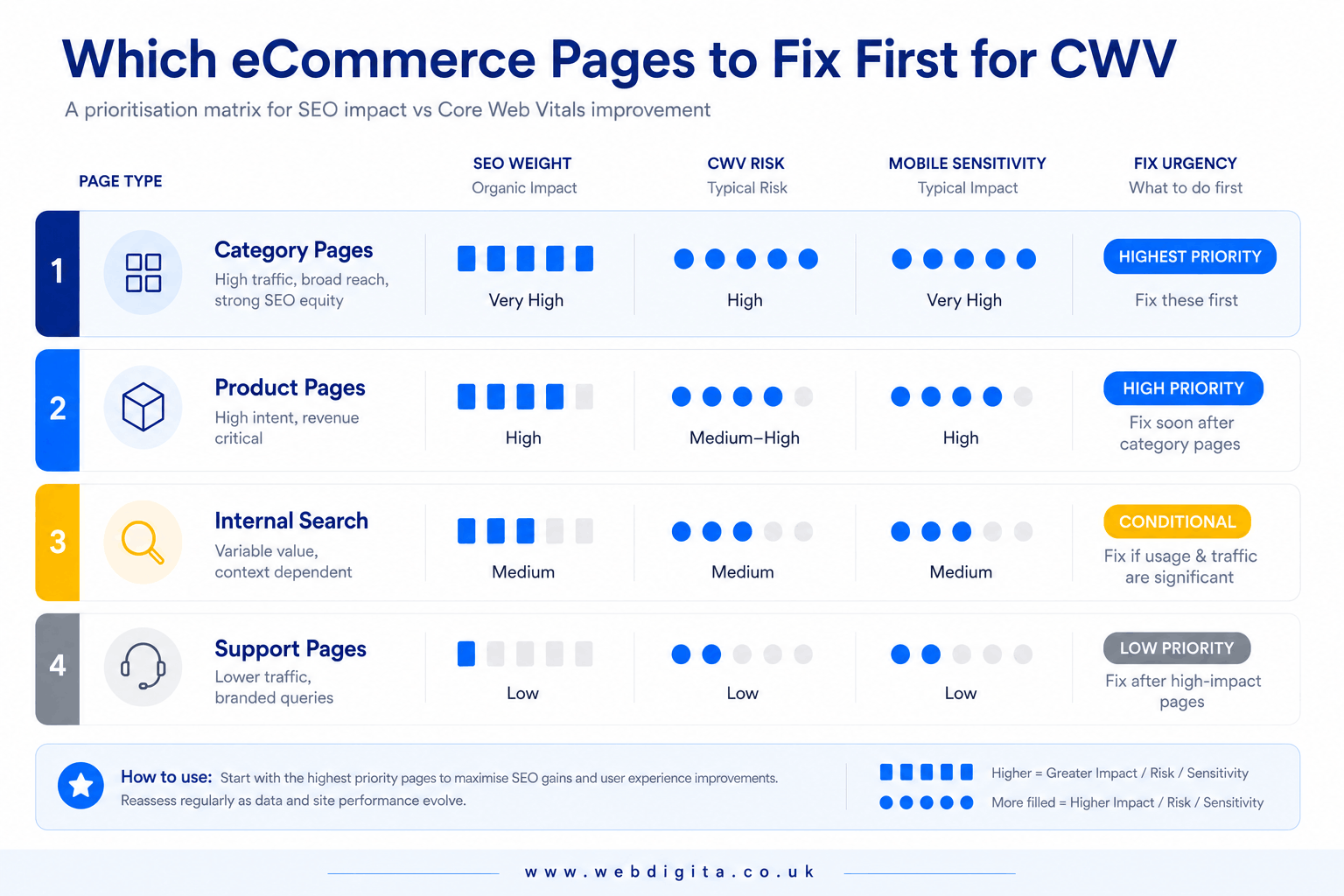
Category pages get first attention in almost every audit I run, because they combine search demand, internal links, faceted navigation and merchandising clutter in one place – and faceted navigation is exactly where canonical tag and crawl budget problems tend to live too. Product pages come next, usually when image weight, reviews and third-party widgets are slowing real users down. A slow support page? Rarely urgent SEO work, unless it happens to be a genuine organic entry page.
If you want the wider commercial picture, read what actually moves organic revenue in eCommerce SEO. It keeps CWV decisions tied to business impact rather than score chasing – which is the whole point.
Field data beats lab scores when you are deciding what to fix first
Lab tools are useful. They are not the judge, jury or anything else with actual authority. Field data shows what real users experience on real devices and networks – that should set your priority order.
I check mobile field data first, especially on category and product templates. If lab scores look poor but field data is stable on the templates that matter, that is probably not your most urgent SEO problem. If field data is weak on mobile entry pages, treat that as a warning sign even if the desktop test looks tidy.
Lab data still earns its place because it helps diagnose what is actually breaking. Google’s own Core Web Vitals guidance is genuinely useful here. Use lab tools to explain the problem, not to decide the business priority.
- Check field data by template, not sitewide averages.
- Compare mobile performance before and after every release.
- Review crawl, rendering, internal linking and your XML sitemap alongside CWV.
- Ask whether the issue repeats across revenue-driving pages, not just the one you tested.
A faster page that is poorly rendered, weakly linked or buried in crawl noise still underperforms organically. If you are seeing recurring regressions after launches, push for clearer+iterative eCommerce maintenance services & ownership, so performance does not get broken again by the next app, banner or script update.

Not sure which templates are slowing your organic performance?
We run a performance-led SEO review that checks field data on your category, product and search templates, then shows you which fixes would actually help visibility and where the real weight is coming from.
Usually takes one working day to map the priority order.
What usually breaks performance on eCommerce templates
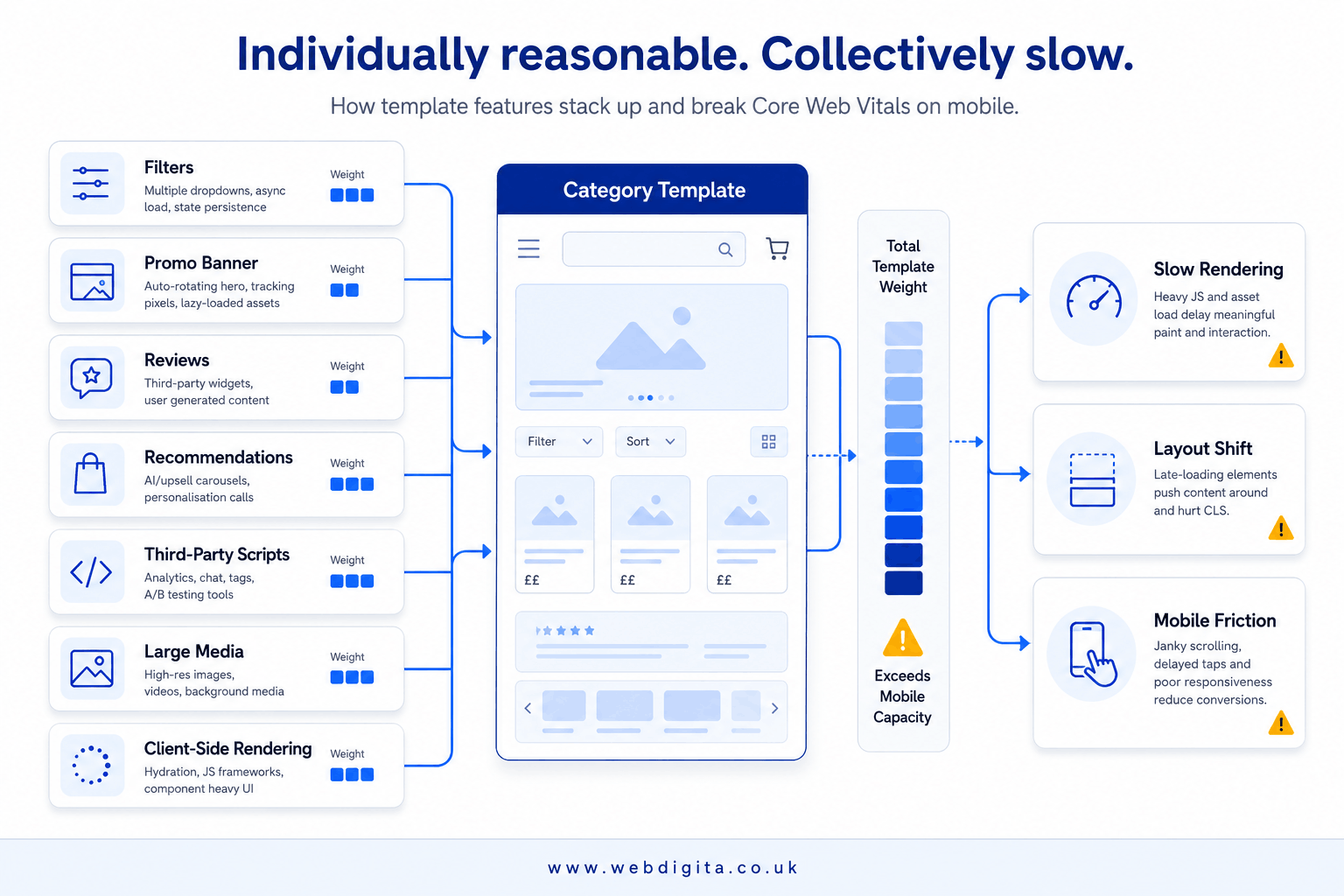
The problem is rarely one dramatic bug. It is almost always stacked weight – apps, scripts, widgets, banners, filters, reviews, recommendation blocks and oversized media, each added by a different team for a sensible reason, with nobody owning the combined cost.
A typical category template carries filters, promo banners, review snippets and recommendation modules that each look harmless in isolation. Stack them together on mobile and you get slower rendering, layout shifts and weaker throughput on one of the most important SEO templates on the site.
Watch app bloat, client-side rendering delays and faceted navigation overhead first – those issues repeat at scale, so fixing them once pays off across thousands of URLs. Do not assume every merchandising feature is worth its performance cost. Some help CRO, but if they slow your highest-entry templates down enough, they quietly damage both visibility and conversion support.
The pattern I see in almost every eCommerce CWV review
In my experience reviewing CWV remediation work across ecommerce builds, the pattern repeats with almost boring consistency: the best SEO wins never come from chasing scores evenly across the site. They come from fixing the handful of revenue-critical templates – category, product, internal search – and leaving everything else alone until those are solid.
That is the trade-off most teams miss. Broad clean-up feels productive because the dashboard goes green everywhere, but it spreads the same fixed effort across pages with wildly different SEO weight. Targeted template work on category and product pages creates far more leverage for the same hours spent.
If you are seeing repeated regressions, ask who can approve third-party scripts, who owns the performance budget, and who signs off template changes – including whether product schema and other structured data survive the change. Without clear ownership, you are not fixing a speed issue. You are funding the same rework on a loop.
A simple order of operations for SEO-led CWV fixes
You do not need a giant remediation programme to get started. You need a sensible order: start with the templates that drive organic entry and revenue, validate the issue with field data, then fix repeated causes before isolated page quirks.
Separate quick wins from structural work. Compressing media, removing duplicate scripts and deferring non-critical widgets can help fast. Reworking template logic, reducing client-side dependency or cleaning up faceted navigation is slower – but it is usually where the real SEO value sits. I always push on whether a provider can explain that trade-off honestly.
- Which page types drive the most organic entry and revenue intent?
- Are the worst field-data issues on mobile, and on indexable templates?
- Is the problem repeated across a template, not isolated to one URL?
- Can you remove or defer weight before rebuilding template logic?
- Who owns release checks, app approvals and the performance budget?
- Have canonical tags, your XML sitemap and schema markup been checked after the change?
- Can the provider link CWV fixes to crawl, rendering and SEO impact?
You should also ask how future releases get governed. If new apps, merchandising requests and tracking tags keep landing without review, the gains will not hold. And if you are choosing a partner for the next phase, a project discovery workshop can help pin down template priorities, ownership and fix scope before the budget disappears into generic clean-up.
If you want a low-pressure next step, start with a performance-led SEO review of your category and product templates first. That is where the real answer is hiding.
Questions teams ask before prioritising Core Web Vitals work
Common questions about deciding which page types, templates and fixes deserve first attention for eCommerce SEO.
1. Why do category pages usually deserve first attention for Core Web Vitals fixes?
Category pages combine search demand, internal links, faceted navigation and merchandising weight in one place, so template-level performance issues here affect hundreds or thousands of indexable URLs. They are often the highest-traffic organic entry pages on an eCommerce site, which means poor mobile performance on category templates can quietly drag down both visibility and conversion support at scale.
2. Should I prioritise lab scores or field data when deciding which Core Web Vitals issues to fix first?
Field data should lead your priority order because it shows what real users actually experience on real devices and networks. Lab tools are useful for diagnosing what is breaking, but if field data is stable on key templates, that may not be your first SEO problem. Check mobile field data first, especially on category and product templates, because that is where organic entry and revenue intent usually sit.
3. What usually causes Core Web Vitals problems on eCommerce templates?
The problem is rarely one dramatic bug. It is usually stacked weight from apps, scripts, widgets, banners, filters, reviews and recommendation blocks added by different teams for sensible reasons, with nobody owning the combined performance cost. A category template might carry filters, promo banners, review snippets and recommendation modules that each look harmless on their own but together slow rendering, create layout shifts and weaken mobile throughput.
4. How do I stop Core Web Vitals performance from breaking again after each release?
Ask who can approve third-party scripts, who owns performance budgets and who signs off template changes. Without clear governance, new apps, merchandising requests and tracking tags will keep landing without review, and the gains will not hold. You need release checks and ownership in place, not just one-off fixes, otherwise you are funding rework rather than sustainable improvement.
5. Do Core Web Vitals directly improve rankings for eCommerce sites?
Core Web Vitals matter, but not because every green score creates a ranking jump. Their real value is helping you spot where poor mobile experience, slow rendering and unstable templates are dragging down pages that already carry search demand. Treat CWV as part of organic performance rather than a vanity scoreboard, and focus on whether weak page experience is sitting on the templates that drive discovery, internal links and revenue entry points.
6. Should I fix product pages or category pages first for Core Web Vitals?
Category pages often deserve first attention because they combine search demand, internal links and merchandising clutter in one place, and template-level issues here affect more indexable URLs. Product pages usually come next when image weight, reviews and third-party widgets are slowing real users. Rank fixes by SEO weight, mobile exposure and how widely the issue repeats rather than treating every page type equally.
7. What is the difference between quick wins and structural Core Web Vitals fixes?
Quick wins include compressing media, removing duplicate scripts and deferring non-critical widgets, which can help quickly without major template changes. Structural work means reworking template logic, reducing client-side dependency or cleaning up faceted navigation, which is slower but often where the real SEO value sits. Separate the two so you can show early progress while planning the deeper fixes that create lasting improvement.
8. How do I know if a Core Web Vitals issue is affecting SEO performance?
Check whether the issue sits on templates that drive organic entry and revenue intent, whether field data is weak on mobile, and whether the problem repeats across indexable pages rather than isolated URLs. A faster page that is poorly rendered, weakly linked or buried in crawl noise still underperforms organically, so link CWV fixes to crawl, rendering and internal linking rather than treating speed scores in isolation.
Conclusion
The best SEO wins usually come from fixing revenue-critical templates rather than chasing scores everywhere equally. That means starting with the page types that drive organic entry and revenue intent, validating issues with field data on mobile, and fixing repeated template causes before isolated page quirks.
- Start with category and product templates. These are where search demand, internal links and conversion intent overlap, so template-level issues here affect organic performance at scale.
- Separate quick wins from structural work. Compressing media and deferring non-critical widgets can help quickly, but reworking template logic or reducing client-side dependency is often where the real SEO value sits.
- Ask who owns release checks and performance budgets. Without clear governance, new apps and scripts will keep breaking what you fix, and you will be funding rework rather than sustainable improvement.
- Link CWV fixes to crawl, rendering and SEO impact. A faster page that is poorly rendered, weakly linked or buried in crawl noise still underperforms organically, so keep the conversation tied to discovery and indexing, not just speed scores.
Ready to fix the performance issues that are actually hurting your organic visibility?
Our eCommerce SEO service focuses on the templates that drive revenue entry, not vanity scores. We prioritise category and product page fixes, review field data on mobile, and make sure performance improvements hold after releases.
See how we approach eCommerce SEOOr start with