Key Takeaways
WordPress development cost in the UK depends less on the platform and more on scope clarity, custom build depth, and what happens after launch. Here's what moves the price most:
- Custom versus configurable: page builders reduce upfront cost but custom themes, ACF structures, and bespoke plugins add significant build effort and long-term maintenance responsibility
- WooCommerce and integrations: once WordPress becomes a trading platform, product logic, checkout rules, stock sync, and third-party system connections push budgets into mid five-figure territory quickly
- Post-launch ownership: hosting fit, security hardening, plugin updates, SLA support, and change capacity sit outside most build quotes but define the real total cost of ownership
- Scope exclusions: content migration, CRM integration, performance work, and analytics setup are often parked for later, turning a low quote into a higher final bill once the gaps surface
At WEBDIGITA, we have reviewed and developed hundreds of project proposals to know how this goes: the number that gets a decision-maker to sign is rarely the number that gets the site to launch. The things that actually cost money – bespoke functionality, integration logic, performance tuning, security hardening, post-launch support, and the discovery work that should have happened before anyone wrote a line of code – tend to appear on addendum quotes, not opening ones.
WordPress development in the UK typically ranges from a few thousand pounds for a clean brochure site to a lower five-figure budget for a properly structured marketing site – and into mid to upper five-figures when WooCommerce, custom PHP plugins, REST API integrations, WPML multilingual requirements, or serious performance targets are in scope. What moves the price is not WordPress itself. It is the depth of custom build, the complexity of third-party system ownership, the performance bar you have set, and critically, what happens after launch.
What a WordPress quote actually covers – and what it quietly excludes
A standard proposal covers the build. That means theme setup or a custom front end, page templates, CMS configuration, core plugin installation, basic QA, and handover. If the agency is thorough, it also includes Yoast SEO configuration and a basic performance pass. That is what you are buying when you see the opening number.
What most quotes do not include – and where I see projects fall apart – is everything that happens around the build.
Content Migration: moving pages, posts, images, and metadata from an old site to a new one takes real time. If you have a large site, a blog archive, hundreds of redirects, or content that needs reformatting to fit a new template structure, this is a project in its own right. It is almost always excluded from the build quote and almost always necessary.
Third-Party Integrations: connecting to CRM platforms, marketing automation, ERP systems, booking engines, or analytics pipelines is rarely in a base quote. Each integration involves its own discovery, field mapping, authentication setup, error handling logic, and test cycle. A HubSpot form embed is an afternoon. A bidirectional CRM sync with custom field logic and failure retry handling is weeks. Most proposals treat these as separate line items – which is fair, but only useful if someone has actually scoped them.
Performance Work: if you have agreed a site build but nobody has discussed Core Web Vitals targets, hosting specification, caching configuration, or image delivery pipeline, performance work is almost certainly not in scope. This becomes a problem when you discover at launch that your LCP is 4.8 seconds.
Security Hardening: this means more than installing a security plugin. It covers server-level configuration, file permission auditing, brute-force protection, login security controls, audit logging, and a defined process for malware events. Most build quotes treat the default WordPress setup as the acceptable baseline. It is not.
Post-Launch Support: a warranty period is not a support contract. They are different things. Ask specifically what happens sixty days after go-live when something breaks, and get the answer in writing.
If you are comparing WordPress development partners in the UK, ask for the exclusion list before you compare headline numbers. Two quotes that look 5,000 pounds apart may be describing the same project with different assumptions about who pays for migration, integration, and post-launch coverage.
I have seen this exact situation on enough projects: a business thinks it is buying a four-page marketing site, then adds gated content, WPML multilingual pages, a resource hub, HubSpot forms, and role-based admin editing over six weeks. The WordPress install did not change. The scope did. That is what moves the price – and it moves regardless of whether the original quote acknowledged it.
- Usually included: Build, templates, CMS and plugin setup, basic QA, launch handover
- Often excluded: Content entry and migration, third-party integrations, Yoast SEO and analytics configuration, security hardening, performance optimisation, hosting setup, SLA support, post-launch change requests
If a quote looks unusually low, it is probably not more efficient than the others. It is probably more incomplete.
Which scope decisions push the price furthest, fastest
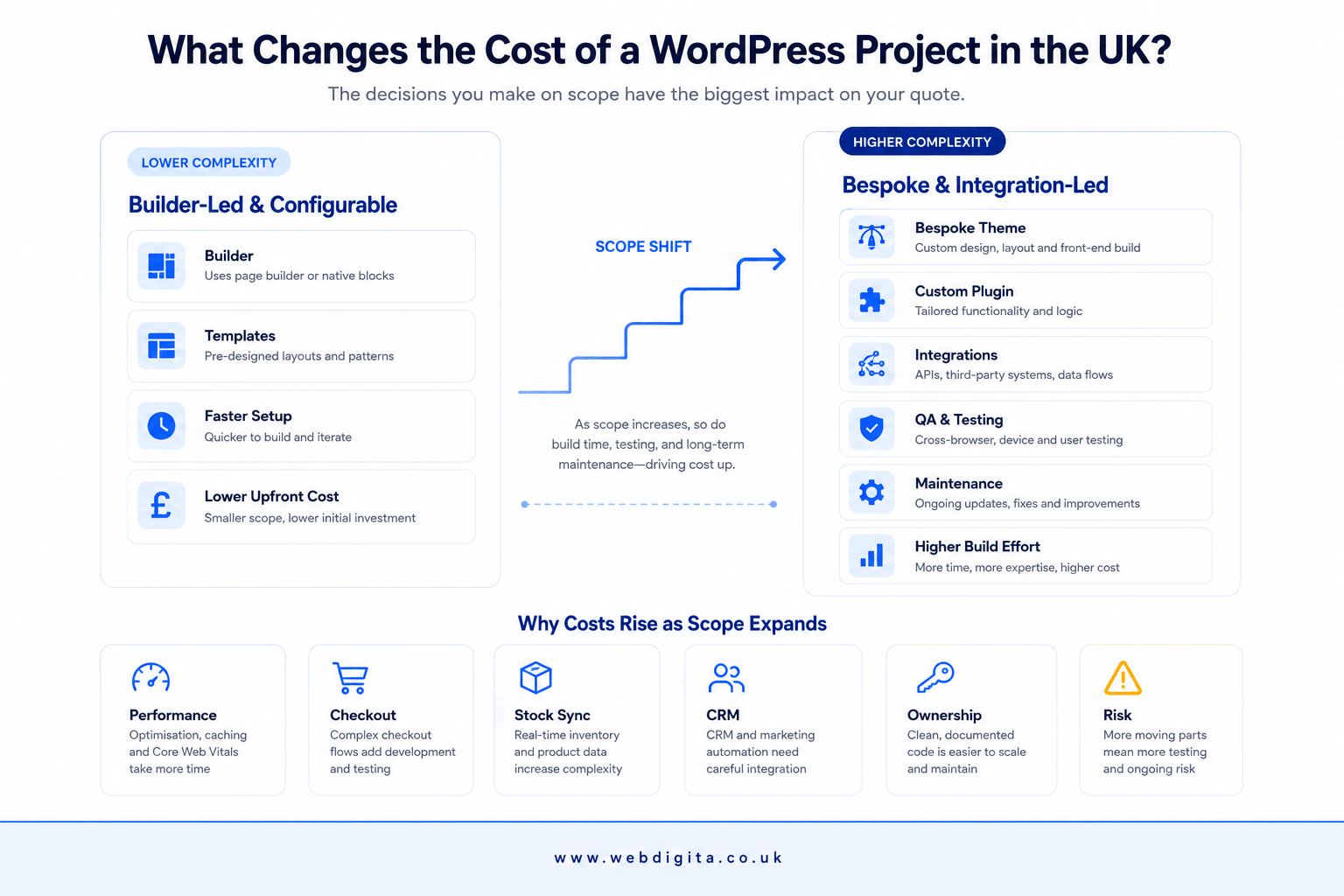
The fastest way to increase the cost of a WordPress project is to move from configurable to bespoke. Agencies tend to describe both as “custom,” which is not helpful. Here is where the real cost decisions live.
Custom WordPress Theme vs Page Builder:
Elementor and similar builder-led builds are faster and cheaper to deliver for straightforward campaign or brochure work. The trade-off is measurable. A builder-heavy WordPress install running 30-plus active plugins will generate 300KB or more of render-blocking CSS for a single above-the-fold view. A properly architected custom theme built on Gutenberg and ACF delivers the same output at a fraction of the page weight. That is not a styling preference – it is the difference between an LCP under two seconds and one pushing four. If you have agreed any kind of Core Web Vitals performance target, a page builder build has limits that a custom build does not.
Beyond Performance: if you want tighter editorial control, a structured content model using custom post types and ACF field groups, or a codebase that survives the next three WordPress major releases without a rebuild, a custom theme costs more upfront. The maintenance cost comparison over a two to three year horizon tends to favour it.
One thing I would add that rarely appears in agency sales conversations: if the agency you are evaluating is still building new sites on Classic Editor in 2026, ask why. Gutenberg is where WordPress is heading. Building on Classic Editor today means a painful transition is coming, and you will pay for it.
Custom plugin development:
This is where budgets move most aggressively, and where I see the most consistent underestimation. Custom plugin development is not just PHP code. You are paying for:
- Discovery and logic mapping: Understanding the business rules, edge cases, and admin workflow before a line is written. Skip this and the build reflects the developer’s interpretation of your requirements, not the actual ones.
- MySQL schema design: The database structure determines whether the plugin is extendable or a dead end eighteen months from now. A poor schema is not usually visible until you need to add something, at which point the cost is a rearchitecture project.
- REST API design: If the plugin needs to expose or consume data, the endpoint structure, authentication method, rate limit handling, and error response format all need decisions that take time.
- Admin interface development: Custom metaboxes, settings pages, and list table modifications are not trivial. A well-built plugin admin interface is a small application running inside WordPress.
- QA and edge case testing: Every conditional in business logic is a branch to test. Booking logic and account-level pricing rules tend to have a lot of conditionals.
- PHP version compatibility: PHP 8.2 broke patterns that worked cleanly on 7.4. Someone has to own compatibility testing and remediation work across version upgrades. That is a repeating cost, not a one-time handover item.
If you are asking for bespoke booking logic, account-level pricing rules, multi-vendor workflows, or unusual admin tooling, treat the brief as a software specification exercise before a meaningful development quote can be given. Agencies that price custom plugin work off a two-paragraph brief are either making large confident assumptions, or they are not accounting for what will slow them down.
WooCommerce and integrations:
Once WordPress becomes a trading platform, the scoping complexity compounds quickly. The storefront is usually the simple part. The real time goes into:
Product catalogue complexity: variant logic, attribute inheritance, and custom fields for product data that does not map neatly to WooCommerce defaults. If you are selling configurable products or running a catalogue with unusual taxonomies, this is not a plugin configuration task.
Checkout and tax rules: UK VAT, EU VAT for cross-border sales, and tax category exceptions for specific product types are not plug-and-play. Post-Brexit customs logic for physical goods adds another layer.
Payment gateway specifics: Stripe is straightforward. Custom gateway integrations, deferred payment logic, or purchase order workflows require custom plugin development and their own test cycle.
Stock and inventory sync via REST API: if you are syncing inventory with an ERP or third-party warehouse system, you are building a sync layer that handles field mapping, conflict resolution, failure logging, and retry logic. That is a standalone project, not a plugin configuration task.
If you are heading into WooCommerce territory, read what actually changes WooCommerce development cost in the UK before your next supplier conversation. The scope assumptions in a WooCommerce quote are worth understanding before you compare numbers.
WPML multilingual and performance constraints:
WPML is consistently the most underestimated scope item I see on WordPress project briefs. It gets treated as a plugin you install and configure in a day. At any meaningful scale it is not. WPML affects your ACF field relationships (each translatable field adds a database row), your URL structure (hreflang implementation is not automatic and has real edge cases), your WooCommerce product management (translating product variants and pricing is its own workflow), and your caching layer (language-aware caching requires explicit configuration, not a toggle). If multilingual content is in your brief, add 30 to 50 percent to the build estimate and ask which team members have actually delivered WPML at scale on a comparable project.
In my experience, the same pattern appears on WooCommerce builds with REST API integrations: the storefront looks simple, the real cost sits in the integration surface. Ask who owns each dependency before build starts, not after QA breaks.

Not sure where your WordPress project sits on the cost scale?
We run a short scoping call to map your functionality needs, integration points, and post-launch ownership requirements before you commit to a quote. It helps you see what drives cost and where the exclusions usually hide.
No obligation. Just clearer scope and honest budget guidance.
Fixed price versus milestone billing: which model actually protects you
This is a question buyers rarely ask early enough, and agencies rarely volunteer an honest answer to.
Fixed price contracts feel safe because you see the total number up front. The problem is that fixed price only works honestly when scope is fully defined at the point of signing. On most WordPress projects, it is not. The agency has to protect its margin somewhere, which usually means conservative estimates padded for risk, stricter change control than the sales conversation implied, and a specification document that becomes the reference point for every future disagreement.
Milestone billing is more honest for complex or evolving briefs. It ties payment to delivery of defined phases: discovery, design, development, QA, launch. Each milestone is scoped with knowledge of what came before it. The trade-off is that the total project cost is less certain from day one – which makes some buyers uncomfortable even when it is the more transparent model.
In a fixed price quote, the specification document is what you are actually buying. If it does not describe integrations, edge cases, performance targets, hosting expectations, and post-launch responsibilities in detail, the price is not really fixed – it is an opening bid on a scope that will get clarified during the build, usually in the agency’s favour.
In milestone billing, look at how tightly each milestone is defined. Vague deliverables like “design phase complete” or “development of core templates” leave room for interpretation. That interpretation tends to resolve in favour of whoever wrote the milestone definitions.
The best protection against cost overruns in either model is a proper scoping phase before full build begins. Not a discovery call – a structured exercise that produces a specification document detailed enough to make the build contract meaningful. If an agency offers to skip straight to build, the cost surprises that follow are predictable.
Cost driver matrix: project type, complexity and typical UK price range
WEBDIGITA WordPress Quote Reality Matrix: use this to sanity-check where your project probably sits before you compare proposals.
| Project type | Complexity | What usually drives cost | Typical UK price range |
|---|---|---|---|
| Brochure site | Low | Template count, design polish, content setup | A few thousand pounds |
| Marketing site | Medium | Custom theme work, CMS structure, forms, Yoast SEO setup, migration | Lower five-figure budget |
| WooCommerce site | Medium to high | Catalogue complexity, checkout rules, payments, shipping, account flows, REST API integrations | Lower to mid five-figure budget |
| Bespoke or integration-heavy build | High | Custom PHP plugins, MySQL schema design, REST API work, WPML, performance constraints, testing load | Mid five-figure and up, depending on scope |
Use ranges like these to frame the conversation, not to pin a number before scope is defined. If ownership costs and integration scope are absent from the proposal, the real number will emerge later regardless of what the quote says.
The post-launch costs most quotes do not mention
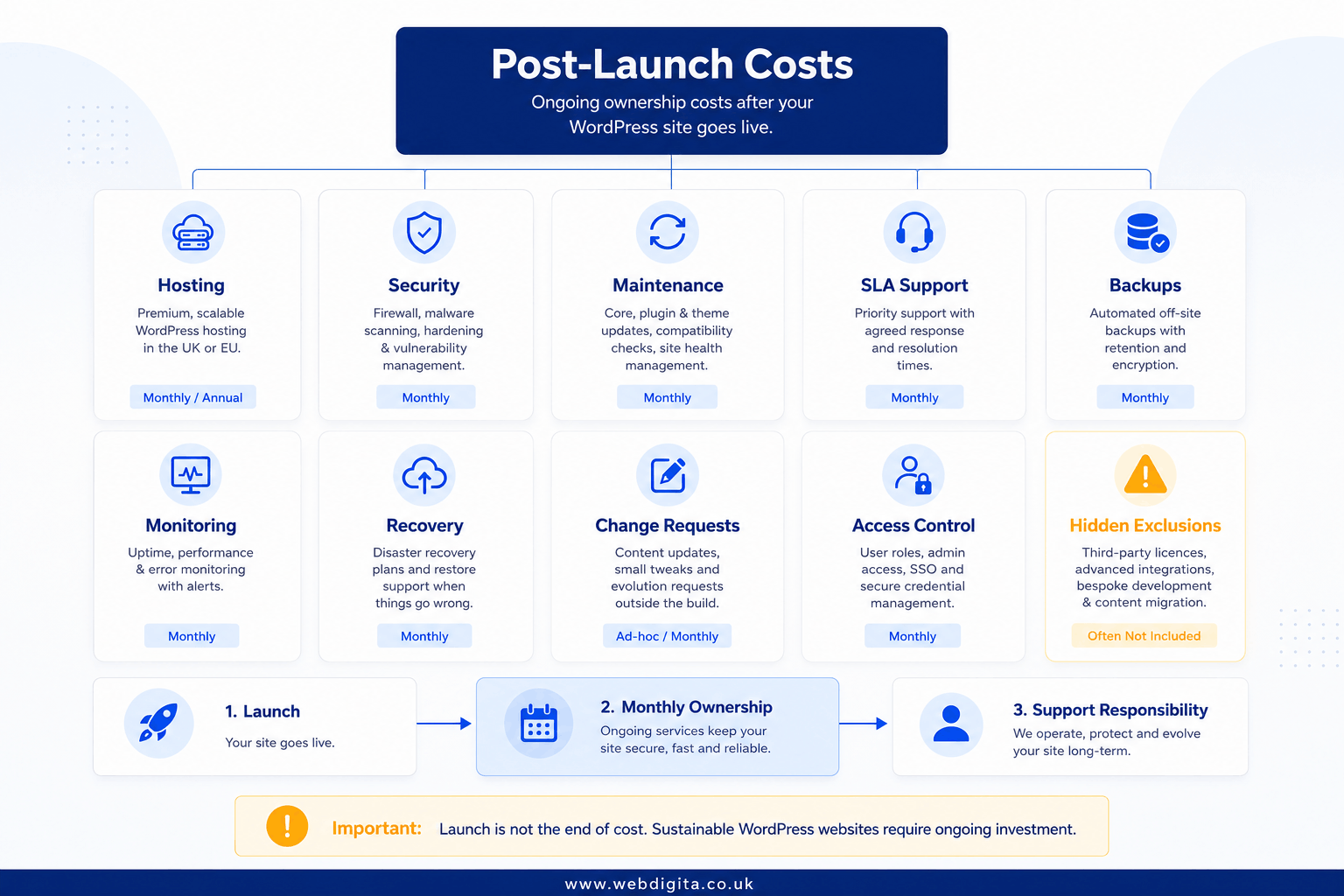
Most WordPress build quotes end at launch. Ownership starts there.
Hosting and infrastructure:
Basic managed WordPress hosting works for a low-traffic brochure site. It does not work for a WooCommerce store doing meaningful transaction volume. At that point you need PHP-FPM configuration, Redis or Memcached object caching, MySQL query optimisation, CDN delivery for static assets, and a staging environment that mirrors production closely enough to be useful for testing updates. The hosting plan that fits the site you are actually building is usually not the plan included in the build quote.
PHP version compatibility:
This is the maintenance cost WordPress site owners consistently underestimate. PHP 8.0 reached end-of-life in November 2023. PHP 8.1 end-of-life is December 2025. PHP 8.2 introduced deprecation patterns that break code which worked cleanly on 7.4. Staying on a supported PHP version is a security requirement, not a preference. Someone has to own the compatibility testing and remediation work each time a version upgrade is needed across WordPress core, active plugins, and any custom code. That is a repeating cost, not a one-time handover item, and it almost never appears in a build proposal.
Maintenance, security and SLA support:
WordPress core updates, plugin compatibility checks, malware scanning, access control reviews, backup verification, and small-change capacity are the baseline tasks of site ownership. None of them are optional. If the build quote does not reference a maintenance retainer or point you toward one, ask specifically what happens when something breaks outside warranty. For a detailed view of what a proper post-launch arrangement should cover, see what post-launch support, handover and warranty should include.
Before you ask for build quotes, define these ownership requirements in writing:
- Hosting specification matched to your actual traffic and transaction load
- PHP version upgrade responsibility and testing budget
- WordPress core and plugin update cadence and ownership
- Security monitoring, hardening scope, and incident response process
- Backup frequency, retention period, and recovery testing
- SLA response times, hours of coverage, and what they actually cover
- Change request process and cost model once warranty expires
If you already know the site will need ongoing support, ask what eCommerce maintenance services or a similar supporting retainer actually covers before you sign the build contract.
Questions worth asking before you sign anything
How do you protect against scope creep and cost overruns?
The honest answer involves a detailed specification document, a defined change control process, and payment milestones tied to delivery. If the answer is “the team works flexibly with clients,” that is not a protection mechanism. It is a description of how disputes will be managed informally, after they arise.
What specific deliverables are tied to each payment milestone?
This question reveals how well the project has actually been scoped. Vague milestone descriptions like “design phase” or “development of core templates” should prompt follow-up. You need to know exactly what is being signed off at each stage before the next payment triggers. If the agency cannot answer this before the contract is signed, the specification is not finished.
Why does WooCommerce cost so much more than a standard WordPress build?
Because it is not a theme swap. WooCommerce is a trading system sitting on top of WordPress, and the complexity comes from the business logic underneath it: product variants and catalogue structure, checkout and tax configuration, payment gateway specifics, order management workflows, customer account logic, and integration with whatever stock management, CRM, or fulfilment system the business actually runs on. A quote that does not reflect that complexity has not accounted for it – which means either the scope is genuinely simpler than you think, or someone will be surprised later.
What does security hardening actually include?
Hardening is not a plugin. It is server configuration, file permission auditing, login protection, two-factor enforcement, audit logging, and a defined process for what happens if a malware event occurs. On shared hosting environments, some of these controls are not available to the developer at all – they require hosting-level changes. When an agency says “security hardening is included,” ask them to list exactly what that means, and verify the hosting environment you are on supports the controls they are describing.
The headline quote is only useful if the scope behind it is honest. If you want a realistic budget figure, push harder on exclusions, ownership, and post-launch responsibility than on the opening number. If a proposal is unclear on those points, the scoping session matters more than the discount.
Related reading: if your WordPress brief is drifting into wider platform complexity, integration work, or a trading build, see the breakdown of eCommerce development cost in the UK.
Questions buyers ask before budgeting WordPress development in the UK
Common questions about scope, pricing, and what sits outside most WordPress quotes
1. What is the typical cost of WordPress development in the UK?
WordPress development cost in the UK typically ranges from a few thousand pounds for a simple brochure site to a lower five-figure budget for a serious marketing site with custom theme work, CMS structure, and migration. WooCommerce projects usually sit in the lower to mid five-figure range depending on catalogue complexity, checkout rules, and integrations. Bespoke builds with custom plugins, API work, and performance constraints can reach mid five-figure budgets and higher. The biggest price movers are custom build depth, ecommerce logic, third-party integrations, and post-launch support scope.
2. What usually sits outside a WordPress development quote?
Most WordPress quotes cover the core build but exclude content migration, copy population, redirects, CRM or marketing system integration, analytics setup, advanced SEO configuration, security hardening, hosting setup, and post-launch support. These exclusions are where low quotes turn into higher final costs. Before comparing agencies, ask what sits outside the headline number and whether maintenance, plugin updates, SLA support, and change-request capacity are included or priced separately.
3. What is the difference between a custom WordPress theme and a page builder site?
A page builder site uses tools like Elementor or WPBakery to reduce upfront cost and speed up delivery, especially for simpler brochure or campaign work. A custom theme offers tighter performance, cleaner editing control, fewer plugin dependencies, and a more structured content model using Gutenberg, ACF, and custom post types. Custom themes require more build effort and cost more upfront, but they usually perform better, scale more cleanly, and reduce long-term maintenance complexity compared to builder-heavy sites.
4. Why does WooCommerce increase WordPress development cost?
WooCommerce turns WordPress into a trading platform, which adds product variants, tax rules, shipping logic, payment gateways, stock sync, customer accounts, and operational handoffs. Each of these requires configuration, testing, and integration work. If you need custom checkout rules, pricing logic, or connections into ERP, CRM, or fulfilment systems, the scoping load rises fast. WooCommerce projects usually sit in the lower to mid five-figure range in the UK, with the real cost driven by catalogue complexity and system dependencies rather than the storefront design.
5. What is custom plugin development and when do you need it?
Custom plugin development means building bespoke functionality that does not exist in off-the-shelf plugins. You need it when you require booking logic, account workflows, pricing rules, admin tools, or business-specific features that cannot be configured using existing plugins. Custom plugins add significant cost because you are paying for discovery, architecture, edge cases, QA, update compatibility, and future maintenance responsibility. Treat custom plugin work as software development, not a small add-on, and ask who owns long-term support before build starts.
6. What post-launch costs should be included in a WordPress budget?
Post-launch costs include hosting and infrastructure, plugin and core updates, security monitoring, backup and recovery, malware response readiness, performance monitoring, and small change capacity. If you need SLA support with response-time commitments or business-hours coverage, that should be priced separately. Most WordPress quotes cover launch but not ownership, so ask for maintenance scope, SLA terms, and change-request boundaries in writing before you commit. A warranty period is not the same as ongoing support.
7. How do integrations affect WordPress development cost?
Integrations add cost because they require API work, data mapping, error handling, testing, and ongoing maintenance. Common integrations include CRM systems like HubSpot or Salesforce, marketing platforms, ERP systems, booking tools, payment gateways, and stock management. Each integration adds discovery effort, technical risk, and support responsibility. If your WordPress site needs to connect to third-party systems, ask who owns the integration logic, what happens when APIs change, and whether ongoing sync monitoring is included in the quote.
8. What should be included in a WordPress project scope before you ask for quotes?
A clear WordPress scope should list required functionality, not just page count. Define integrations, data flows, and who owns each system. State content volume and migration needs. Set performance and hosting expectations. Specify security, access, backup, and recovery needs. Ask for maintenance scope, SLA terms, and change-request boundaries. If you skip these details, the quote will be incomplete and the real cost will surface later. Vague exclusions are a warning sign, especially if the quote looks aggressively low.
Conclusion
The WordPress quote that looks cheap at the start usually excludes the things that matter most after launch: integration logic, performance constraints, security hardening, hosting fit, and the support burden that starts the week the site goes live.
- Pin down exclusions early: ask what sits outside the quote before you compare prices, especially content migration, integrations, post-launch support, and change-request boundaries
- Treat bespoke work as software: custom plugins, API connections, and workflow logic are not minor add-ons and should be scoped, priced, and maintained as serious build effort
- Plan for ownership cost: hosting, updates, security monitoring, SLA cover, and small change capacity define the real cost of running the site, not just building it
If the proposal is vague on scope, ownership, or post-launch responsibility, the scoping review matters more than the opening number. A realistic budget starts with honest exclusions, not an attractive headline price.
Ready to scope a WordPress build that fits your budget and ownership model?
We work with UK businesses building brochure sites, marketing platforms, and WooCommerce stores. Our WordPress development service covers custom theme work, plugin development, integrations, performance setup, and post-launch support with clear pricing and no hidden exclusions.
See Our WordPress Development ServiceOr if you prefer,