Key Takeaways
A disciplined WooCommerce development process moves through discovery, planning, staged build, QA, launch, and handover with clear outputs at each phase. Weak discovery creates scope drift, plugin bloat, and rework costs that could have been avoided with proper definition upfront.
- Discovery output: You need priorities, risks, acceptance criteria, and ownership clarity before any design or plugin decisions happen.
- Build visibility: Expect working staging access, plugin justification, data structure decisions, and performance planning during the build, not vague progress percentages.
- Launch readiness: Real testing covers payment flows, shipping logic, tax rules, mobile QA, Core Web Vitals, error handling, and rollback plans before go-live.
- Handover quality: Delivery includes access details, deployment notes, plugin inventory, recovery ownership, and post-launch support boundaries, not just a live site.
I had a client bring me into a WooCommerce build eight months after sign-off. The WordPress install was solid, Stripe and PayPal were both live and integrated correctly. The problem was a checkout that failed every time two discount rules ran at the same time – because nobody had defined discount logic before the build started. Discovery was a single 30-minute call. No acceptance criteria. No scope document. The process was invented week by week, and the budget was nearly exhausted.
Most WooCommerce development projects go wrong not because of technical failure but because the process was skipped.
A proper WooCommerce development process runs from discovery through scoped planning, staged build reviews, QA, deployment, and post-launch handover – each phase producing inspectable outputs. Compress or skip any phase and the cost appears downstream: rework, plugin debt, MySQL performance problems, or a checkout that breaks under real transaction conditions. This guide gives you the buyer-side view of what each phase should produce and what to challenge when it does not.
A proper WooCommerce development process should move through clear phases: discovery, scoped planning, UX and technical decisions, staged build reviews, pre-launch QA, controlled deployment, and post-launch handover. Each phase should produce something you can inspect, approve, and challenge – including scope, acceptance criteria, staging reviews, performance targets, security controls, backup ownership, and launch readiness checks.
This guide is for eCommerce managers, founders, operations leads, and marketing teams who need a buyer-side view of the process before shortlisting WooCommerce agencies, planning a rebuild, or locking budget and timeline.
A proper WooCommerce process starts before anyone talks about themes or plugins
If an agency jumps straight to design ideas or extension recommendations, slow the conversation down. The first job is to define how the store actually needs to work: catalogue size, product rules, shipping logic, payment methods, customer journeys, content ownership, and launch constraints. WooCommerce runs on top of WordPress, which gives it real flexibility – but that flexibility creates scope unless it is bounded at the start.
What you need back from discovery is not a pile of workshop notes. Ask for priorities, known risks, acceptance criteria, and clear ownership. If nobody can tell you who is validating tax logic, product data structure, or fulfilment edge cases, treat that as a warning sign.
I see this on WooCommerce projects where the visible brief looks simple, but payment rules and shipping exceptions stay vague until build. The result is usually the same: extra plugins, awkward workarounds, and a timeline that slips because the real scope was hidden at the start.
If you are comparing agencies, ask how they handle assumptions before code starts and how they turn those into delivery decisions. It is the fastest way to identify a proper WooCommerce development agency versus one that is just good at pitching.
The middle of the project should produce inspectable outputs, not just progress updates
This is where weak agencies start talking in vague percentages. You do not need “80 percent complete”. You need working outputs: approved flows, technical decisions, staging access, and a build plan that shows what is being developed, reviewed, and held back.
Plugin Decisions: every WooCommerce extension adds speed, compatibility, update, and security risk. Ask why each plugin is needed, what native WooCommerce functionality or custom PHP development could replace it, and what happens if that extension stops being maintained. The WooCommerce REST API can handle many integration scenarios where agencies default to a plugin – if a team reaches for an extension every time data needs to move between systems, ask whether a direct API connection would be cleaner and more maintainable over time. More plugins do not automatically mean faster delivery. Sometimes they just create more future debt.
Database & Performance Planning: MySQL schema decisions need to happen before the catalogue grows and orders start stacking up. Check how product attributes, variations, customer data, and order history will be structured – messy MySQL table design creates slow queries, admin pain, and reporting problems that are expensive to fix later. Checkout UX and speed belong here too, not as a final polish task after the build is done. If the project is using WooCommerce Blocks for the cart and checkout, performance expectations differ from the classic shortcode-based checkout – both have different caching behaviour and should be tested separately.
If discovery still feels fuzzy at this point, I would push for proper WooCommerce project discovery workshop, before the build goes further. It is much cheaper to challenge assumptions here than after custom checkout logic and plugin dependencies are already in place.

Not sure if your WooCommerce project is scoped properly?
We help eCommerce teams validate scope, identify hidden risks, and define acceptance criteria before build starts. Our discovery process turns vague requirements into inspectable outputs you can challenge and approve.
Quick diagnostic call to review your current brief and planning.
WooCommerce development process: phases, inputs, outputs and typical timing
Discovery: Input is business goals, operational rules, integrations, and constraints. Output is scope, priorities, risks, and ownership. Duration is usually short but high leverage.
Planning and UX: Input is approved scope. Output is user flows, wireframes, technical decisions, staging plan, and acceptance criteria. Duration is medium.
Build and staging review: Input is signed-off flows and technical plan. Output is working store components, reviewed features, and resolved issues. This is usually the longest phase.
QA and launch prep: Input is a feature-complete staging site. Output is tested payments, shipping, performance checks, fixes, and launch approval. Duration is medium.
Launch and post-launch: Input is approved release plan and backups. Output is live deployment, monitoring, handover, and support ownership. Duration is short to medium, but commercially critical.
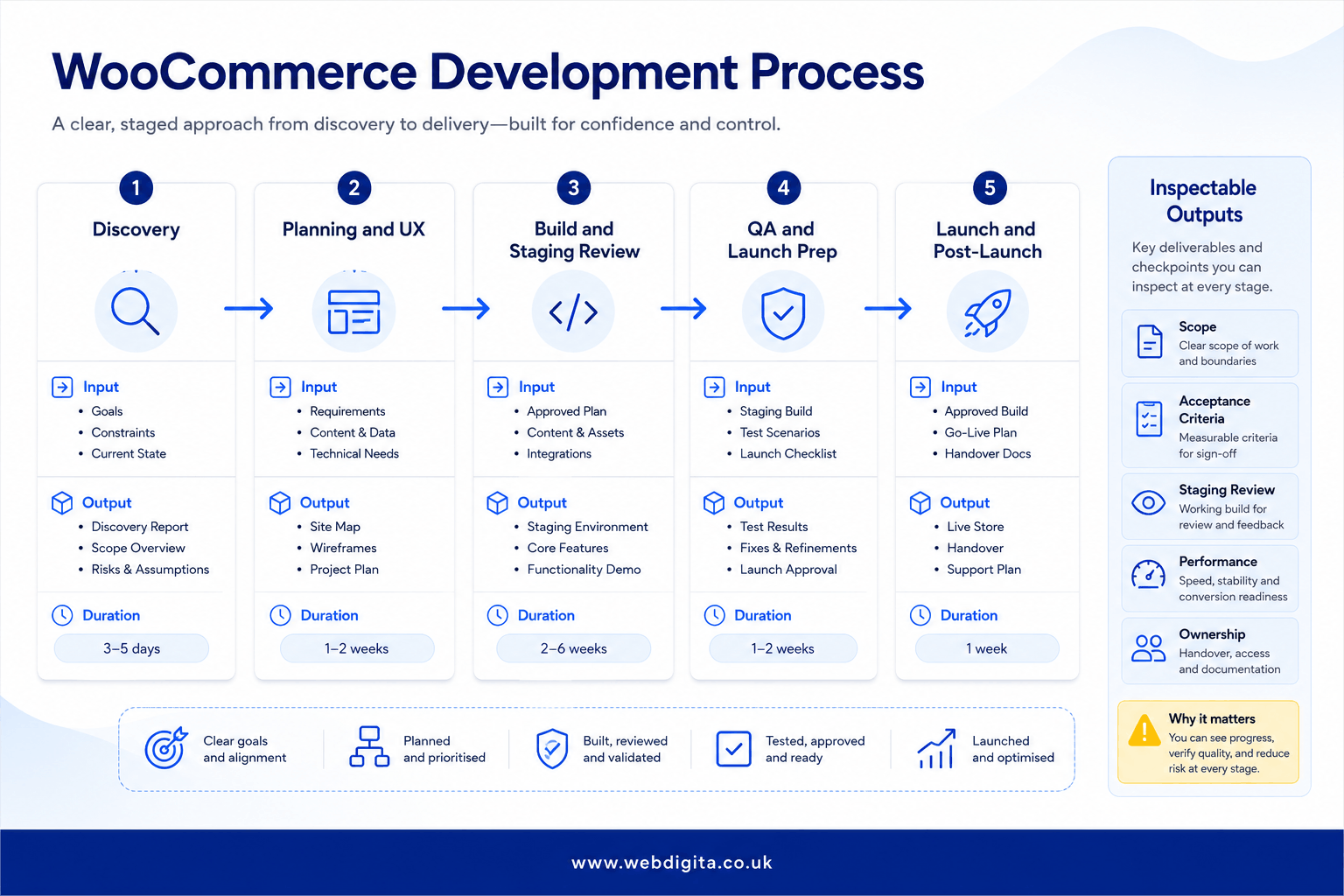
You should also expect regular staging reviews during the build, not a big reveal near launch week. Ask to see catalogue behaviour, checkout flow, account areas, and custom features in a working environment while there is still time to fix things properly.
What good testing looks like before launch
Testing is where revenue risk becomes visible. If the team cannot explain how Stripe and PayPal are being tested across failure states, partial captures, and refund scenarios – not just successful payments – you should not sign off the launch plan yet. The same discipline applies to shipping providers, tax rules, coupons, transactional emails, and edge-case checkout failures. From my experience reviewing WooCommerce launches, the failure states are where real problems surface. Success-path-only testing is not testing.
Core Web Vitals matter here too, especially on home, category, product, cart, and checkout templates. Performance targets need to be treated as release gates, not improvements to schedule for after launch. If you want more detail, this guide on Core Web Vitals targets that actually matter for eCommerce is worth reading alongside the build plan.
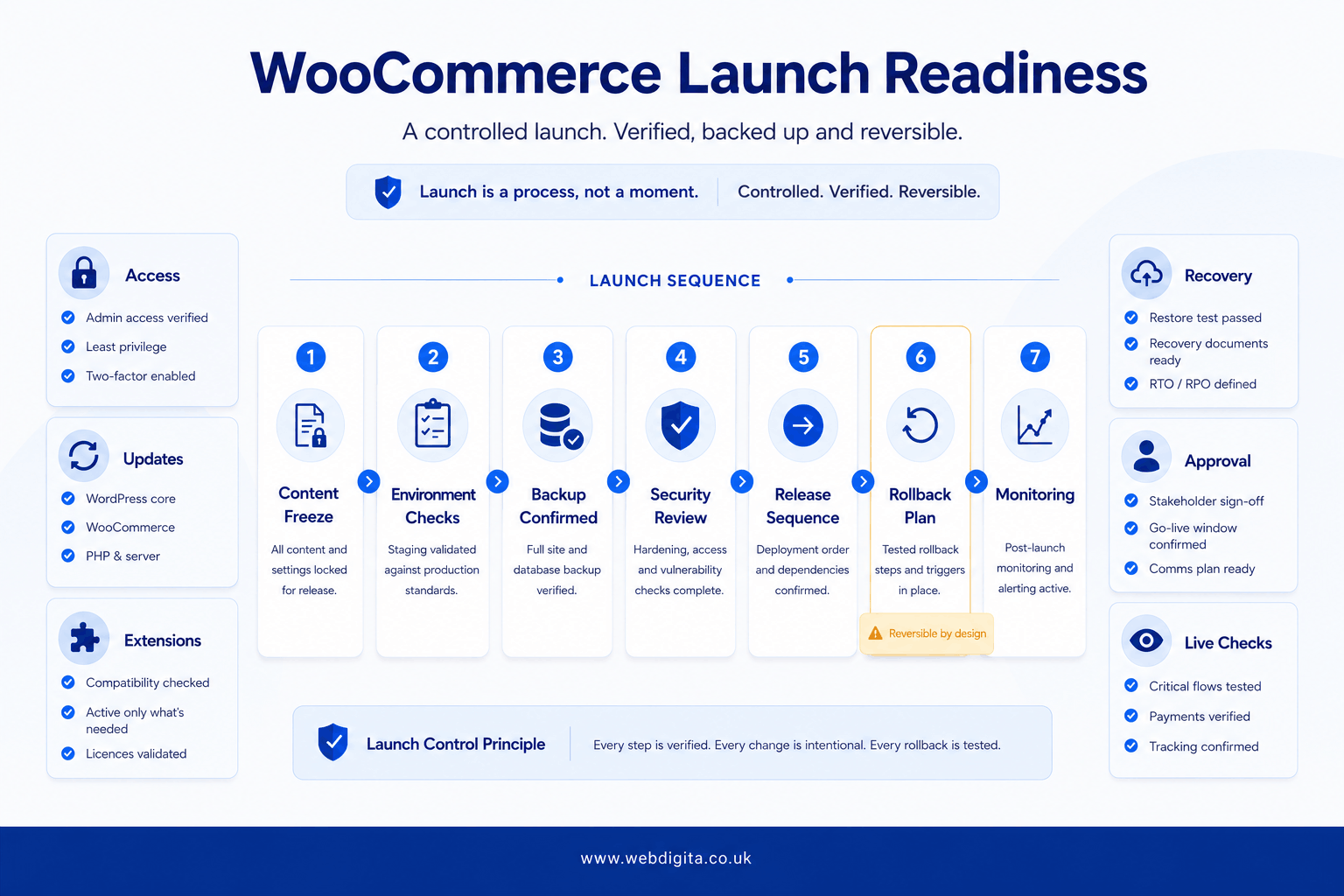
WEBDIGITA WooCommerce Launch Readiness Checklist: Use this to pressure-test whether the project is actually ready to go live, not just visually finished.
- Real order simulations completed across payment and shipping combinations, including Stripe and PayPal failure paths
- Product data, pricing, stock, tax, and coupon logic checked by your internal team
- Mobile and desktop QA completed across key browsers and devices
- Core templates reviewed for speed and Core Web Vitals performance
- Error handling, transactional emails, and edge-case checkout failures tested
- Named sign-off owners agreed for UAT, content, and launch approval
Your team will still need time here. Do not assume the agency can validate every product rule or content detail without you. In most projects, internal time is needed for data checks, UAT, and realistic order simulation – because only you know where the operational edge cases sit.
Launch is a controlled deployment step, not a late-night gamble
A disciplined WooCommerce launch is boring in the best possible way. You should expect a release sequence, a content freeze decision, environment checks, backup confirmation, and a rollback plan before anyone touches the live store.
Security hardening: Ask about admin access rules, update policy, environment separation, extension review, and who is responsible for ongoing patching. Do not accept vague reassurance here. I have seen clients treat “we’ll keep an eye on it” as a security plan – three months later they were dealing with a compromised WordPress admin panel. If security is described as something they will monitor rather than something they have a documented process for, that is not a process.
Backup and recovery: Ask what is backed up, how often, where it is stored, and whether recovery has been tested. A backup that has never been restored is just a comforting theory. The same goes for deployment: if rollback steps only appear after something breaks, the risk has already been pushed onto you.
If those controls are vague, the launch risk has not disappeared. It has just been handed to your team.
And if you are still tightening the pre-launch detail, this article on getting the WooCommerce setup right before launch helps with the final readiness layer.
Handover and post-launch support are part of delivery, not an optional extra
A store is not fully delivered because it is visible online. It is delivered when your team can run it safely, understand what has been built, and know what happens when something fails.
Ask for more than just login credentials. A proper handover pack should include deployment notes, a full plugin inventory with version numbers and update risk flags, PHP version dependencies, documentation of any custom MySQL tables or non-standard database structures, WooCommerce REST API endpoint documentation if any third-party integrations are connected, and clear support boundaries with named ownership. If any of those are missing, you are carrying undocumented risk from day one.
If post-launch monitoring is not in place, checkout issues, extension conflicts, and performance drops will appear in the first live weeks with nobody clearly accountable. WooCommerce extension updates are a common trigger – a plugin update that worked cleanly in staging can conflict in production once real traffic, real data, and real caching conditions apply. The WordPress core update cycle adds another layer: PHP compatibility and MySQL performance assumptions made during build can shift when the underlying platform moves.
In my experience, this is where rushed projects show their real quality. Small plugin updates, payment changes, or WordPress core version bumps often expose bigger undocumented problems that were hidden during launch.
If you need continuity after go-live, proper eCommerce maintenance should cover monitoring, updates, issue response, and ownership clarity rather than just ad hoc fixes. I would treat that as part of the original delivery conversation, not a separate afterthought.
The best agencies can explain their WooCommerce development process in plain English, phase by phase, with outputs, gates, and ownership at each step. If they cannot do that before you sign, do not assume they will become more structured once the project starts.
Questions buyers ask before starting a WooCommerce project
Clear answers on process, timing, ownership, and what to expect at each stage of a WooCommerce build.
1. How long does a typical WooCommerce development project take?
A properly scoped WooCommerce project usually takes 8 to 16 weeks from discovery to launch, depending on catalogue size, custom features, integrations, and internal approval cycles. Discovery and planning might take 2 to 3 weeks, build and staging review 4 to 8 weeks, QA and launch prep 1 to 2 weeks, and launch plus handover another week. Rushed timelines often skip discovery or compress QA, which creates rework and post-launch issues that cost more to fix later.
2. What should I expect to receive at the end of the discovery phase?
Discovery should produce a clear scope document, prioritised features, known risks, acceptance criteria, technical decisions, and ownership assignments. You should also receive a delivery plan showing what happens at each phase, what you need to approve, and where internal time is required. If discovery ends with vague workshop notes or a list of ideas rather than defined outputs, the project is not ready to move into build.
3. How do I know if the supplier is adding too many plugins?
Ask why each plugin is needed, what native WooCommerce or custom development could replace it, and what happens if the extension stops being maintained. More plugins do not mean faster delivery. They often create speed, compatibility, update, and security risks that become your problem after launch. A good supplier will justify every extension and explain the trade-offs clearly before adding it to the build.
4. What does proper WooCommerce testing cover before launch?
Testing should cover real order simulations across payment and shipping combinations, product data and pricing checks, mobile and desktop QA, Core Web Vitals performance on key templates, error handling, transactional emails, and edge-case checkout failures. You should also see backup confirmation, rollback plans, and security hardening checks. If testing is described as a quick final check rather than a structured phase, launch risk is being underestimated.
5. Who is responsible for post-launch issues and ongoing updates?
This should be defined during handover, not after something breaks. Ask for clear support boundaries, plugin update ownership, monitoring responsibility, and response times for critical issues. If post-launch support is vague or treated as an optional extra, you are likely to face accountability gaps when payment issues, extension conflicts, or performance drops appear in the first live weeks.
6. What is the biggest risk in a WooCommerce project?
The biggest risk is weak discovery leading to bad scope. When product rules, shipping logic, payment methods, and operational edge cases stay vague until build, the result is usually plugin bloat, awkward workarounds, timeline slippage, and budget going on rework rather than progress. Most expensive WooCommerce problems are created before the code starts, not during development.
7. How much should I budget for a WooCommerce development project?
Budget depends on catalogue complexity, custom features, integrations, and supplier experience. A straightforward WooCommerce build with standard features might start around a few thousand pounds, while a complex store with custom checkout logic, integrations, and performance optimisation could require a lower five-figure budget. If the supplier cannot explain how scope affects cost, or if pricing feels vague, ask for a clearer breakdown before committing.
Conclusion
The suppliers who can explain their WooCommerce development process clearly before you sign are usually the ones who deliver without drama. If the process feels vague at pitch stage, it will not become more structured once the project starts.
Before committing: Ask how discovery turns into scope, how staging reviews work, what testing covers, and who owns post-launch issues. If those answers are unclear, the delivery risk has already been pushed onto you.
After launch: The real test is whether your team can run the store safely, understand what was built, and know what happens when something breaks. If handover feels rushed or incomplete, you are carrying technical debt that should have been resolved during delivery.
Ready to start a WooCommerce project with a proper process behind it?
WEBDIGITA builds WooCommerce stores through structured discovery, staged reviews, and controlled deployment. We deliver inspectable outputs at every phase, from scope validation to post-launch handover, so you know exactly what you are approving before code is written.
See our WooCommerce Development ServicesOr if you prefer,