Key Takeaways
A WooCommerce store that looks finished can still be dangerously unready. The difference between a stable launch and a fragile one usually comes down to decisions made before go-live, not features added during build.
- Architecture decisions matter more than feature lists. Hosting, theme approach, plugin dependency level, payment gateway choice, and expected order volume should be locked in before launch, not patched around later.
- Plugin sprawl creates more pain than platform limits. Five overlapping plugins often cause more maintenance overhead than one well-scoped custom feature. Every plugin needs a clear purpose, an owner for updates, and a plan for what happens if the vendor stops maintaining it.
- Checkout and performance need real-world testing. Test mobile checkout, failed payment handling, poor-connection behaviour, and guest checkout flows before sign-off. A polished homepage is not enough if the cart page stalls under load.
- Backup is not the same as recovery. Know how often backups run, what they include, where they are stored, and whether recovery has actually been tested. A backup that cannot be restored cleanly is mostly theatre.
The stores that stay stable after launch are the ones where operational control, staging discipline, and plugin ownership were decided early, not deferred until the first avoidable failure.
Most WooCommerce problems are caused by rushed setup decisions, not by the platform itself. I have scoped enough builds to say that with confidence. The store looks finished on staging, everyone signs off, and then real traffic arrives and the quiet architectural compromises start making noise.
A WooCommerce store is launch-ready when hosting, caching, HPOS direction, plugin strategy, checkout behaviour, and backup recovery are all confirmed – not assumed. Get those wrong upfront and you are not launching a store. You are launching a support backlog.
This guide is for founders, eCommerce managers, and delivery teams who need a clear pre-launch check before sign-off, supplier selection, or final scope decisions. The aim is straightforward: make sure the store can handle real customers, real orders, and real operational change without becoming fragile.
What needs to be decided before launch, not patched after
Founders ask me if the site works. The harder question is whether it will stay stable once traffic, orders, and day-to-day changes start hitting it at the same time. Those are not the same question, and most demo environments are designed to answer the first one only.
The decisions that create the most downstream pain are not the glamorous ones. They are hosting tier and environment parity, PHP version and MySQL configuration, caching layer, and whether the build is structured for HPOS – WooCommerce’s High-Performance Order Storage – or still running on the old post-based order table. Defer those and you are not staying flexible. You are borrowing trouble.
A common failure pattern: a feature-heavy build passes staging because the test environment is nothing like production. Then real traffic lands. Payment gateways behave differently on mobile. Product filters hit the database harder than the demo suggested. The team starts patching symptoms instead of fixing root causes. I have seen this play out more times than I would like.
If you are comparing WooCommerce development agencies, ask specifically what they expect to hold stable as traffic and catalogue complexity grow. If the answer is mostly about design and features, push harder on the engineering side. That is where the real cost of a rushed build shows up.
Which setup choices create the most pain later
Most early WooCommerce pain comes from quiet setup decisions, not dramatic platform failure. Plugin sprawl is usually first on the list.
Plugin strategy: check for overlap, dependency chains, and update risk. Five small plugins that each do one clever thing can create more overhead than one well-scoped custom feature or a tighter brief. Ask who owns plugin updates, how overlap is audited, and what happens if a key vendor stops maintaining a dependency. That last question rarely gets asked until it matters.
Data and performance layer: WooCommerce data grows quickly once orders, customers, sessions, and product variations accumulate. Ask whether the setup supports HPOS where appropriate, how object caching is handled, and whether Redis or a comparable object cache layer is part of the plan. Do not leave database optimisation until the store slows down. By then you are fixing production pain instead of preventing it.
In my experience scoping WooCommerce builds across different sectors and order volumes, the stores that stay stable share one pattern: better upfront setup – clean plugin architecture, object caching configured from day one, HPOS adopted early – consistently reduces plugin debt, reactive support issues, and post-launch rework. It is not exciting to scope. It is reliable to operate.
A backup is not a recovery plan, and a plugin list is not architecture.
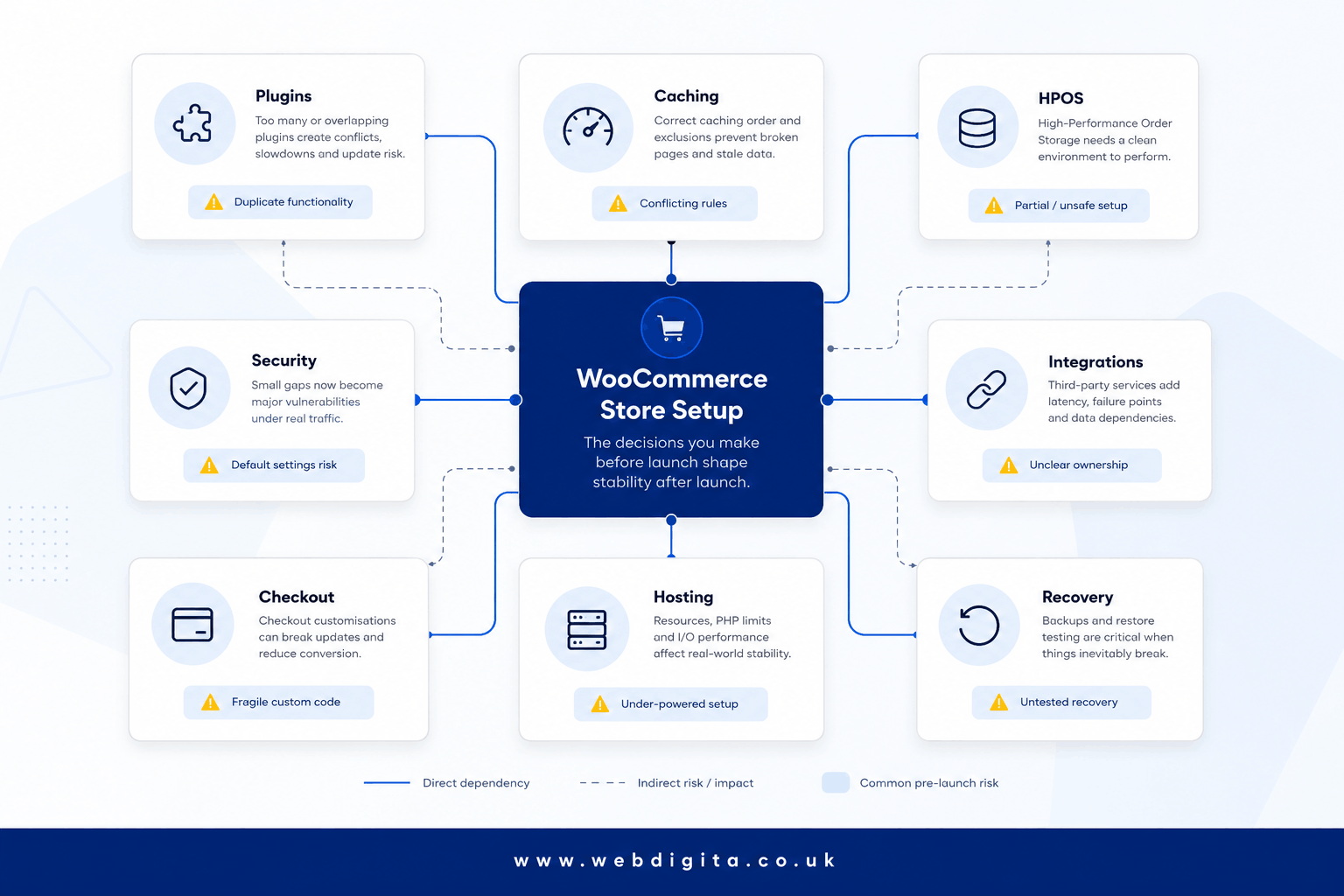
Security hardening: before launch, lock down admin access, remove anything unnecessary, enforce update discipline, and reduce the attack surface. If a provider treats security as something to sort out after go-live, take that seriously as a signal about how they approach everything else. If the store depends on third-party systems, planning eCommerce integrations before launch matters more than most teams expect.
If your requirements still feel loose, this is often where a WooCommerce project discovery workshop saves you from vague assumptions that later turn into change requests, delays, and brittle workarounds.

Not sure if your WooCommerce setup is ready for real traffic?
We run pre-launch checks that catch the setup problems most teams miss: plugin overlap, checkout friction, performance gaps, and deployment risk. The goal is to launch with a stable store, not patch problems after go-live.
Quick diagnostic call. No obligation. Clear next steps.
Checkout and performance checks that should pass before go-live
Checkout is where weak setup becomes expensive. You can survive rough edges elsewhere. You cannot afford to lose orders because the payment flow stalls, checkout fields are awkward on mobile, or the page falls apart on a slow connection.
Before sign-off, ask the provider to demonstrate failed payment handling, mobile checkout behaviour under realistic conditions, and cart testing with multiple product types – not only a clean desktop demo. Test guest checkout, coupon logic, address validation, and what happens when a customer goes back a step mid-flow. If you only test happy-path journeys, you miss the failure modes that generate support tickets and abandoned baskets.
Performance standards need to be defined before launch, not after the first complaint. Use Core Web Vitals guidance as a neutral reference point, but evaluate it in commercial terms: product, cart, and checkout pages must feel consistently responsive on mobile and under less-than-ideal network conditions. A polished homepage is not enough. If friction is already visible in testing, a WordPress UX audit can surface that friction before it costs you orders.
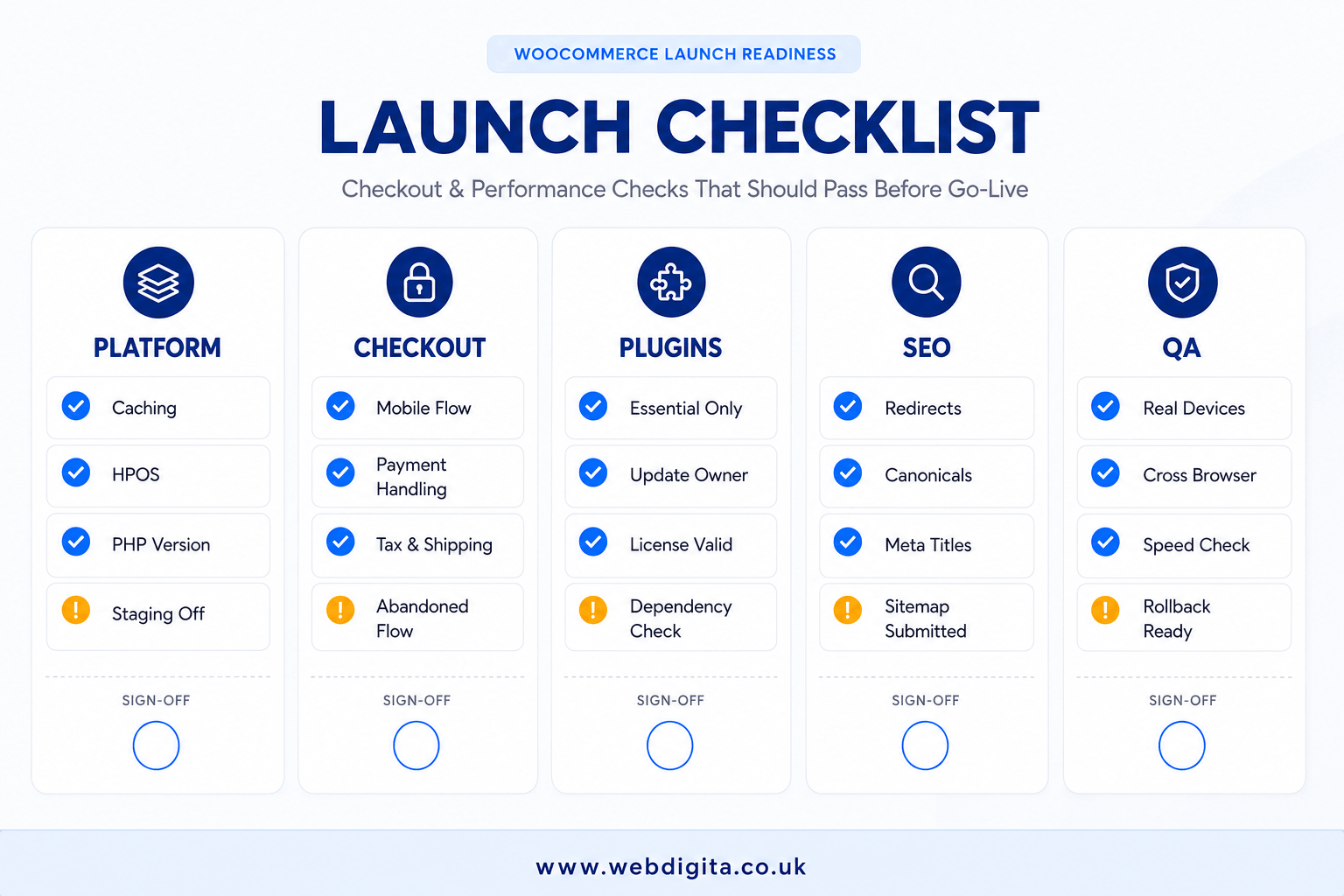
WooCommerce launch checklist
Use this as a sign-off tool, not a box-ticking exercise.
- Platform: hosting tier, PHP version, object caching, HPOS direction, and environment parity are confirmed before go-live.
- Checkout: mobile flow, payment gateway behaviour, failed-order handling, and field friction are tested on real devices under realistic conditions.
- Plugins: every plugin has a clear purpose, no meaningful overlap, an assigned update owner, and an assessed vendor risk.
- SEO: indexation basics, metadata templates, canonicals, redirects, and crawl blockers are checked and signed off.
- QA: real-device testing, poor-connection testing, rollback steps, and post-launch ownership are documented and assigned.
How to launch without creating a maintenance problem on day one
A stable launch needs operational control, not optimism. This is where otherwise decent WooCommerce projects tend to come apart.
Launch-critical controls: you need a proper staging environment, a controlled deployment workflow, tested recovery, and clear ownership of each. Live edits on production are not a workflow – they are a liability. A store launched with overlapping plugins and direct live changes becomes a support problem quickly. A store launched with controlled dependencies and a staging gate is far easier to maintain and far cheaper to evolve.
Backup and recovery: know how often backups run, what is included, where they are stored, and who can restore them. Then ask the more important question: has recovery actually been tested under realistic conditions? A backup nobody has ever restored is mostly theatre. I have seen teams discover this at the worst possible moment.
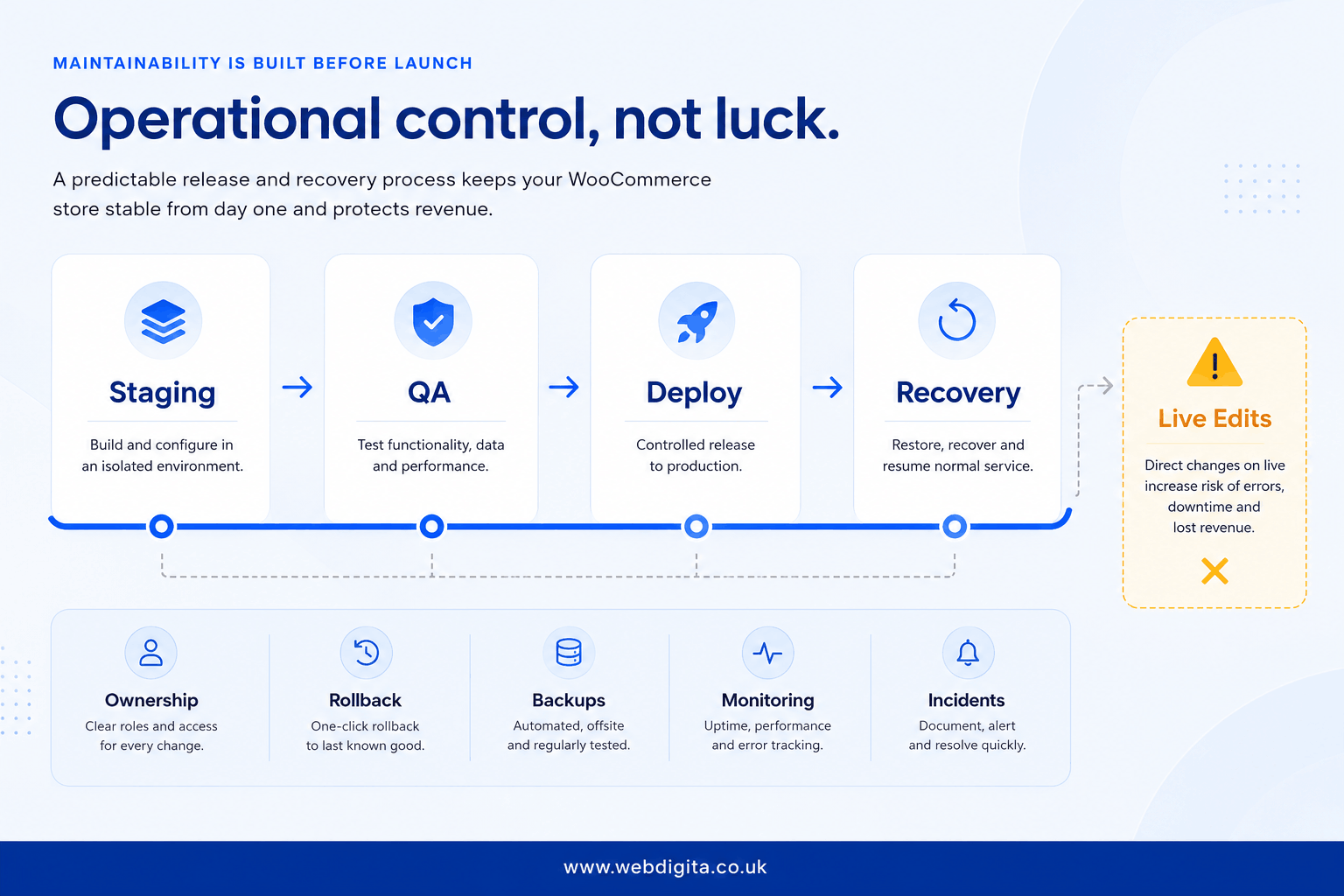
Post-launch scope: deeper optimisation, broader UX refinement, and lower-priority enhancements can follow after launch. What should not be deferred is clear ownership of platform setup, checkout behaviour, plugin stack, SEO basics, QA processes, and monitoring. If nobody owns those decisions from day one, they do not get made properly – and you will feel that within 30 days.
It is also worth asking what happens in the first month after go-live: who handles incidents, what does warranty cover, and where does it stop. That is usually where eCommerce maintenance becomes part of the real decision. If you want an honest check on whether your launch plan is solid, get that clarity before the store goes live – not after the first failure.
Questions teams ask before launching a WooCommerce store
Practical answers on setup, testing, plugins, and post-launch stability.
1. What is the most common WooCommerce setup mistake before launch?
The most common mistake is approving a feature-heavy build based on how staging looks, without testing real traffic, mobile checkout behaviour, or failed payment handling. The store works in a demo but becomes fragile once real customers, orders, and day-to-day changes start hitting it. Plugin sprawl, vague performance standards, and no proper staging discipline usually follow.
2. How many plugins should a WooCommerce store use?
There is no fixed number, but every plugin should have a clear purpose, no obvious overlap, and an owner for updates. Five small plugins that each do one clever thing can create more maintenance overhead than one well-scoped custom feature. The real question is whether the plugin stack is audited for overlap, dependency chains, and update risk before launch.
3. What checkout tests should pass before a WooCommerce store goes live?
Test mobile checkout flow, guest checkout, failed payment handling, coupon logic, address validation, and what happens when a customer goes back a step. Test on real devices, under poor connections, and with realistic cart scenarios. If you only test happy-path journeys on office Wi-Fi, you miss the failure modes that create abandoned baskets and support tickets.
4. Does WooCommerce need HPOS before launch?
HPOS is not mandatory for every store, but it should be part of the setup decision before launch, especially if you expect high order volume or complex catalogue growth. Ask whether the hosting and plugin stack support HPOS, and whether the team has a clear direction on when and how to enable it. Leaving it until later often means rework.
5. What is the difference between a backup and a recovery plan?
A backup is a copy of your store data. A recovery plan is knowing how often backups run, what they include, where they are stored, who can restore them, and whether recovery has actually been tested. A backup that cannot be restored cleanly is mostly theatre. Test recovery before launch, not after the first incident.
6. Should WooCommerce stores use staging environments?
Yes. A proper staging environment lets you test changes, plugin updates, and checkout behaviour before they hit production. Stores launched without staging usually rely on live edits, which creates fragile dependencies and makes rollback harder. Staging is not optional if you want operational control after launch.
7. What performance standards should a WooCommerce store meet before launch?
Product, cart, and checkout pages should feel consistently responsive on mobile and under less-than-ideal conditions. Use Core Web Vitals as a neutral reference point, but judge performance in commercial terms: can customers complete checkout without friction? A polished homepage is not enough if the cart page stalls under load.
8. How do you reduce plugin debt in a WooCommerce store?
Audit the plugin list before launch for overlap, dependency chains, and update risk. Remove anything unnecessary, consolidate overlapping functionality, and make sure every plugin has a clear owner for updates. Ask what happens if a key vendor stops maintaining a dependency. Better upfront setup reduces plugin debt, support issues, and post-launch rework.
Conclusion
- Lock down the setup decisions that create technical debt. Hosting, plugin strategy, HPOS direction, caching layer, and payment gateway choice should be confirmed before launch, not left vague. Deferring those decisions does not keep you flexible. It creates fragile dependencies that are harder to fix once the store is live.
- Test the failure modes, not just the happy path. Checkout needs to work on mobile, under poor connections, with failed payments, and when customers go back a step. If you only test clean desktop journeys, you miss the friction that creates abandoned baskets and support tickets.
- Make sure someone owns post-launch stability. Know who handles incidents in the first 30 days, where warranty stops and support begins, and whether staging, backups, and recovery have been tested properly. A store launched without operational control usually becomes a maintenance problem quickly.
- Treat launch as the start of operational discipline, not the end of the project. Deeper optimisation, broader UX refinement, and lower-priority enhancements can follow after go-live. What should not be deferred is ownership of platform setup, checkout behaviour, plugin stack, SEO basics, QA, and monitoring.
Need a WooCommerce store built for stability, not just features?
We build WooCommerce stores with proper architecture from day one: controlled plugin strategy, performance layer, checkout testing, staging workflow, and recovery planning. The result is a store that handles growth without becoming fragile.
See our WooCommerce Development ServicesOr talk through your launch plan with