Key Takeaways
Magento development cost in the UK depends less on build hours and more on what sits outside the core quote: Adobe Commerce licensing, hosting infrastructure, integration complexity, and the performance and support work that becomes essential after launch.
- Scope creep starts at selection stage. Custom pricing logic, ERP or PIM integration, and extension conflicts add engineering time fast, especially when data quality or third-party systems are inconsistent.
- The real budget includes operational costs. Adobe Commerce licensing, managed hosting, search infrastructure, and post-launch support are separate budget lines that weak proposals often bury or exclude entirely.
- Migration and integration projects carry hidden risk. Data cleanup, catalogue edge cases, middleware testing, and ownership gaps between systems push budgets higher than the initial build estimate suggests.
- Performance and stability work is rarely included upfront. Caching, frontend optimisation, and tuning under real traffic conditions often fall outside warranty and move into retainer or separate engagement scope.
Before accepting any Magento proposal, ask what costs sit outside the build quote but are still required for launch, and who owns integration testing, update responsibility, and performance work once the store is live.
The quote for Magento development covers the build. It rarely covers what comes after.
At WEBDIGITA, we have reviewed enough Magento 2 proposals to recognise this pattern. The headline number shows design, development hours, and theme configuration. Then the rest surfaces: Adobe Commerce licensing, production-grade hosting with Redis, Varnish and Elasticsearch, extension conflict resolution, ERP or PIM integration, and a support overhead nobody wanted to discuss during the sales call.
Magento 2 development in the UK ranges from lower five figures for a focused, tightly scoped Open Source build to mid or high six figures for an Adobe Commerce engagement with B2B logic, enterprise integrations, and migration included. The main cost variables are platform edition, custom development depth, integration complexity, and ongoing support scope. Most proposals underquote at least two of those four.
If you are planning a Magento project and need a credible budget before approaching a Magento development agency, this is a working cost guide for founders and commercial leads – not a generic overview, but a practical document for pressure-testing proposals and identifying what is missing from the number you were sent.
What a UK Magento project actually includes in the real budget
The number that matters is not the build quote. It is the full deployment cost once you account for everything the store requires to go live and stay live.
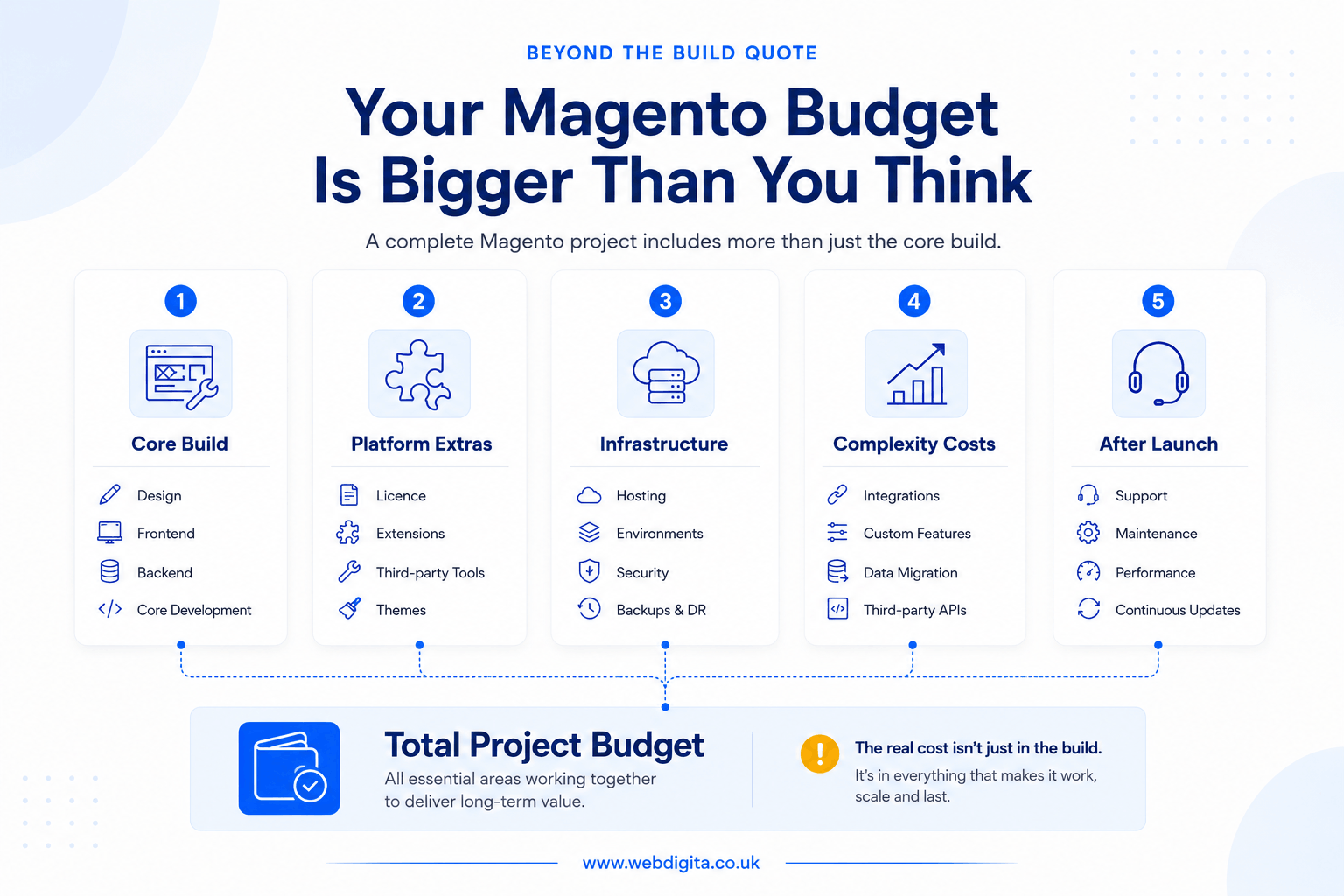
I split Magento project budgets into five layers. The quote usually covers only the first one.
- Core build: design, theme development, backend configuration, payment and shipping setup, testing, and launch support.
- Platform licensing: Magento Open Source carries no licence cost; Adobe Commerce carries an annual fee that should be quoted directly by Adobe or your implementation partner – not buried inside vague platform wording.
- Infrastructure: server environment, Varnish for full-page caching, Redis for session and object cache management, Elasticsearch or OpenSearch for catalogue and layered navigation search, deployment pipeline, monitoring, and staging environments that mirror production.
- Complexity and integration: custom development, ERP or PIM connections, migration from a prior platform, B2B pricing logic, multi-store or multi-currency configuration.
- Post-launch operations: maintenance retainer, security patches, Magento 2 version updates, extension compatibility management, performance engineering.
Proposals tend to cover layer one and nod at layer five. Layers two through four are where most budget surprises live. If the quote in front of you does not explicitly list what is included in each layer – and what is excluded – treat that as incomplete documentation, not a competitive price. Any estimate that feels neat and round without detailed assumptions has had scope simplified rather than properly priced.
What changes Magento development cost the most
Magento does not get expensive because of the platform name at the top of the proposal. It gets expensive when the brief contains complexity that nobody priced properly at the start.
Custom development depth: bespoke checkout flows, account management logic, tiered pricing rules, or catalogue behaviour that does not fit the standard Magento 2 data model all require engineering time that compounds fast. The difference between configuring the platform and extending it is usually measured in weeks, not days. Any quote that does not separate those two activities is not a credible estimate.
Platform edition – Open Source vs Adobe Commerce: this is one of the earliest and largest cost decisions on a Magento project, and one that some agencies make for you without making it explicit. Magento Open Source carries no licence cost but limited B2B functionality out of the box. Adobe Commerce adds company accounts, shared catalogues, purchase approval workflows, and native B2B checkout logic – but carries an annual licence based on Gross Merchandise Value. If your requirements are heavy on trade account management, Adobe Commerce is an architecture decision with a sound commercial rationale. If your requirements are mostly standard direct-to-consumer, the licence adds cost with no corresponding return.
Frontend architecture – Hyva vs PWA Studio: this choice has a larger cost impact than most briefs acknowledge. Hyva is now the standard frontend framework for Magento 2 builds – it delivers substantially better Core Web Vitals performance than the legacy Luma theme and is faster and cheaper to develop against for most project types. PWA Studio and headless GraphQL architectures offer greater flexibility for complex UX requirements but cost significantly more to build and require deeper specialist engineering. If a proposal includes PWA Studio without explaining why, ask the question directly. The answer will tell you whether the choice was made for your requirements or for the agency’s team preferences.
UK Magento agency rate context: senior Magento 2 and Adobe Commerce engineering in the UK reflects genuine specialist scarcity. This is not a platform you staff with general PHP developers and expect production-quality output – the learning curve is steep, the platform quirks are many, and the failure modes on a live store are expensive. A reputable UK agency applies specialist rates across the project: architecture, backend development, Hyva or PWA Studio frontend, integration engineering, and QA. A quote that looks significantly lower than the market without explanation is either based on offshore delivery, optimistic scope assumptions, or both. None of those outcomes is inherently wrong, but you should know which one you are buying before you sign.
Extension selection and dependency risk: more modules do not mean faster delivery or lower cost. I have seen this pattern many times – two extensions appear to cover the same requirement, then their checkout event hooks collide on the first update cycle, and somebody pays later for stability work that should never have been needed. The extension count on a proposal is an inverse indicator of architecture quality in my experience. More modules typically means requirements being met by a search-and-install approach rather than clean development. That decision costs significantly more across three years of operation than it saves in initial build time.
The buyer scenario where a simple brief gets expensive
Consider a brief that reads cleanly on paper: migrate from Shopify, keep the existing catalogue, add trade pricing, and connect the ERP.
By the time discovery is complete, the project usually looks different. Customer groups need custom pricing logic that does not map cleanly to the ERP’s account structure. The ERP data has attribute consistency issues across product records. Stock rules differ by warehouse and do not follow a single model. Two extensions selected for the trade pricing requirement overlap in their checkout event handling – a detail nobody noticed until integration testing.
That is four separate cost drivers that were not in the original estimate. I see this pattern on the majority of Magento projects that combine ERP, PIM, custom pricing, or migration in the same scope. It is not a planning failure – it is what happens when complexity is real and discovery is treated as optional.
In my experience, any brief containing three or more of these elements – migration, ERP, custom pricing, B2B accounts, bespoke catalogue rules – should go through a proper scoping phase before any number is treated as reliable.
If replatforming is part of the scope, note that eCommerce migration costs add a distinct budget layer to the total Magento project cost. And if the platform decision itself is still open, platform selection costs affect the total budget before build even starts.

Not sure what your Magento project should actually cost?
Most Magento quotes miss the operational costs that appear after the build. We help you separate the core implementation from the wider delivery stack, so you can budget properly before shortlisting agencies or signing anything.
We will walk through your requirements and show you what sits inside and outside the build quote.
Cost driver matrix: project type, complexity and typical UK price range
Use this as a scoping frame, not a price list. The range that applies to your project depends entirely on what is actually inside the brief – not what the project type is called.
WEBDIGITA Magento Cost Driver Matrix: use this to compare project shape, hidden complexity, and the kind of UK budget range that typically follows.
| Project type | Complexity | Typical UK price range | What usually pushes it up |
|---|---|---|---|
| Focused Magento 2 Open Source build | Low to medium | Lower five-figure budget | Custom theme work, non-standard checkout, additional environments |
| Migration from Shopify or WooCommerce | Medium | Mid five-figure budget | Data cleanup, redirect mapping, catalogue edge cases, extension replacement |
| Adobe Commerce build with B2B features | Medium to high | Higher five-figure budget plus licence | Company accounts, custom pricing logic, approval workflows, shared catalogues |
| Integration-heavy Magento or Adobe Commerce project | High | Higher five-figure to low six-figure budget | ERP or PIM data mapping, middleware, testing overhead, ownership gaps between systems |
| Hyva or PWA Studio custom frontend rebuild | High | Varies significantly by scope | GraphQL layer development, headless complexity, performance engineering, refactoring |
Read the table as a starting point for a scope conversation, not a commitment. The assumptions behind any range matter more than the range itself.
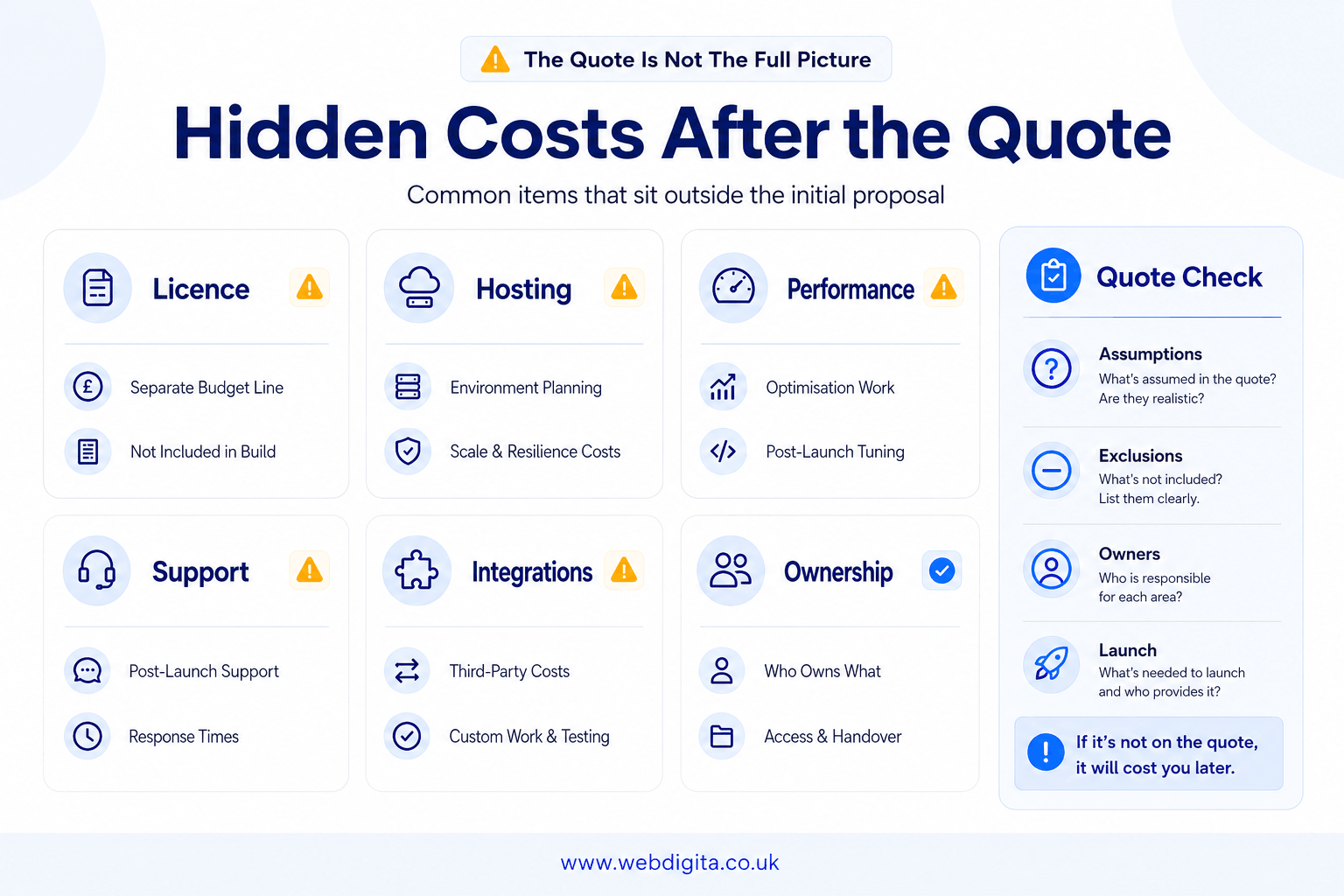
The costs that appear after the quote
This is where weak proposals get exposed. A Magento price can look reasonable until you account for the operational costs that were always going to exist.
Adobe Commerce licence: Adobe Commerce is not Magento Open Source with extra modules bolted on. It is a separately licensed enterprise platform with an annual cost tied to Gross Merchandise Value. That figure should appear as a distinct budget line – confirmed directly with Adobe Commerce or a licensed implementation partner, not embedded inside vague “platform fees” wording. I have reviewed proposals from agencies that refer only to “Magento” without specifying which edition. That ambiguity becomes expensive when the licence invoice arrives.
Hosting and infrastructure: Magento 2 is a resource-intensive platform and its infrastructure requirements are not negotiable. A production-ready environment requires Varnish for full-page caching, Redis for session management and object cache, Elasticsearch or OpenSearch for layered navigation and catalogue search, a CDN, and staging environments that mirror production properly. Magento Cloud is Adobe’s managed hosting solution and handles most of this out of the box – but carries its own usage-based cost. Self-managed cloud hosting on AWS, GCP, or similar gives more control but requires active DevOps investment for configuration, monitoring, and incident response. I have reviewed proposals that quote development to launch without specifying the hosting architecture at all. When I see that, my first question is: what does the production environment actually look like, and who is responsible for it when something breaks on a peak trading day?
Extension compatibility and update cost: the purchase price of an extension is not the real cost. A typical Magento project uses between five and fifteen extensions. Each one adds a dependency layer. Every Magento security patch or version update – and Magento 2 ships them regularly – requires every extension to be tested for compatibility and updated where needed. The cost of an extension conflict on a live store is not a theoretical risk. A poorly timed update that breaks modified checkout logic or catalogue rules can cause revenue loss that dwarfs the extension cost several times over. This is an operations cost that belongs in the project budget from the start, not a line item that surfaces during year two’s first incident.
Ongoing maintenance and support retainer: post-launch support is not optional for a commercially important Magento store. Magento 2 has a regular security update schedule. Adobe Commerce has a structured release calendar. A support retainer covers update management, security patching, bug resolution, environment monitoring, and agreed response SLAs. Ask specifically what the post-launch warranty covers, when it expires, and what the retainer structure looks like after that. The conversation is easier to have before you go live than during your first production incident. For the scope of what ongoing support typically involves, checkout eCommerce maintenance services.
Performance engineering as a separate engagement: Magento 2 performance at scale is a specialist discipline, not a configuration task. Real page speed on a high-traffic Magento store requires correct Varnish purge logic, Redis tuning for concurrent session management, Elasticsearch index optimisation, image delivery configuration, JavaScript deferral, third-party script audit, and database query profiling under realistic load. If the proposal includes “performance optimisation” as a two-line item, it is describing post-launch cleanup, not engineering. For stores with significant catalogue depth, high concurrent traffic, or complex layered navigation, performance engineering is a standalone engagement with its own scope. I would not assume it is included unless the proposal specifies measurable performance targets and states how they will be tested.
Fixed price vs time and materials for Magento development
This is a question I get regularly, and the answer is more practical than most agencies make it sound.
Fixed-price contracts work when scope is genuinely complete before signing: a known catalogue structure, integrations with documented and stable APIs, no legacy data problems, and no unresolved business rules. When all of that holds, a fixed-price agreement gives you a cost ceiling and holds the agency accountable to what was agreed.
Time and materials is the more honest model when scope contains real uncertainty: an ERP with undocumented field mappings, a migration from a platform with inconsistent data quality, custom B2B workflows that require business rule clarification during build, or a brief that is still being defined. In those situations, a fixed-price contract does not protect you from cost growth. It gives the agency a contractual justification to deprioritise unspecified work or raise change orders for every ambiguity the brief contains.
My honest view: most Magento projects of meaningful size do not have scope that is clean enough for a fully fixed-price contract to hold in practice. The model that produces better outcomes is a fixed-cost discovery phase that generates a properly scoped and costed project plan, followed by a fixed-price build based on that output. This separates the thinking cost from the build cost and makes the fixed-price number something both parties can actually defend.
Whichever model applies, confirm the change request process in writing before signing. Its absence from a contract is a risk indicator, not an administrative detail.
Before you sign anything, use this as a scope filter:
- Ask which costs are outside the build quote but required for a production launch.
- Confirm whether extension fees, hosting, and Adobe Commerce licensing appear as separate budget lines.
- Ask who owns integration testing for ERP, PIM, payment, and fulfilment connections.
- Establish whether performance engineering is in the build scope or a separate post-launch engagement.
- Ask what post-launch support covers, when the warranty expires, and what the retainer structure looks like after that.
- Confirm whether the project is fixed-price or time and materials, and if fixed-price, ask for the change request process in writing.
- Do not accept vague exclusions. Named assumptions, named owners, named boundaries – in writing.
A good Magento proposal makes the expensive parts visible. If the one you are reviewing does not, the price is not competitive. It is incomplete.
Questions buyers ask before budgeting Magento development
Common questions about Magento project costs, scope boundaries, and what sits outside the core build quote.
1. What does Magento development cost in the UK for a standard build?
For a tightly scoped Magento build handled by a serious UK agency, you are usually looking at a lower five-figure budget. That typically covers design, frontend and backend development, configuration, testing, and launch. Cost moves higher once you add migration, integrations, Adobe Commerce licensing, B2B features, or heavy custom development. The useful number is not the build quote alone but the full project budget including hosting, extensions, support, and the operational costs that make the store work properly after launch.
2. What is the difference between Magento Open Source and Adobe Commerce cost?
Magento Open Source is free to download and use, so your cost is implementation, hosting, and support. Adobe Commerce adds a separate licence fee, which is a distinct budget line and should be confirmed directly with Adobe or your implementation partner. Adobe Commerce also includes B2B features, advanced permissions, and enterprise support, but the licence cost is significant and should never be buried inside vague platform wording in a proposal.
3. Why do Magento quotes often exclude hosting and infrastructure?
Many agencies separate build from infrastructure because hosting requirements vary widely depending on traffic, catalogue size, and performance expectations. Magento needs proper caching, search, deployment workflow, backups, monitoring, and security. Some proposals exclude hosting to keep the build quote clean, but that leaves you comparing incomplete budgets. Always ask what hosting setup is recommended, who manages it, and whether infrastructure cost is included or treated as a separate engagement.
4. What makes integration-heavy Magento projects more expensive?
ERP, PIM, payment, and fulfilment integrations add cost because they require data mapping, middleware, testing, and ongoing ownership when systems update or fail. The expensive part is not the connection itself but the edge cases, data quality issues, and responsibility gaps between platforms. If your brief includes integration, expect more discovery, more testing overhead, and clearer ownership boundaries than a standard Magento build would need.
5. How much should I budget for Magento support after launch?
Post-launch support depends on store complexity, update frequency, and how much technical ownership you want in-house. A modest monthly support retainer typically covers updates, bug fixing, and basic performance monitoring. More complex stores with integrations, custom features, or high traffic usually need a larger retainer or dedicated support resource. Ask what sits inside warranty, what moves into retainer, and what would fall under separate engagement scope if performance or stability work is needed.
6. Does migrating to Magento from Shopify or WooCommerce add significant cost?
Yes. Migration adds data cleanup, redirect mapping, catalogue edge cases, extension replacement, and testing overhead. The cost depends on how clean your existing data is, how many custom features need rebuilding, and whether your current platform uses logic that Magento handles differently. Migration is rarely a straight lift. Budget for discovery, data quality work, and testing time beyond the core Magento build estimate.
7. What should I ask before accepting a Magento development quote?
Ask which costs are outside the build quote but still required for launch. Check whether extension fees, hosting, and Adobe Commerce licensing are shown separately. Ask who owns ERP, PIM, payment, and fulfilment integration testing. Check whether performance work is included or treated as a later engagement. Ask what support looks like after launch, including update responsibility and response times. Do not accept vague exclusions. You need named assumptions, named owners, and named boundaries.
Conclusion
A credible Magento budget should make the awkward parts visible before you commit, not after the build starts and the expensive decisions have already been locked in.
- Separate core build from operational reality. Hosting, licensing, integrations, and support are not optional extras. If they are missing from the proposal, the price is incomplete, not competitive.
- Pressure-test assumptions before shortlisting. Ask which costs are excluded, who owns third-party integration testing, and what happens when performance work or extension conflicts appear after launch.
- Treat vague exclusions as commercial risk. A good Magento quote names assumptions, names owners, and names boundaries. If the proposal feels neat and low without clear scope limits, you are probably looking at the first invoice, not the full project cost.
- Budget for the platform you are actually building. If the brief includes ERP, PIM, custom pricing, or migration, expect more discovery, more testing, and more edge cases than a standard Magento implementation would require.
Ready to scope a Magento project that covers the full delivery stack?
WEBDIGITA builds Magento and Adobe Commerce stores for UK businesses that need proper architecture, integration planning, and post-launch support. We help you separate the build from the operational costs, so the budget makes sense before the project starts.
See our eCommerce development servicesOr start with