Key Takeaways
The framework you choose should match your operational reality, not a simplified demo. Most failures happen when rendering strategy, catalogue volatility, and integration load are treated as later problems rather than scoping decisions.
- Next.js is the safest default for most serious eCommerce builds because it handles mixed rendering, SEO control, and dynamic data better than alternatives when scale and integrations matter.
- Gatsby struggles with volatility once product data, stock, or pricing changes frequently, making it better suited to content-led builds with stable catalogues.
- Nuxt.js makes sense only when Vue is already central to your wider stack and your team can maintain it properly, not when you simply want an alternative name.
- Rendering decisions drive performance more than the framework label, especially on category pages, search results, and mobile checkout where Core Web Vitals problems actually appear.
- Weak recommendations sound vague and focus on speed or modernity rather than how the stack will handle ERP sync, checkout boundaries, B2B rules, and load under real traffic.
If the framework choice came before the requirements were clear, that is the real risk. Tighten the architecture, integration map, and delivery assumptions before committing to build.
The most common technical decision most buyers skip in scoping is the one that delays launch. Most framework mistakes happen before a line of code is written. Someone picks the front end because a demo looked quick, a developer likes the stack, or the scoping call stayed conveniently vague. Then the real constraints arrive: ERP sync, stock volatility, faceted search, checkout rules, B2B pricing, and product pages that need to rank without falling apart under real traffic.
For most serious headless ecommerce development projects, start with Next.js and make someone prove why you should not. It handles mixed rendering strategies well, gives you strong control over SEO-critical page output, and copes when your storefront is more than a marketing site with a basket attached. Gatsby is usually the wrong fit once catalogue data changes often or integrations get complex. Nuxt.js makes sense when you have a real Vue requirement and a team that can support it properly – not when you want an alternative name on the slide.
This guide is for founders, eCommerce managers, and technical leads comparing framework options before scoping a headless build or challenging an agency recommendation.
Which front-end framework fits most eCommerce projects?
Start with Next.js and make someone prove why you should not. It handles mixed rendering strategies well, gives you strong control over SEO-critical page output, and copes better when your storefront is more than a marketing site with a basket attached.
You should be wary of Gatsby if your catalogue changes often, stock moves throughout the day, or your product data depends on multiple systems. Gatsby can look fast in a tidy demo, but the failure mode appears later – when rebuild logic, preview workflows, and operational overhead start fighting the business. I have seen this play out on builds where the visible brief focused on design and page speed, but the real risk sat in headless commerce API latency, inventory sync, and how product state moved between systems.
- Next.js: best default for most serious eCommerce builds, especially where SEO, dynamic data, and scale all matter. Handles Shopify Storefront API, headless WooCommerce, and custom commerce backends reliably under real load.
- Gatsby: better suited to content-led builds with relatively stable data. Not the right call for integration-heavy commerce or catalogues that change intraday.
- Nuxt.js: a valid choice if your wider product stack is already Vue-led and your team can maintain it. Not a reasonable default if you are starting from scratch.
Do not ask which framework is fastest in isolation. Ask which one still behaves well when Shopify, WooCommerce, or Magento data is live, when filters are dynamic, when promotions are running, and when checkout has edge cases nobody wrote down in the brief. That is the real commercial test.
The wrong framework rarely fails in the pitch. It fails six months later as rework, slower delivery, and technical debt nobody priced.
What actually drives speed and SEO in a headless storefront
The framework name is not the performance strategy. Every agency that leads with “Next.js is fast” is describing a capability, not a decision. What actually determines whether your headless storefront performs under real conditions is a set of choices that need to be made and tested – not assumed.
Here is where headless eCommerce builds actually break:
- Rendering model mismatch: SSG works for stable content. But product pages with live stock, personalised pricing, or B2B-specific visibility rules need SSR or ISR, and ISR has staleness windows that bite you when a promotion goes live or stock drops to zero. If nobody has defined which pages use which rendering strategy and why, you have a problem waiting to happen.
- Cold start latency on SSR: serverless SSR deployments (common on Vercel and Netlify) have cold start penalties that show up directly on Time to First Byte. On category pages and product detail pages – exactly where Core Web Vitals are measured – this matters. Warm instance configuration and edge caching need to be part of the architecture conversation, not an afterthought.
- ERP and PIM integration latency: when product data comes from an ERP via a scheduled sync, stale data is a structural risk, not a monitoring problem. I have seen builds where the storefront was technically fast, but prices and stock were consistently 15 minutes behind reality. That is an operational failure, not a framework failure – but it starts with assumptions nobody challenged in scoping.
- Image pipeline and LCP: Largest Contentful Paint problems on product pages are almost always image handling failures. Next.js’s Image component helps if it is used correctly, but the gains disappear fast if your PIM is serving unoptimised originals or if the CDN configuration is wrong.
- Script and third-party load: analytics, loyalty, live chat, A/B testing tools – every third-party script is a CWV liability if it is not deferred, sandboxed, or loaded conditionally. Checkout optimisation requires controlling which scripts fire and when, across every step of the funnel.
Core Web Vitals problems almost always show up on category pages, search results, product pages, and mobile checkout – not on the homepage screenshot everyone likes sharing. If you are hearing broad claims about speed, ask how the team will handle dynamic content, metadata, structured output, and crawlable page generation across the full catalogue under real traffic.
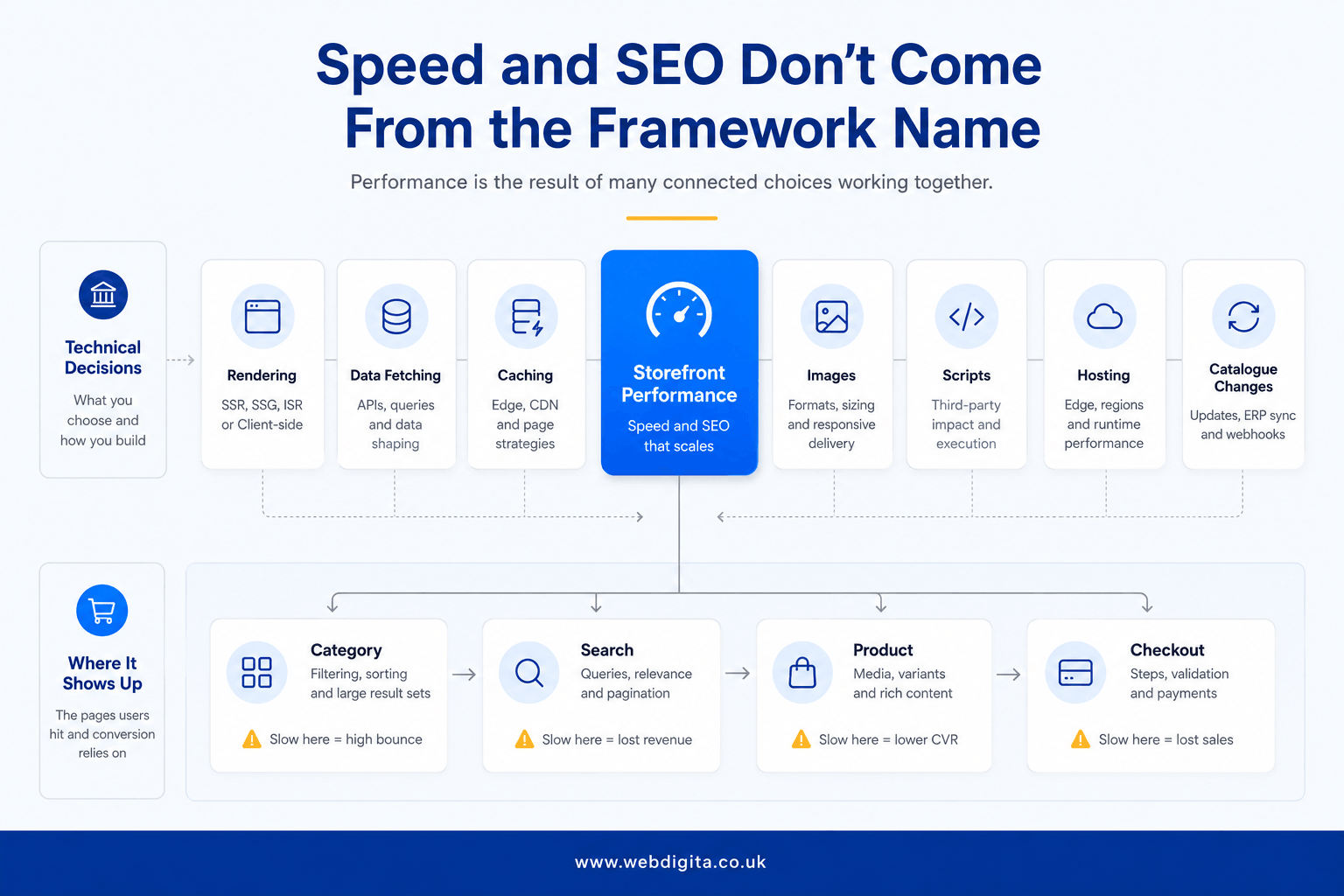
If you want to avoid these problems, the eCommerce development conversation needs to get into rendering decisions, integration failure modes, and hosting architecture before build starts – not during it.
The project requirements that should decide the framework before build starts
Most bad framework decisions are really bad discovery decisions. Define the operational requirements first, then choose the front end that can survive them. If the recommendation came before the requirements, push back on that.
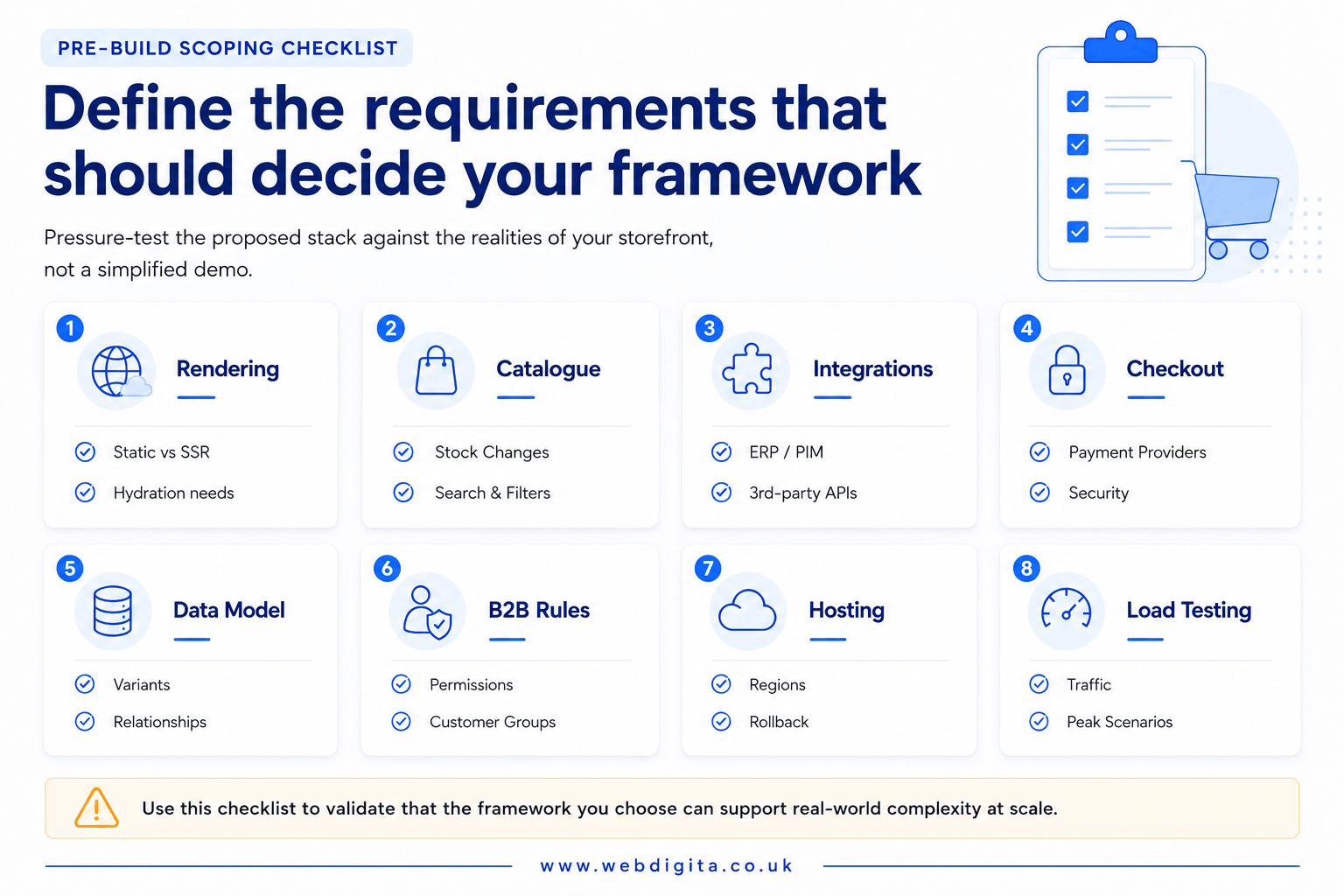
WEBDIGITA Headless Framework Checklist: use this to pressure-test whether the proposed stack fits your actual storefront, not a simplified version of it.
- Rendering needs: which pages must be static, server-rendered, or hybrid, and who owns that decision?
- Catalogue volatility: how often do products, prices, stock, and promotional content change?
- Integration load: what depends on ERP, PIM, loyalty, analytics, search, or inventory systems?
- Checkout boundary: where does the front end touch payment, customer state, validation, or sensitive flows?
- Product data model: are variants, bundles, kits, or complex B2B eCommerce attributes already defined properly?
- B2B rules: do you need customer-specific pricing, permissions, account hierarchies, or quote flows?
- Hosting approach: who owns deployment, caching, observability, and rollback?
- Load testing: what will be tested, when, and against which traffic and catalogue conditions?
If even half of that list is vague, the framework choice is not ready. You should also ask who owns integration assumptions – front-end teams often inherit backend ambiguity and then get blamed for delays. For a deeper view on dependency planning, see planning eCommerce integrations before development starts.
When these answers are unclear, a project discovery workshop is usually more valuable than another round of framework opinions. It is cheaper to challenge assumptions here than after build starts.
Related: headless eCommerce development cost in the UK.

Not sure if your framework choice fits the real storefront?
We help technical leads and founders map rendering decisions, integration dependencies, and checkout boundaries before build starts. If your scoping feels vague or the recommendation came before the requirements, we can help you pressure-test the stack properly.
Quick diagnostic call. No sales pitch. Just clarity on what fits.
How to pressure-test the recommendation before you commit
A strong framework recommendation should sound specific. It should reference rendering decisions, integration failure modes, checkout boundaries, hosting, and maintainability. If you are only hearing that a framework is modern, fast, or good for SEO, treat that as a warning sign.
You need to know how the team will handle scale, not only launch. Ask what happens when traffic spikes, when the ERP is late, when product data is incomplete, or when B2B pricing logic collides with promotional rules. Weak recommendations fall apart where ownership is fuzzy.
Questions worth asking in scoping
- How will you decide which pages are static, server-rendered, or hybrid – and who makes that call when requirements change?
- What breaks first if ERP or PIM data is delayed, malformed, or out of sync?
- How will headless commerce API responses be cached, and what invalidates the cache when a product changes?
- How will search, filtering, and product pages perform under load – not only on demo content with 200 SKUs?
- Who owns checkout security boundaries and third-party script control?
- What is the load testing approach before launch, and what does pass look like?
- How will the stack stay maintainable when requirements change after launch?
If you are reviewing a WooCommerce headless build in particular, ask even harder questions about plugin behaviour under a decoupled architecture, REST or GraphQL boundary ownership, and operational maintainability. That is often where apparently modest builds become expensive – which is why a deep technical discussion with a WooCommerce development agency is always better that a framework-first guesswork.
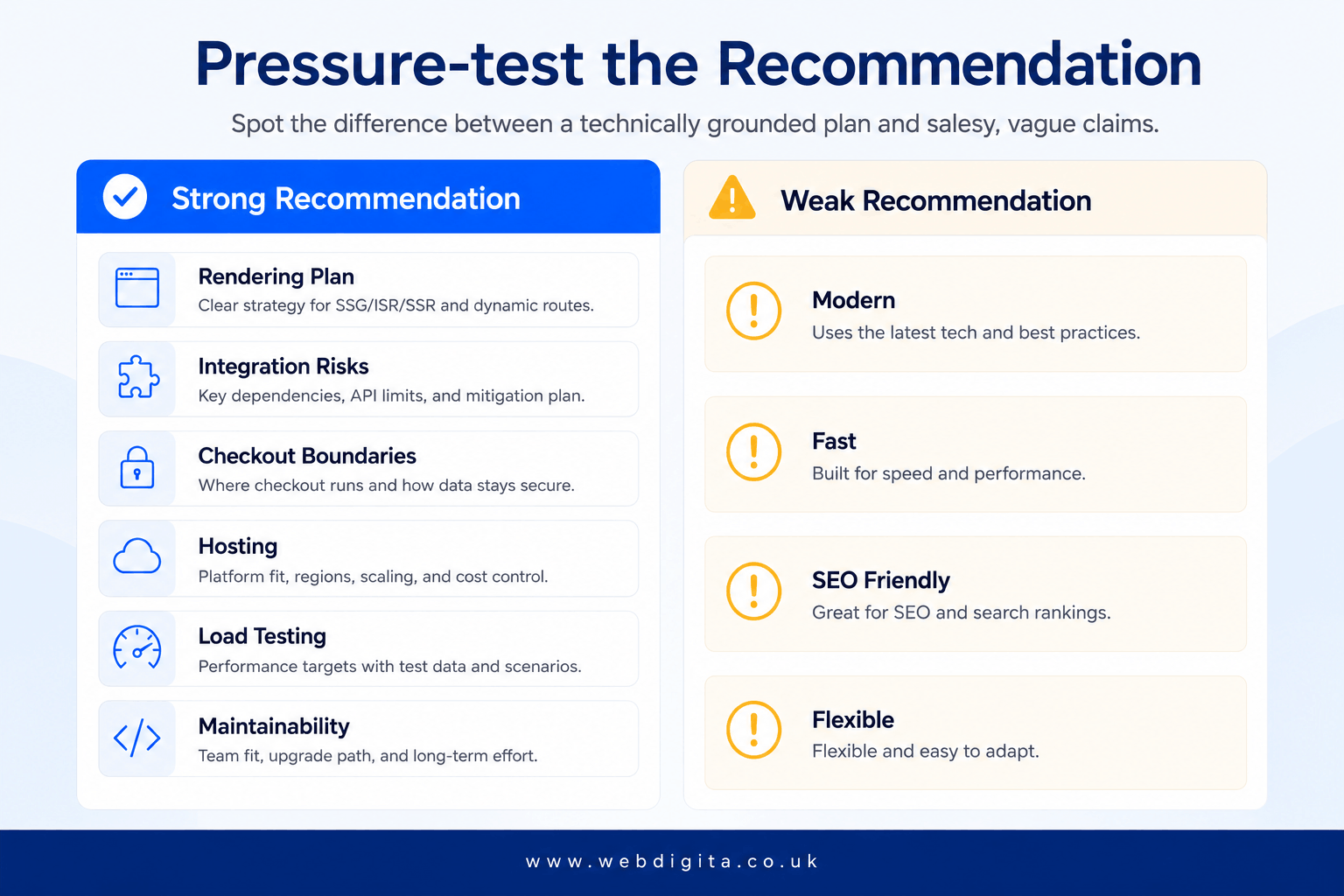
If the answers stay vague, your brief is still too soft. The safer next move is not to keep debating Next.js versus Gatsby versus Nuxt.js. It is to tighten the architecture, integration map, and delivery assumptions before somebody turns uncertainty into a quote.
Questions teams ask before choosing a headless eCommerce framework
Common concerns about Next.js, Gatsby, and Nuxt.js in real eCommerce builds
1. Why is Next.js usually the better choice for eCommerce over Gatsby?
Next.js handles mixed rendering strategies better, giving you control over which pages are static, server-rendered, or hybrid. This matters when your catalogue changes often, stock moves throughout the day, or product data depends on multiple systems. Gatsby can look fast in demos, but struggles with volatility because it relies on build-time generation. Next.js copes better when your storefront is more than a marketing site with a basket attached, especially where SEO, dynamic data, and scale all matter at once.
2. When does Gatsby actually make sense for an eCommerce build?
Gatsby works better for content-led builds with relatively stable catalogues, where product data does not change frequently and integrations are minimal. If your catalogue is small, updates are infrequent, and the storefront is closer to a brochure with checkout than a full commerce operation, Gatsby can deliver fast page loads without the operational overhead. But once stock, pricing, or promotional content changes often, the rebuild logic and preview workflows start fighting the business rather than supporting it.
3. Should I choose Nuxt.js if my team prefers Vue over React?
Only if your wider product stack is already Vue-led and your team can maintain it properly. Nuxt.js is a valid choice when Vue is central to your existing architecture and you have the internal capability to support it long-term. But do not pick Nuxt.js simply because you want an alternative name on the slide or because one developer prefers the syntax. The framework needs to fit your operational requirements, not just developer preference, especially when scale, SEO, and integrations all matter.
4. How do I know if the framework recommendation is actually based on my requirements?
A strong recommendation should reference rendering decisions, integration failure modes, checkout boundaries, hosting approach, and maintainability. If you are only hearing that a framework is modern, fast, or good for SEO, treat that as a warning sign. Ask how the team will handle scale when traffic spikes, when the ERP is late, when product data is incomplete, or when B2B logic collides with promotional rules. Weak recommendations fall apart where ownership is fuzzy.
5. What happens if I choose the wrong framework for my eCommerce build?
The wrong framework rarely fails in the pitch. It fails six months later as rework, slower delivery, and technical debt nobody priced properly. You will see problems on category pages, search results, product pages, and mobile checkout where Core Web Vitals issues appear under real traffic. Common failure modes include stale data, awkward rebuild logic, pages that are technically live but operationally unreliable, and integration patterns that do not scale when catalogue volatility or system dependencies increase.
6. Does the framework choice affect how quickly my eCommerce site loads?
The framework name is not the performance strategy. Speed comes from rendering choices, data-fetching patterns, caching, image handling, script control, and hosting setup. You need to check those decisions early because they decide whether the storefront stays stable under real traffic. A fast demo does not mean the stack will perform well when search, filtering, promotions, product updates, and checkout journeys are all live at once. That is the real commercial test.
7. Can I switch frameworks later if the first choice does not work out?
Technically yes, but it is expensive, disruptive, and usually avoidable if you scope properly upfront. Switching frameworks means rebuilding the front end, retesting integrations, revalidating SEO output, and redeploying hosting infrastructure. It also means explaining the delay and cost to stakeholders. The safer approach is to define operational requirements first, then choose the framework that can survive them, rather than picking a stack based on a simplified demo and hoping it scales.
Conclusion
The framework decision should follow discovery, not replace it. If you are still debating Next.js versus Gatsby versus Nuxt.js without clear answers on rendering strategy, catalogue volatility, integration load, and checkout boundaries, the scoping is not ready yet.
A strong recommendation should reference specific operational constraints and failure modes, not just claim a framework is modern, fast, or good for SEO.
Ask how the stack will behave when traffic spikes, when the ERP is late, when product data is incomplete, or when B2B logic collides with promotional rules. If those answers stay vague, the safer move is to tighten the brief rather than turn uncertainty into a quote. The wrong framework rarely fails in the pitch. It fails six months later as rework, slower delivery, and technical debt nobody priced properly.
Need help scoping a headless eCommerce build that survives real catalogue changes and integration pressure?
We work with technical leads and founders to define rendering strategy, integration boundaries, checkout security, and hosting assumptions before the framework decision locks in. If you need a second opinion on the stack or want to tighten the brief before approaching other agencies, we can help.
See our eCommerce development approachOr if you prefer to talk first,