Key Takeaways
- Do not judge by appearance alone: an ageing storefront is not the real issue if the underlying architecture still supports clean releases, stable integrations, and straightforward merchandising changes.
- Repeated workarounds are a cost signal: when routine updates trigger plugin conflicts, QA overhead, manual checks, or support noise, you are no longer just maintaining the site; you are funding technical debt.
- Use a threshold test, not a platform debate: if problems sit in a few templates or steps, improvement is often the better commercial move; if change keeps exposing hidden dependencies, the stack is resisting growth.
- Check operational drag as seriously as UX: brittle stock sync, payment behaviour, fulfilment issues, and unreliable data flows can make a rebuild more rational than another round of front-end fixes.
- Budget for waste, not just project cost: phased improvements can look safer, but if every release carries extra contingency and rework, the cheaper option on paper may be the more expensive one in practice.
Rebuilding too early wastes money. Rebuilding too late means you keep funding a platform that is quietly slowing growth – and that cost compounds in ways that rarely show up clearly on a single budget line.
The short answer: Rebuild when your current stack – whether Shopify, WooCommerce, or Magento – blocks meaningful change across checkout UX, CMS integration, payment gateways, or inventory sync, and every fix exposes new dependencies. Keep improving when the architecture is stable and problems are isolated to specific templates or workflows. The decision is not about how old the site looks. It is about whether your problems are local or structural.
Most rebuild conversations start when the site has already been patched into a corner. Checkout changes need workarounds, plugins or apps are doing jobs the platform should handle natively, integrations break when one vendor changes a field, and basic merchandising requires too many manual steps. At that point, incremental improvement can look cheaper on paper while quietly draining margin through rework, QA, support tickets, and delayed releases.
This guide is for founders, eCommerce managers, and growth teams comparing rebuild and improvement options before budgeting, scoping, or shortlisting support.
When incremental improvement is still the smarter move
If the core architecture is stable, a rebuild is often the wrong first move. Look for problems that are concentrated rather than systemic: a weak product template, a clumsy mobile menu, a slow collection page, or a checkout step that can be improved without touching fulfilment, payment gateways, or reporting.
If your CMS integration still supports merchandising cleanly, integrations behave predictably, and releases can be scoped without detective work, improvement is usually the better commercial call. Targeted UX work, performance fixes, and selective development can remove friction faster than a full rebuild. The key question is whether the pain sits in a few templates or in the underlying architecture.
The pattern we see across audits is telling. Some sites look rough on the surface, but selective remediation consistently beats a rebuild because the foundations are sound – integrations are stable, checkout logic is clean, and custom work is contained. Others show the opposite: every fix exposes another dependency, and no amount of incremental work changes the underlying structural problem. That is the line you need to find before you budget anything.
If you need outside technical judgement early, a eCommerce website development company should be able to tell you what is fixable, what is structural, and what should not be touched without wider discovery.
The signs you are paying to preserve a bad foundation
This is where many brands lose time. The site still works, orders still go through, and the team keeps shipping patches – so it feels safer to keep improving. But if each release uncovers another edge case, another plugin conflict, or another manual workaround, you are not improving the store. You are subsidising technical debt.
Watch the dependency sprawl: if key journeys rely on too many apps, plugins, theme overrides, or fragile custom patches, maintainability is already slipping. Repeated breakage after routine platform updates is a structural warning, not normal behaviour. On Shopify, checkout customisation is constrained by what the platform tier permits; on WooCommerce, plugin conflicts are the most common trigger; on Magento, the overhead typically comes from version lag and custom module fragility.
Check where growth gets blocked: if checkout UX cannot be changed cleanly, promotions are constrained by the content model, or product and category pages fight basic merchandising logic, CRO work alone will not rescue the situation. In my experience reviewing rebuild cases for growth-stage brands, the single most common mistake is treating a structural blocker as a UX problem and throwing conversion spend at it. The blocker does not move.
Look at operational drag: payment gateways, inventory sync, CMS integration, and vendor feeds should not need constant babysitting. A typical pattern is a store where one inventory sync failure cascades into manual order checks, customer service noise, and delayed campaign launches – because nobody trusts the data flow any more. That overhead is a structural cost, not an operational quirk.
If your team cannot scope a change without first untangling hidden dependencies, assume the architecture is now part of the commercial problem.
A quick decision tree for improve vs rebuild
You do not need a dramatic platform debate to make this call. You need a threshold test. Use the table below to decide whether the issue is local and fixable, or whether the stack is now resisting change across UX, tech, operations, and growth.
WEBDIGITA Rebuild Decision Matrix: use this to separate isolated friction from structural failure before you commit budget to either phased improvement or a full rebuild.
| Trigger area | Improvement territory | Rebuild territory | Likely direction |
|---|---|---|---|
| UX and checkout | Friction sits in a few templates or steps and can be changed without breaking core logic | Checkout rules, theme structure, or platform limits stop meaningful UX change | Improve if fixes are isolated; rebuild if UX is blocked by architecture |
| Technical architecture | Codebase is understandable, updates are manageable, and custom work is contained | Plugin or app sprawl, brittle patches, and undocumented dependencies create release risk | Improve if maintainability is intact; rebuild if debt compounds with every change |
| Operational burden | Integrations are stable and day-to-day trading does not rely on manual intervention | Stock, payment, fulfilment, or CMS workflows break often or need repeated manual fixes | Improve if operations are stable; rebuild if the store creates ongoing overhead |
| Growth constraints | The stack can still support new content, campaigns, testing, and channel expansion | New initiatives stall because the platform, data model, or release process cannot support them | Improve if growth work ships cleanly; rebuild if the stack is now the bottleneck |

Not sure if your store needs fixes or a rebuild
We can assess whether the real issue is isolated UX friction, technical debt, or a stack that now resists change across checkout, integrations, and operations.
Practical input before you commit budget
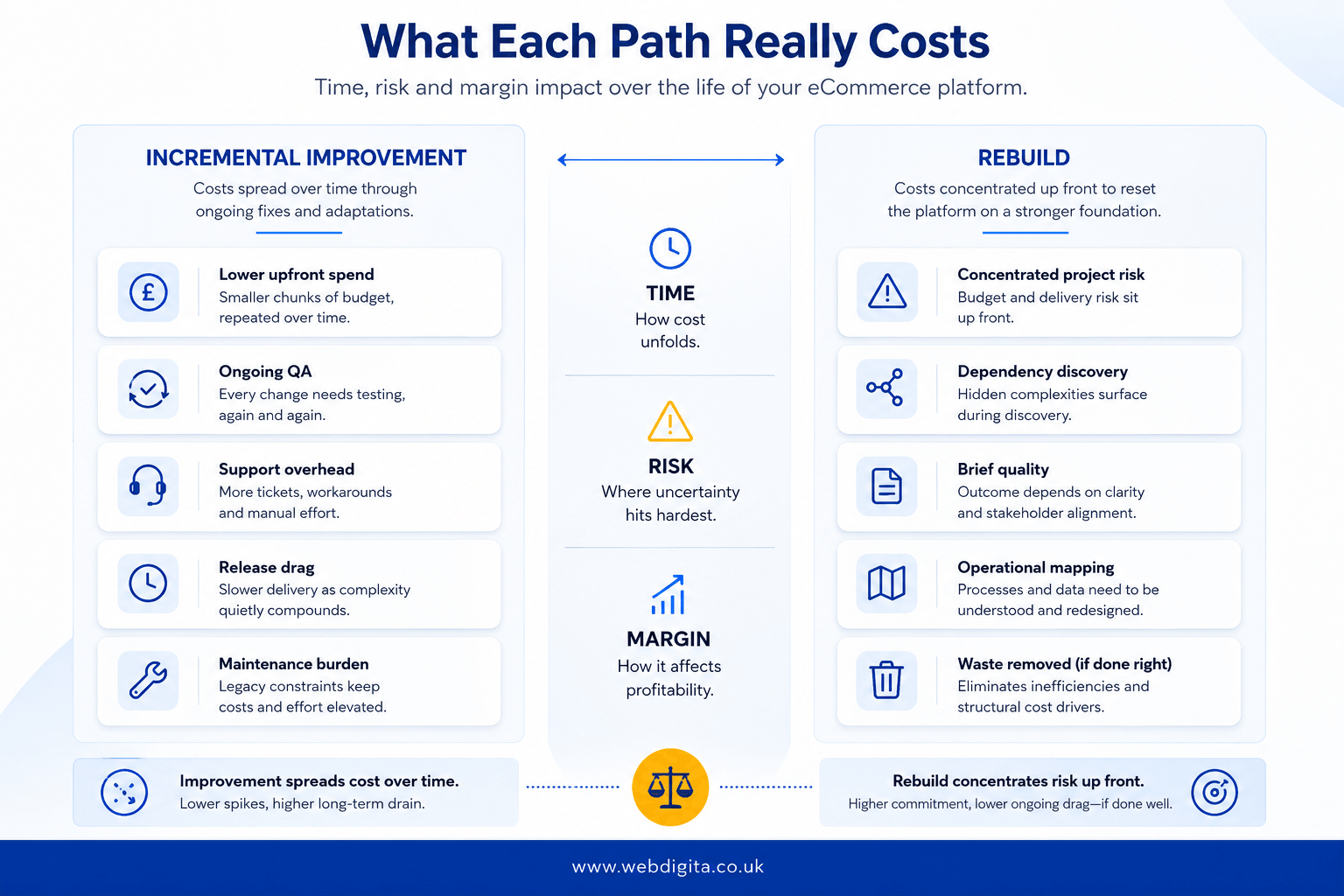
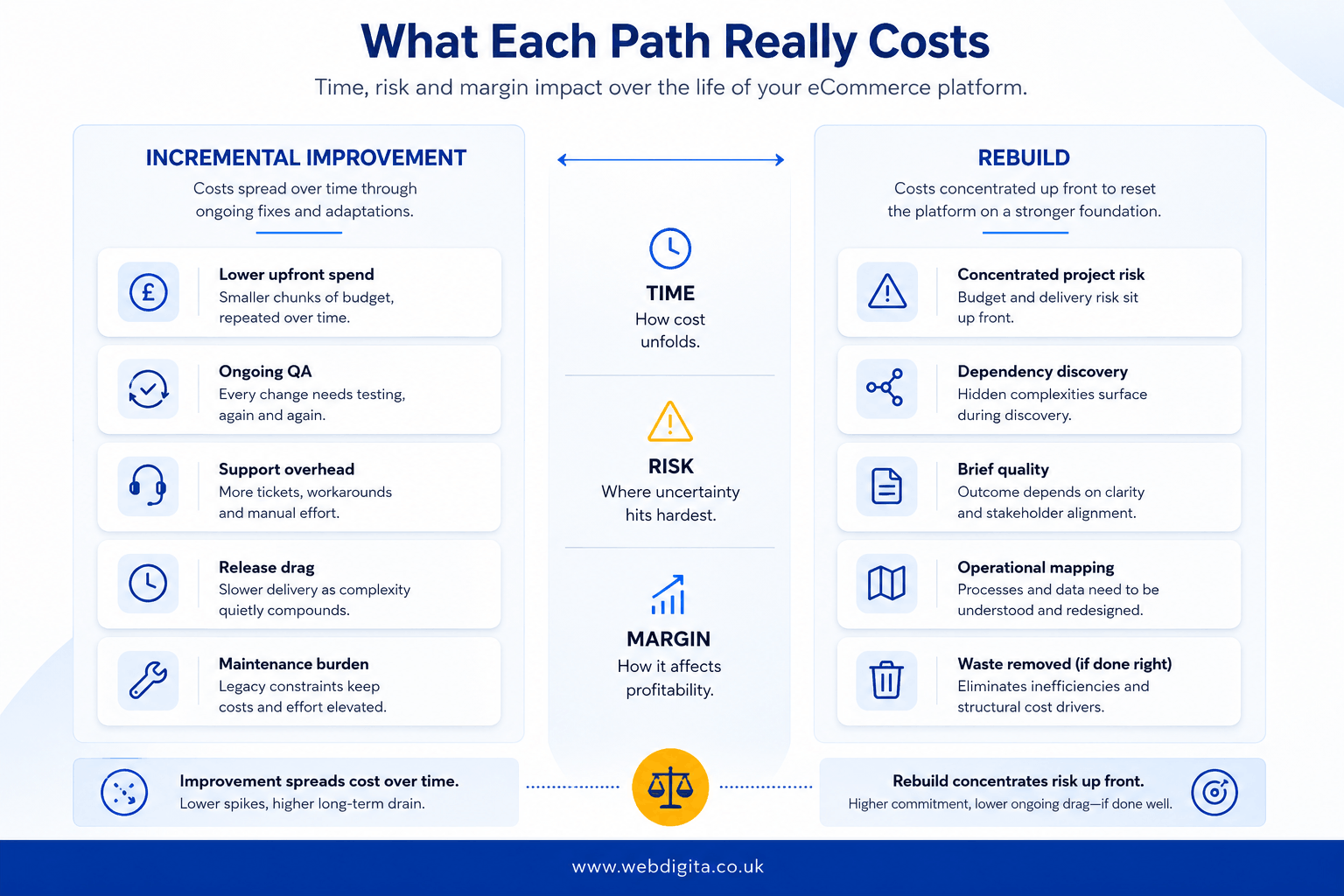
What each path really costs in time, risk, and margin
The cost comparison between improving and rebuilding is rarely what the initial numbers suggest. Here is where each path actually bleeds budget.
The hidden cost of staying on a brittle stack: Incremental improvement spreads spend over time, which is why it feels manageable. But on a stack where every release carries extra QA, extra contingency, and additional support overhead, the long-tail cost accumulates fast. Factor in delayed campaign launches, stalled CRO work, integration failures, and the developer hours spent on dependency untangling rather than shipping new capability. That is operational drag with a direct margin impact – it just does not appear on a single budget line.
Where the rebuild cost concentrates: A rebuild concentrates risk in the discovery and build phase. The failure mode is almost always the same: a weak brief that underestimates integration complexity. The real cost is rarely in design or frontend. It sits in checkout logic, tax rules, inventory sync, payment gateway edge cases, and exception handling that only becomes visible during QA. Teams that talk about visual design before they have mapped these dependencies routinely underestimate the build by a significant margin.
The headless commerce question: Some brands use a rebuild as the moment to move to a headless commerce architecture – decoupling the frontend from the commerce engine to gain checkout UX flexibility and CMS independence. That adds real capability but also adds integration overhead and ongoing maintenance complexity. It is the right call for some stacks, the wrong call for others. Do not let a vendor default you into it before you have tested whether your current architecture genuinely cannot be extended.
The ongoing support cost: Whether you improve or rebuild, ask what level of Website maintenance agency is needed to keep releases safe and integrations stable. If maintenance is simply absorbing technical debt rather than reducing it, that is a signal the current path has a ceiling.
If CRO gains keep stalling because the platform resists basic UX or content changes, treat that as a structural cost showing up in your conversion data. Improvement spreads risk over time; a rebuild concentrates it in a defined phase. Your job is to decide which route removes more waste across the next stage of growth.
What to assess before you commit either way
Before you approve a rebuild or keep funding incremental work, force the decision through evidence. You need both technical and commercial reality in the room – otherwise design preference and platform fashion will make the decision for you.
Use this checklist before budgeting or reviewing rebuild scope. If you decide the current WooCommerce or WordPress stack is the problem, a credible London based WooCommerce development agency partner should challenge your assumptions rather than simply agree that a rebuild sounds sensible.
- Check whether architecture issues are isolated or spread across the whole stack.
- Ask whether checkout changes can be shipped cleanly without side effects.
- Review whether payment gateways and inventory sync are stable or rely on manual fixes and workarounds.
- Test whether the CMS integration supports merchandising, promotions, and SEO without awkward patches.
- Measure how long routine releases take, including QA, rollback risk, and support effort.
- Check whether maintenance effort is reducing risk or merely preserving a brittle setup.
- Ask whether the next stage of growth needs capabilities the current stack cannot support cleanly.
If your team can isolate issues and ship fixes cleanly, improvement may still be the right move. If every scoped change starts with dependency untangling, I would treat that as rebuild territory.
And before you commit to either route, it is worth reviewing rebuild scope before signing off on a quote. A proper rebuild assessment should test assumptions first – then tell you whether to remediate, rebuild, or phase the work, instead of guessing expensively.
Common questions about choosing a rebuild or phased improvement
These are the questions teams usually ask when the current store still works, but no longer changes cleanly.
1. How do you know when an ecommerce site needs a rebuild rather than more fixes?
An ecommerce site usually needs a rebuild when change has become structurally hard, not just inconvenient. If checkout updates, merchandising changes, integrations, and routine releases keep exposing hidden dependencies or manual workarounds, the architecture is part of the problem. If issues are isolated to a few templates or journeys, targeted improvement is often still the better call.
2. Is incremental improvement usually the cheaper option?
Incremental improvement is only cheaper if the existing stack can still absorb change efficiently. Spreading spend over time looks safer, but repeated QA, patching, rollback risk, and support overhead can make phased work more expensive than it first appears. The real comparison is not project price alone, but how much waste each route removes.
3. What are the clearest signs of technical debt in an ecommerce store?
The clearest signs are repeated breakage, dependency sprawl, and operational babysitting. If routine updates trigger plugin conflicts, stock sync issues create manual checks, or the team cannot scope a change without detective work first, technical debt is already affecting commercial performance. A store can still take orders and still be too brittle to support growth properly.
4. Can CRO and UX improvements solve the problem without a rebuild?
CRO and UX improvements can solve the problem if the blockers are local rather than structural. If friction sits in a few templates, navigation patterns, or checkout steps, targeted work can deliver value quickly. If the platform, content model, or checkout logic prevents meaningful change, optimisation work will keep stalling because the foundation is fighting it.
5. What should be assessed before approving a rebuild?
A rebuild should be assessed against architecture, integrations, checkout logic, content structure, operational workflows, and release risk. The key is to test whether current problems are isolated or spread across the stack. A sound assessment should tell you what can be remediated, what is genuinely structural, and whether a phased approach makes more sense than a full restart.
Conclusion
A rebuild is justified when the current store cannot absorb change without creating more risk, overhead, and delay than the change itself is worth.
- Pressure-test the brief: before approving a rebuild, make sure checkout logic, integrations, content structure, and operational ownership have been mapped properly rather than assumed.
- Be honest about maintenance: ongoing support is useful when it protects a workable platform, but it is poor value when it only keeps a fragile setup trading for another quarter.
- Separate tactical pain from structural failure: stalled CRO, awkward merchandising, and slow releases matter most when they trace back to architecture rather than isolated execution issues.
- Choose the route that removes waste: the right decision is the one that gives your team a cleaner path to ship, test, and grow without dependency untangling every time a priority changes.
If the stack is blocking growth, rebuild decisions need proper technical review
Our eCommerce development team helps brands separate fixable issues from structural problems, then scope the right route across platform, checkout, integrations, content architecture, and delivery risk.
Explore Our eCommerce development ServicesNeed a second opinion first