Key Takeaways
Shopify Core Web Vitals work is not about polishing one hero page until Lighthouse looks pretty. It is about keeping product templates, collection templates, content rules and third-party dependencies fast across the whole estate as the store changes.
- Theme architecture and data modelling decide whether performance scales. Lean Liquid, controlled metafield logic and consistent product templates prevent catalogue growth from breaking speed.
- Apps and third-party scripts are usually the real performance risk. One badly behaved app can do more damage than five well-contained ones, so test what each app injects, when it loads and whether the dependency is worth the trade-off.
- Checkout performance should be handled without false promises. You can influence clean checkout extensibility choices, restrained tracking and a faster path into checkout, but you cannot fully re-engineer platform-controlled behaviour.
- Define the rules before build starts, not after the first score drop. Lock theme standards, app approval rules, metafield models, media rules and integration methods early to avoid performance debt later.
Ask any Shopify agency to draw a clear line between what they control directly – theme architecture, Liquid output, media handling, metafields and app loading behaviour – and what sits inside Shopify checkout constraints they can influence but not rewrite. If they cannot make that distinction without hesitation, they do not have a Core Web Vitals strategy. They have a pitch.
I have seen this pattern enough times for it to feel predictable. A store launches with acceptable Lighthouse scores. Over the following months it fills with app scripts, heavier media, metafield logic nobody documented and tracking tags added by three different people. Eventually checkout gets blamed because it is the visible part. The real damage happened on product pages, one rushed decision at a time.
A credible strategy treats Core Web Vitals as a governed build standard, not a one-off speed exercise. If you are evaluating Shopify development services, the separation between what can be engineered directly on product pages and what must be managed within Shopify checkout limits tells you quickly who understands the platform and who is selling page-speed theatre.
This guide is for technical leads and founders who need clearer performance requirements before scoping a Shopify build, migration or agency shortlist.
What a serious Shopify Core Web Vitals strategy actually covers
The first thing worth saying is that Shopify Core Web Vitals work is not about polishing one hero page until Lighthouse looks clean. It is about keeping product templates, collection templates, content rules and third-party dependencies fast across the whole estate as the store changes. Shopify Plus stores with large catalogues and active merchandising teams see this break regularly – and it always breaks in the same places.
Control boundary: You can directly improve theme code, Liquid structure, media handling, metafield usage, app behaviour on product pages and the way third-party scripts load. You cannot fully re-engineer Shopify-controlled checkout behaviour in the same way. Any agency that treats these two as equivalent does not understand what they are selling.
Ask any agency to be explicit about what they control directly, what they influence and what they only monitor. Anything in the third category should still have an owner. It should not be treated as platform fate.
The difference matters in practice. A few tuned pages can look clean in a sales demo. Governed performance across hundreds or thousands of SKUs is a completely different job, especially once campaigns, merchandising changes and new integrations start landing.
If an agency talks about speed as a launch task rather than an ongoing governance problem, treat that as a warning sign.
Theme architecture and data modelling decide whether performance scales
If you want stable Core Web Vitals on Shopify, the work starts in the theme and data model. I review builds across Shopify Plus stores regularly enough to know that the agencies who get this right establish Liquid standards, section reuse rules and conditional logic controls before design starts – not after the first performance regression.
Metafields are a useful signal. Used well, they keep content structured and predictable. Used badly, they turn product templates into a maze of conditions, fallbacks and edge-case rendering that degrades page weight and makes maintenance painful. I check whether the agency designs the metafield model before build begins, not halfway through content entry. If the answer is vague, the data model is probably going to become technical debt within six months.
I see this pattern most often when the visible brief looks simple, but the real problem sits in rushed product data decisions. A team adds custom badges, delivery messages, bundle logic and comparison content SKU by SKU, then wonders why template complexity and page weight start drifting across the catalogue. Add Shopify Markets to the mix – multiple storefronts, localised pricing, regional content variants – and a poorly designed metafield model becomes genuinely expensive to untangle.
One more thing worth checking: whether theme development follows Shopify CLI standards for version control and environment management. A team that does not use Shopify CLI properly for theme deployment is usually a team that makes undocumented changes directly to live environments. That is not just a performance issue. It is a stability risk that also creates performance problems.
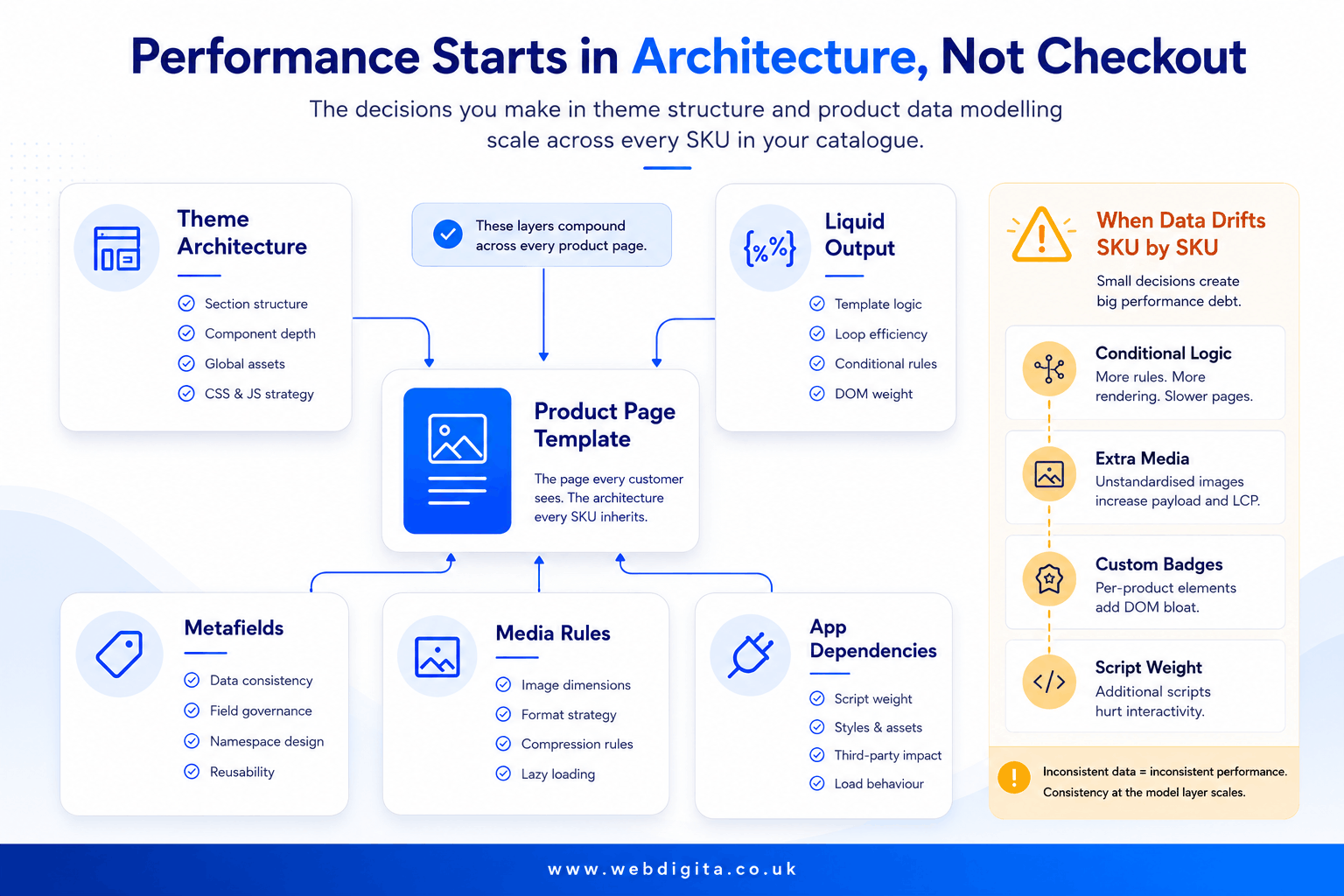
Shopify Flow has a place, but not everywhere. It should reduce manual operational overhead around tagging, routing or internal processes. Push back if it is being used to mask unclear ownership or to attach performance-sensitive logic to already fragile templates. In my experience, Shopify Flow gets misused most often when nobody has defined who owns the operational rules and automation becomes a substitute for that conversation.
- Ask for the Liquid standards applied across all product templates – not best efforts, actual documented rules.
- Check how metafields, media rules and section logic are documented before content population starts.
- Watch for vague answers on template consistency – vague answers at scoping become expensive rework post-launch.
For a broader view on architectural trade-offs, it also helps to read about choosing the right front-end approach for an eCommerce build.
Apps and third-party scripts are usually the real performance risk
App count is not a useful metric. One badly behaved app can do more damage than five well-contained ones. I have seen stores with twenty-plus apps run cleanly because selection and testing were taken seriously. I have also seen stores with six apps suffer catastrophic Largest Contentful Paint degradation because one Shopify App Store addition was injecting a render-blocking script on every product page – and nobody tested it against the live theme before enabling it.
Selection discipline matters more than app enthusiasm. Ask how the agency tests before and after adding any app, how they review render impact and what happens if the app becomes a dependency problem later. Do not assume that anything listed in the Shopify App Store is harmless by default – the platform approval process checks for safety, not for performance impact on your specific theme and data model.
Third-party integrations create the same risk in a different form. ERP, PIM and stock systems are manageable if sync logic is clean and ownership is clear. But if product pages depend on messy real-time calls, duplicated scripts or badly timed data updates, performance and stability both suffer. I have reviewed ERP integrations that added over 800ms to Time to First Byte because the sync was written as a blocking front-end call rather than a backend queue. That is a scope and architecture decision, not a theme problem – and it needs to be settled before any development starts.
- Be sceptical of phrases like “we can always add an app for that” – that phrasing usually means nobody has thought about it yet.
- Ask whether scripts are deferred, conditionally loaded or blocked from templates that do not need them.
- Treat unclear answers on integration ownership as a red flag, especially for ERP or PIM sync.
If you are already seeing app sprawl, it is worth reading about how an eCommerce tech stack starts breaking as complexity grows.

Not sure whether your Shopify build will stay fast under real trading conditions?
We audit theme architecture, app dependencies, metafield structure and integration logic before build starts, so performance does not drift once the catalogue grows and campaigns start landing.
Quick diagnostic call to map what needs governing early.
How checkout performance should be handled without false promises
This is where honest agencies sound different from everyone else. Shopify checkout is not open to the same level of direct optimisation as your theme-controlled product pages – and that includes Shop Pay. Shop Pay accelerates conversion for returning customers, but it is a platform-managed experience. Any agency promising to fully engineer checkout speed is selling you control they do not have.
What you can influence: Clean checkout extensibility choices, restrained use of added functionality in the checkout flow, careful tracking setup and a faster path into checkout from the product page. Ask how the agency keeps overhead low around the purchase journey rather than how they plan to rewrite platform behaviour they cannot touch.
A common mistake is blaming checkout for friction that started earlier. Slow product media, variant logic, sticky third-party widgets and late-loading trust elements often damage the experience before the customer even reaches payment. I see this repeatedly in performance audits: checkout conversion gets flagged as the problem, but the actual drop in intent is happening on the product page. If you are seeing that pattern, ask the agency to map the whole path to purchase, not only the final step.
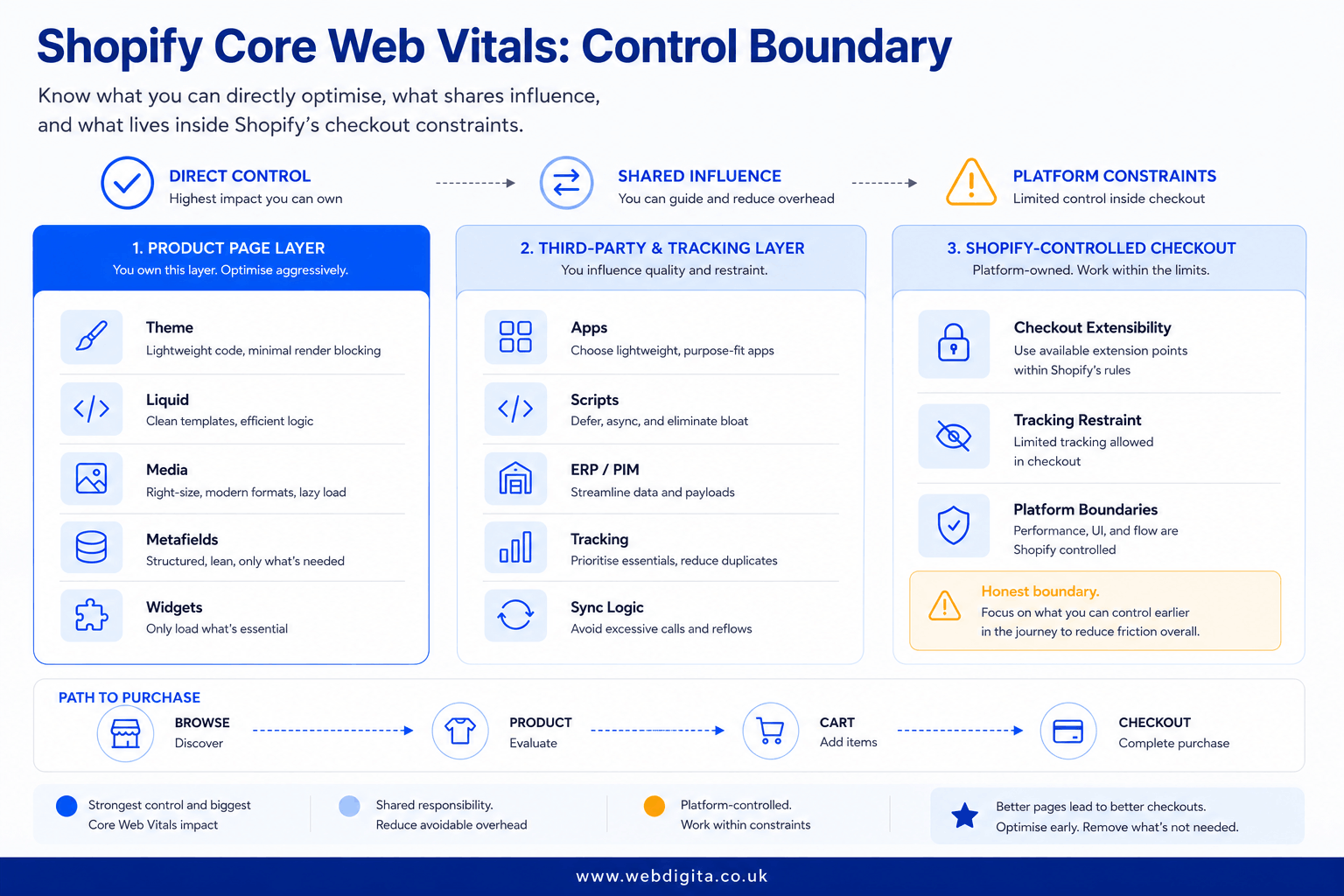
Ask one direct question: what do you control directly, what do you monitor and what do you treat as platform-bound? If they cannot answer that without hedging, do not trust the rest of the performance plan. For an independent baseline on measurement priorities, Google’s Core Web Vitals guidance is still the neutral reference point.
The checklist to define before the project starts
The fastest way to avoid performance debt is to define the rules before build starts, not after the first score regression. Use this as a scoping tool in agency calls, proposal reviews and internal planning.
Webdigita Shopify Performance Scope Checklist: use this to pin down the technical requirements that protect Core Web Vitals before design, app selection and content population create expensive dependencies.
- Theme approach: Define whether the build stays within a lean theme architecture and how reusable sections will be governed.
- Liquid standards: Agree coding rules for template logic, asset loading and section complexity so maintainability does not drift as the catalogue grows.
- App approval rules: Set who can approve Shopify App Store additions, what performance testing is required and what counts as unacceptable script overhead.
- Metafield model: Lock the product data structure early to avoid SKU-by-SKU workarounds later – especially if Shopify Markets is in scope.
- Media rules: define image, video and variant media standards before merchandising teams start uploading at scale.
- Integration method: Document how ERP, PIM, stock and fulfilment data will sync without creating blocking front-end dependencies.
- Shopify Flow use: Keep automation for operational efficiency, not as a patch for unclear process ownership or fragile Liquid logic.
- Checkout extensibility scope: Agree what checkout extensibility will handle and what remains platform-bound – including Shop Pay behaviour.
- Deployment standards: Confirm Shopify CLI is used for all theme deployments, with no undocumented edits to live environments.
- Monitoring ownership: Assign who reviews performance regressions when apps, campaigns or tracking changes go live.
How to tell whether an agency has a repeatable method or just a fast demo
I am not looking for perfect scores on every page at every moment – and neither should you be. The question is whether the agency has a method that survives real trading conditions: auditing, prioritising, rolling changes across templates, checking regressions and defining who owns performance after launch. Most do not.
Target realism matters. Ask for target ranges and consistency expectations across key product page types, not a promise of permanent 100s. If you want a stronger SEO angle on what Core Web Vitals measurement actually requires, this guide covers what actually matters in Core Web Vitals for eCommerce SEO.
| Shallow answer | Credible answer |
|---|---|
| “We optimise page speed before launch.” | “We audit templates, apps, media, scripts and data structure, then monitor regressions after launch.” |
| “Checkout will be fast too.” | “We reduce avoidable overhead around checkout and work within Shopify checkout constraints – including how Shop Pay fits the path to purchase.” |
| “Apps are fine if the feature is needed.” | “We test what each app injects, where it loads and whether the dependency is worth the trade-off before any Shopify App Store addition goes live.” |
| “Content teams can add what they need later.” | “We define metafields, Shopify Markets structure, media rules and Liquid standards early so catalogue growth does not break performance.” |
| “Support is available if anything slows down.” | “We define monitoring, review cadence and ownership for ongoing changes, often through planned eCommerce maintenance in London.” |
If you are choosing a Shopify partner, use these questions as your filter. Ask them to explain the method across Liquid standards, app selection, Shopify CLI deployment practice and checkout boundaries, then listen for specifics. Smooth answers in a pitch are cheap. The specifics are not.
Questions clients ask before scoping Shopify Core Web Vitals work
Common questions about keeping Shopify performance stable as the store grows
1. What is the difference between optimising Shopify product pages and Shopify checkout?
You can directly improve theme code, Liquid structure, media handling, metafield usage, app behaviour and third-party script loading on product pages. Shopify checkout is platform-controlled, so you can only influence clean checkout extensibility choices, restrained tracking and a faster path into checkout. You cannot fully re-engineer checkout behaviour in the same way you can optimise product templates.
2. How do metafields affect Shopify Core Web Vitals?
Metafields keep content structured and predictable when used well. Used badly, they turn templates into a maze of conditions, fallbacks and edge-case rendering that slows pages down and makes maintenance painful. The metafield model should be designed before build starts, not halfway through content entry, to avoid SKU-by-SKU workarounds that damage performance across the catalogue.
3. Should I worry about app count or app behaviour?
App behaviour matters more than app count. One badly behaved app can do more damage than five well-contained ones. You need to know what each app injects, when it loads, which templates it touches and whether the same outcome could be handled natively or with lighter custom logic. Test before and after adding an app, review render impact and have a fallback plan if the app becomes a dependency problem later.
4. What should I ask an agency about Shopify checkout performance?
Ask what they control directly, what they influence and what they only monitor. A credible agency will explain how they reduce avoidable overhead around checkout and work within Shopify checkout constraints, rather than promising total checkout control. Be suspicious of anyone claiming they can fully re-engineer platform-controlled checkout behaviour.
5. How do I know if an agency has a repeatable Shopify performance method?
Ask them to explain how they audit templates, apps, media, scripts and data structure, then monitor regressions after launch. Look for specifics on theme standards, app approval rules, metafield models, media rules and integration methods. Weak answers often sound smooth in a pitch but get expensive once the store is live. You want a method that survives real trading conditions, not just a fast demo.
6. What performance targets should I expect for Shopify product pages?
You should ask for target ranges and consistency expectations across key product page types, not a promise of permanent 100s. Credible agencies define what good looks like across the whole estate as the store changes, rather than polishing one hero page until Lighthouse looks pretty. Target realism matters more than perfect scores on every page at every moment.
7. How should third-party integrations be handled to protect Shopify performance?
ERP, PIM and stock systems can be fine if sync logic is clean and ownership is clear. But if product pages depend on messy real-time calls, duplicated scripts or badly timed data updates, performance and stability both suffer. Document how data will sync without creating fragile front-end dependencies, and treat unclear answers on integration ownership as a red flag.
8. What is the biggest mistake clients make when scoping Shopify Core Web Vitals work?
The biggest mistake is treating Core Web Vitals as a one-off speed exercise rather than a governed build standard. Most Shopify performance problems start with stores that launch with decent scores, then slowly fill up with app scripts, heavier media, awkward metafield logic and rushed tracking requests until the whole product catalogue gets slower. Define the rules before build starts to avoid performance debt later.
Conclusion
The fastest way to avoid performance debt is to define the rules before build starts, not after the first score drop. You need a method that survives real trading conditions: auditing, prioritising, rolling changes out across templates, checking regressions and deciding who owns performance after launch. If an agency talks about speed as a launch task rather than an ongoing governance problem, treat that as a warning sign.
Use the checklist in this guide as a scoping tool in agency calls, proposal reviews and internal planning. Ask them to explain the method across product pages, integrations and checkout boundaries, then listen for specifics. Weak answers often sound smooth in a pitch, but they get expensive once the store is live.
If you need a Shopify build that keeps Core Web Vitals stable as the store scales
We design theme architecture, metafield models, app selection rules and integration logic to protect performance across the whole catalogue, not just the demo pages. Our Shopify work covers governed builds, migrations and technical audits for stores that need repeatable standards.
See our Shopify Development ServicesOr start with