Key Takeaways
Crawl budget problems on eCommerce sites are rarely about scale itself—they come from filtered URLs, duplicate category paths, and weak internal linking pulling crawl away from the pages that drive revenue.
- Map where crawl activity is actually going and compare that with the pages that deserve index visibility and regular refresh
- Reduce index bloat by controlling faceted navigation states, internal search results, and duplicate category routes that add no real search value
- Strengthen internal linking to priority categories and products so Google discovers and refreshes them more consistently
- Set clear canonical, variant, and out-of-stock rules so crawl effort goes to the pages that matter commercially
Most eCommerce SEO failures are architecture decisions made before an agency got involved in your project. Crawlers spend time on filtered, duplicate, and low-value URLs while the category and product pages that drive revenue get discovered late, refreshed slowly, or compete against weaker versions of themselves. I see this pattern constantly – eCommerce SEO treated as a later clean-up job rather than a build-time decision.
To identify and fix crawl budget issues on an eCommerce site, map where crawl activity is actually going, compare that against pages that deserve index visibility, and isolate URL patterns creating waste. Then fix in priority order: reduce low-value parameter states, control index bloat from faceted navigation and duplicate page states, strengthen internal linking to priority categories and products, and set clear rules for canonical tags, product schema, variants, and out-of-stock handling.
This guide is for founders, technical leads, and in-house marketers who need a sharper audit brief before scoping technical work or assessing agency depth.
How to tell whether crawl budget is the real problem
Before you label this a crawl budget issue, check whether Google is actually wasting time on the wrong URLs. On eCommerce sites, the problem is usually not raw page count on its own – it is crawl going to faceted URLs, internal search results, duplicate category paths, and variant states that add little search value.
Start with three comparisons: crawled URLs versus indexable URLs, indexable URLs versus revenue-driving templates, and linked pages versus orphaned or weakly linked priorities. If your main categories and core product pages are being discovered or refreshed slowly while filtered URLs are being hit heavily, treat that as a structural issue, not a content issue.
- Warning sign 1: Filtered or sorted URLs appear in crawl data far more often than core categories
- Warning sign 2: Internal search pages or duplicate product states are indexable
- Warning sign 3: Key category pages have weak internal links despite strong commercial intent
- Warning sign 4: New or updated products take too long to appear or refresh in search
If you are reviewing what technical eCommerce SEO services should cover, I would push on URL architecture rules early in that conversation. Crawl waste is often baked into the build long before anyone runs an audit.
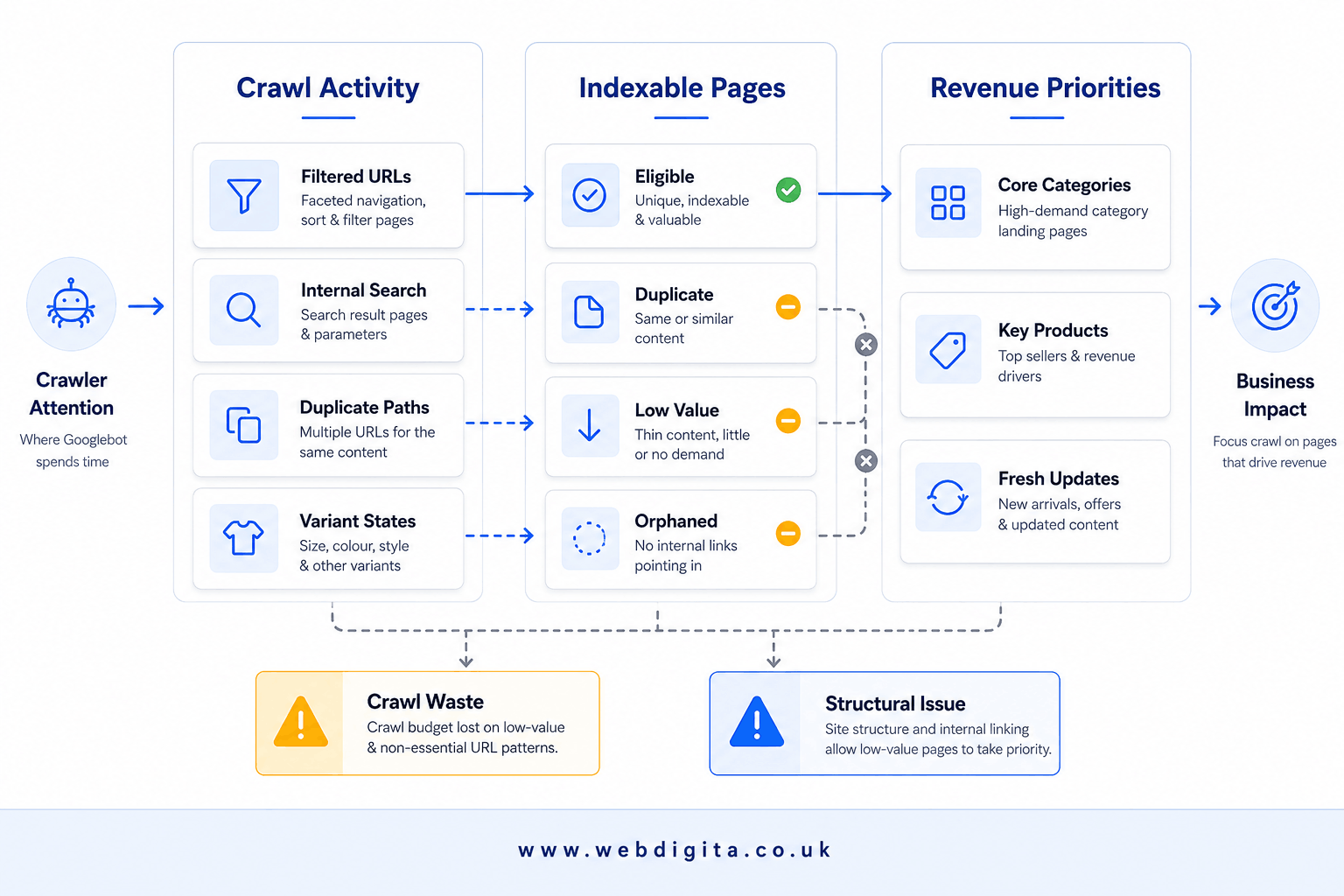
Where index bloat usually comes from on eCommerce sites
Index bloat means too many URLs are eligible for indexing without adding real search value. That is different from having a large catalogue. A big catalogue can be healthy if each indexed page has a clear purpose, unique demand, and a sensible place in the site structure.
On most stores, bloat comes from faceted navigation states, internal search results, duplicate category routes, variant URLs, and poor out-of-stock decisions. Check whether each URL state deserves to rank, or whether it only exists to help users browse. Do not assume that because a page is reachable, it should be indexable.
If users need thousands of filter combinations but search engines only need a small set of high-intent landing pages, your job is to separate user utility from index value.
Canonical tags matter here, especially for variants and duplicate category states. But canonicals are not a rescue plan for weak architecture. If internal linking keeps promoting low-value URLs, or if category page optimisation is thin on the pages that should rank, Google gets mixed signals. If you are also dealing with stock churn, this guide on handling out-of-stock product pages without creating SEO waste is worth reviewing.
In my experience, this pattern shows up when merchandising, dev, and SEO teams each make sensible local decisions that produce a messy global result. Nobody intends to bloat the index. The site just generates URL states faster than governance can handle them.

Not sure where your crawl budget is going
We can map your crawl activity against indexable URLs and revenue priorities, then show you which parameter states, filtered paths, and duplicate category routes are creating waste before you scope the fix.
Quick diagnostic call to confirm whether this is the real problem
How to fix parameter URLs without breaking useful filtered experiences
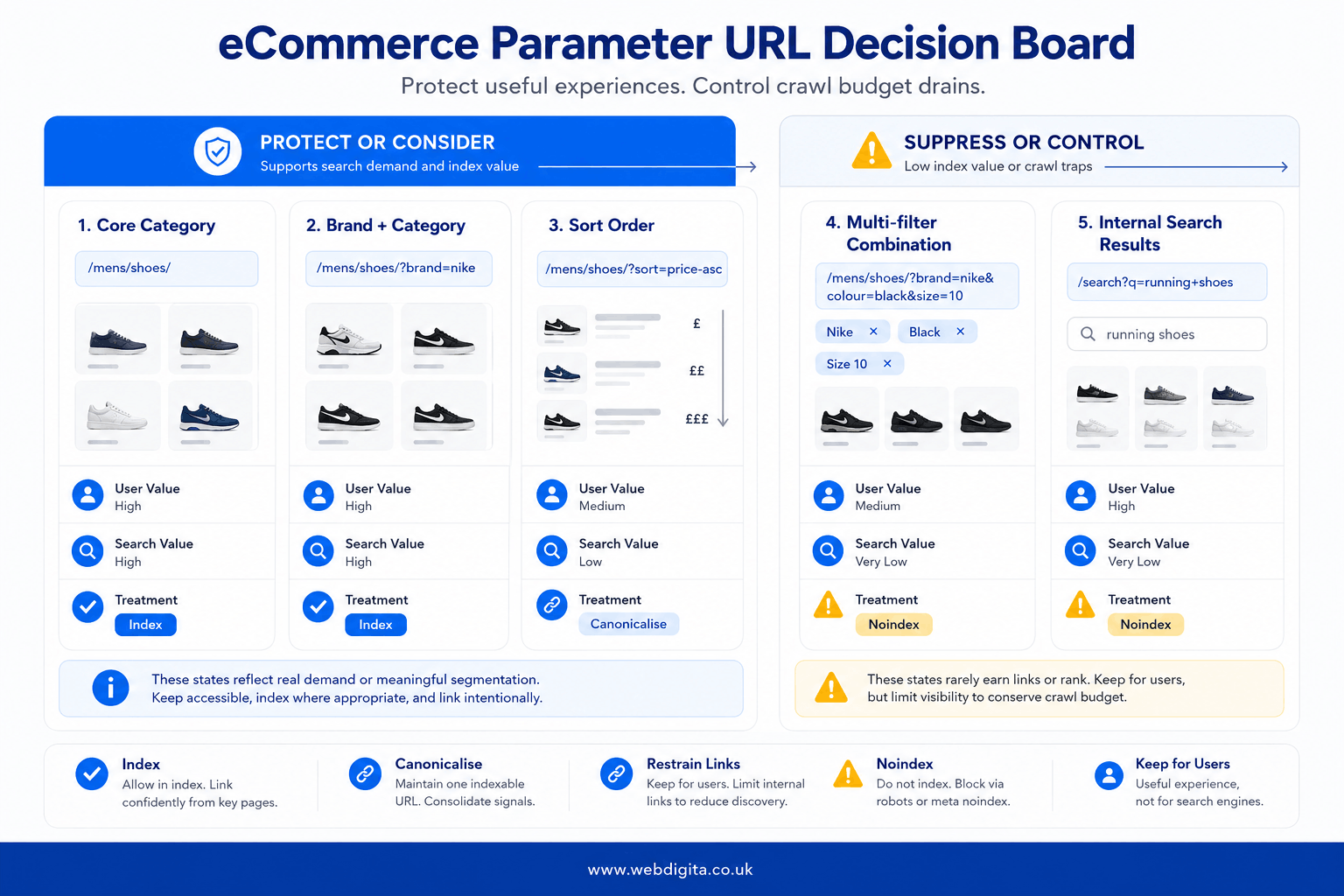
Parameter handling is where many teams either overreact or do too little. You should not block everything with parameters, and you should not leave every combination open. The right approach is to review parameter patterns by search intent, duplication risk, and crawl cost.
A common example is a store with colour, size, price, sort, and availability filters layered onto category pages. That can create thousands of near-duplicate URLs, even though only a handful have real standalone demand. You need to preserve useful shopper journeys while suppressing low-value crawl paths.
Which parameter states deserve protection
Ask which states represent genuine landing pages and which are temporary browsing aids. If the answer is unclear, that is exactly where an eCommerce project discovery workshop can reduce risk before implementation starts.
WEBDIGITA Parameter Value Matrix: Use this to decide which URL states should be indexable, canonicalised, or kept out of the crawl path.
| URL state | User value | Search value | Recommended treatment |
|---|---|---|---|
| Core category | High | High | Index, optimise, strengthen internal links |
| Filter with clear demand, such as brand plus category | High | Possible | Keep only if content, demand, and uniqueness are proven |
| Sort order URLs | Low | Low | Do not let these become indexable crawl traps |
| Multi-filter combinations | Medium | Usually low | Restrain internal linking, use canonical control, suppress where appropriate |
| Internal search result URLs | Medium | Low | Keep for users, not for indexing |
Watch for one more trap: if your product schema, category copy, and canonical logic all point in different directions, Google gets a noisy signal. Poor performance on product or category templates can reduce crawl efficiency too. If you are seeing that pattern, review these Core Web Vitals issues on eCommerce product and category pages alongside the crawl audit.
Technical checklist before project start
The most common reason crawl cleanups fail within six months is that nobody agreed on the rules before the tickets were written. Dev ships a new filter combination, merchandising adds a promotional route, and six months later you are rebuilding the same URL chaos. I have seen this exact pattern on sites that had just paid for a full technical SEO audit. The audit was fine – the governance was not.
WEBDIGITA Crawl Control Checklist: use this to scope the technical decisions that affect crawl efficiency and index quality before implementation starts.
- Architecture: Confirm which category and product templates are priority crawl targets, and check internal linking paths to them
- Faceted navigation: Define which filters can create landing pages and which must stay non-indexable
- Parameter rules: Document canonical, noindex, and crawl-control logic by URL pattern, not page by page
- Variants: Agree whether size, colour, or other product states need separate URLs at all
- Out-of-stock handling: set rules for temporary stock loss, discontinued products, redirects, and retained URLs
- Category priorities: Identify the pages that deserve optimisation, stronger copy, and richer internal authority
- Schema scope: Confirm product schema, review schema, and category structured data coverage and ownership
- Performance: Check Core Web Vitals risks on product and category templates before rollout
- Ownership: assign decisions across SEO, dev, merchandising, and platform teams so fixes stick after launch
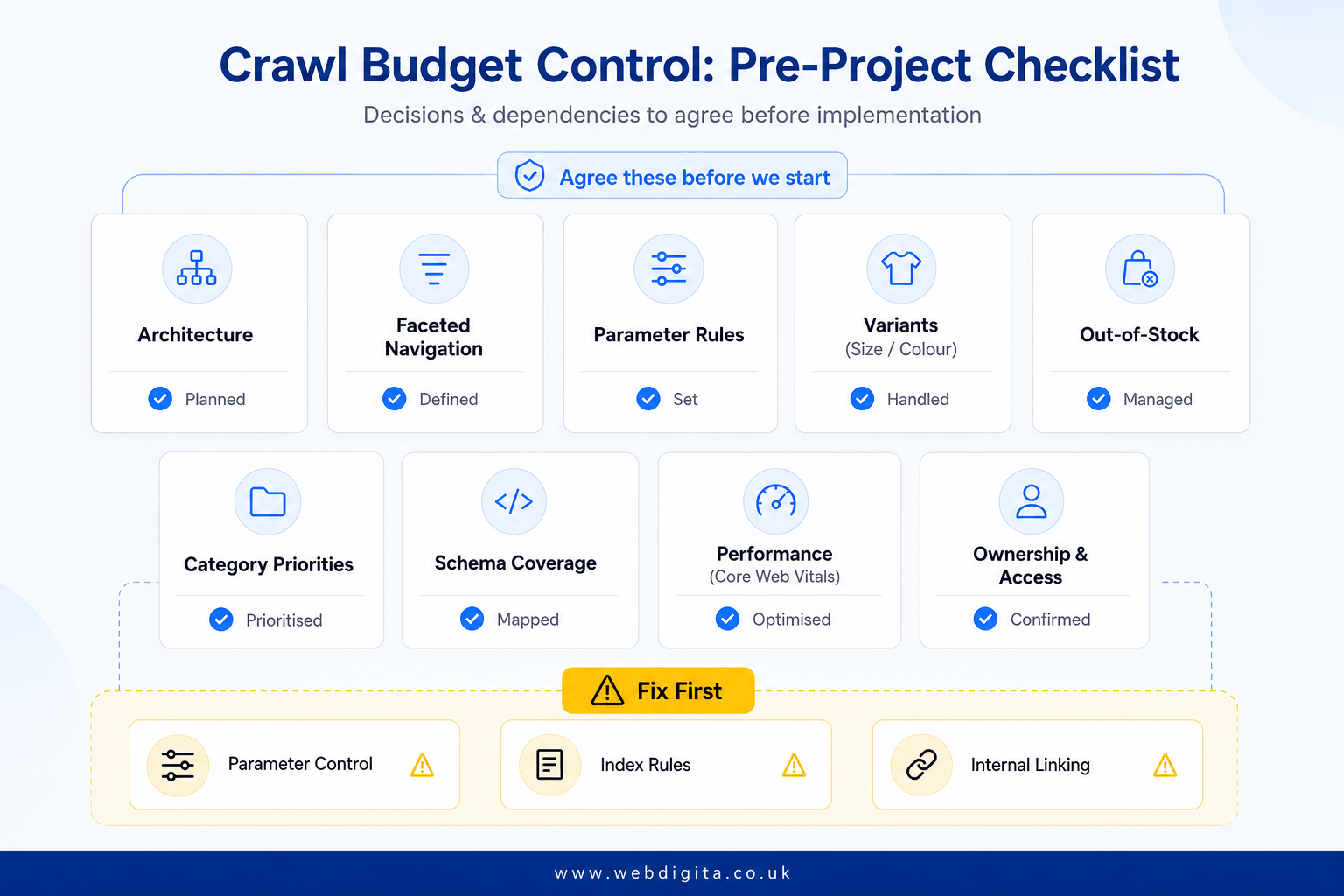
Fix first what changes crawl direction. I would prioritise low-value parameter control, index eligibility rules, and internal linking to key categories before chasing smaller technical polish items.
If you are choosing a partner, ask how they will stop the problem returning after launch – not just how they will clean it up once. That is where eCommerce maintenance services add a lot of value to your business, because crawl control is rarely a one-off task on an active store. For the wider commercial view after the technical clean-up, see the guide on eCommerce SEO strategy that connects technical fixes to revenue impact.
Questions teams ask before fixing eCommerce crawl budget issues
Common questions about identifying crawl waste and controlling index bloat on large stores
1. How do I know if crawl budget is actually the problem on my eCommerce site?
Check whether Google is wasting time on the wrong URLs. Compare crawled URLs versus indexable URLs, indexable URLs versus revenue-driving templates, and linked pages versus orphaned priorities. If filtered or sorted URLs appear in crawl data far more often than core categories, or if key product pages take too long to appear or refresh in search, treat that as a structural crawl issue rather than a content problem.
2. What causes index bloat on eCommerce sites?
Index bloat usually comes from faceted navigation states, internal search results, duplicate category routes, variant URLs, and poor out-of-stock decisions. The issue is not having a large catalogue—it is having too many URLs eligible for indexing without adding real search value. Each indexed page should have a clear purpose, unique demand, and a sensible place in the site structure.
3. Should I block all parameter URLs to fix crawl budget issues?
No. Review parameter patterns by search intent, duplication risk, and crawl cost. Some parameter states represent genuine landing pages with standalone demand, while others are just temporary browsing aids. Preserve useful shopper journeys while suppressing low-value crawl paths. Do not block everything with parameters, and do not leave every combination open.
4. Which filtered URLs should be indexable on an eCommerce site?
Only index filtered URLs that have clear search demand, unique content, and proven commercial value. Core categories should always be indexable. Filters with strong demand, such as brand plus category, may deserve indexing if content and uniqueness are proven. Sort order URLs, multi-filter combinations, and internal search result URLs should usually stay non-indexable.
5. How do I stop crawl budget problems returning after a technical fix?
Set clear governance rules before implementation. Define which category and product templates are priority crawl targets, document canonical and noindex logic by URL pattern, agree on variant and out-of-stock handling, and assign ownership across SEO, dev, and merchandising teams. Crawl control is rarely a one-off task on an active store, so plan for ongoing maintenance and rule enforcement.
6. What should I prioritise first when fixing eCommerce crawl budget issues?
Fix what changes crawl direction first. Prioritise low-value parameter control, index eligibility rules, and internal linking to key categories before chasing smaller technical polish items. These changes have the biggest impact on where Google spends crawl effort and how quickly priority pages get discovered and refreshed.
7. Do canonical tags fix crawl budget issues on eCommerce sites?
Canonical tags help manage duplicate content signals, but they are not a rescue plan for weak architecture. If internal linking keeps promoting low-value URLs, or if category page optimisation is thin on the pages that should rank, Google gets mixed signals. Fix the underlying URL structure and internal linking before relying on canonicals to clean up the mess.
Conclusion
Crawl budget issues on eCommerce sites are usually structural, not content-based. If Google is spending time on filtered URLs, duplicate category states, or low-value parameter combinations while your core product and category pages get discovered slowly, the fix is in the architecture and governance, not the copy.
- Control parameter states: define which filters deserve indexing and which should stay as browsing aids only
- Strengthen internal linking: make sure priority categories and products get consistent crawl attention through better site structure
- Set clear rules early: agree on canonical logic, variant handling, and out-of-stock decisions before the next release
- Plan for ongoing control: crawl waste returns quickly on active stores if governance is weak
Fix what changes crawl direction first—parameter control, index eligibility, and internal linking to key categories—before chasing smaller technical polish items. If you are scoping this work, ask how the partner will stop the problem returning after launch, not just how they will clean it up once.
Fix crawl waste before it becomes a permanent drag on organic performance
We help eCommerce teams reduce index bloat, control parameter URL states, and strengthen internal linking to priority categories and products so Google spends crawl time on pages that drive revenue.
Review eCommerce SEO servicesPrefer to talk first