Key Takeaways
Shopify agency cost in the UK is shaped more by scope clarity, migration complexity, and integration dependencies than by the platform itself. A theme-led build sits at the lower end, while custom design, migration, ERP work, and checkout extensibility push the budget higher.
- Migration is usually priced separately. Redirects, customer data, order history, and validation all add effort that rarely fits inside a storefront quote.
- Apps change cost twice. Once during setup, and again every month through subscription fees, compatibility risk, and operational overhead.
- ERP and third-party integrations swing quotes hard. Field mapping, sync logic, failure handling, and bad data ownership all take time that vague proposals quietly skip.
- Post-launch support is where many budgets break. Bug fixes, theme updates, app maintenance, and release support need a clear retainer or you inherit the operational mess.
The cheapest quote is often the most incomplete. Compare agencies on deliverables, exclusions, assumptions, third-party costs, and what has been pushed into phase two.
Usually, the quote from a Shopify agency covers the build. What comes after – migration, ERP logic, checkout behaviour, app overhead and the steady drip of post-launch costs – quietly drifts into assumptions, phase two, or somebody else’s problem.
I have reviewed enough eCommerce & Shopify project proposals over the years to say this plainly: the cheapest quote in a shortlist is almost never cheap because that agency is more efficient. It is cheap because something difficult has been excluded, deferred or left unscoped. By the time you discover what, you have already signed.
Shopify agency cost in the UK typically runs from a few thousand pounds for a lean theme-led build to the higher end of five figures for Shopify Plus projects with ERP integration, platform migration and checkout extensibility work. The biggest cost drivers are not the platform licence – they are scope complexity, migration data, app dependencies, integration architecture and the support model you need after launch.
What a UK Shopify agency quote typically covers – and what quietly gets excluded
A lean quote covers a pre-built or lightly customised Shopify theme, core page templates – home, collection, product, cart – basic app configuration and a go-live checklist. That is a legitimate package for a small catalogue with simple checkout logic and no migration requirement.
The moment your brief diverges from that baseline, cost moves. Custom Liquid work – building bespoke theme sections, rendering complex metafields, managing conditional display logic, creating custom collection filters – takes real development time. UX beyond standard theme defaults, especially multiple template variants, unique product page layouts or custom content section types, adds further scope. Content migration, if it appears in the quote at all, rarely covers taxonomy mapping, image optimisation, redirect creation or data validation. Those either go into the brief or they fall on the client.
What I see consistently in UK Shopify proposals is that design depth is understated and content population is treated as the client’s problem. Neither of those positions is contractually wrong. But if your expectations are different, the gap surfaces when the build is already half done.
Understanding what a Shopify development project typically involves before you sit down with proposals makes the comparison far more useful. One agency might be quoting three page templates. Another might be quoting eight. The headline number does not tell you which is which.
A cheap Shopify quote is often a partial quote. If migration, integrations and post-launch support are vague, treat the headline number as a warning sign, not a win.
Trade-off to watch: A pre-built theme reduces upfront spend and is the right call for early-stage businesses or lean catalogues. Shopify themes are built around assumptions about how stores work, though. When your product structure, merchandising rules or checkout flow sits outside those assumptions, you pay later through workarounds, app sprawl and eventually a more expensive rebuild. I would rather front-load that conversation than manage the fallout from a theme that was almost right.
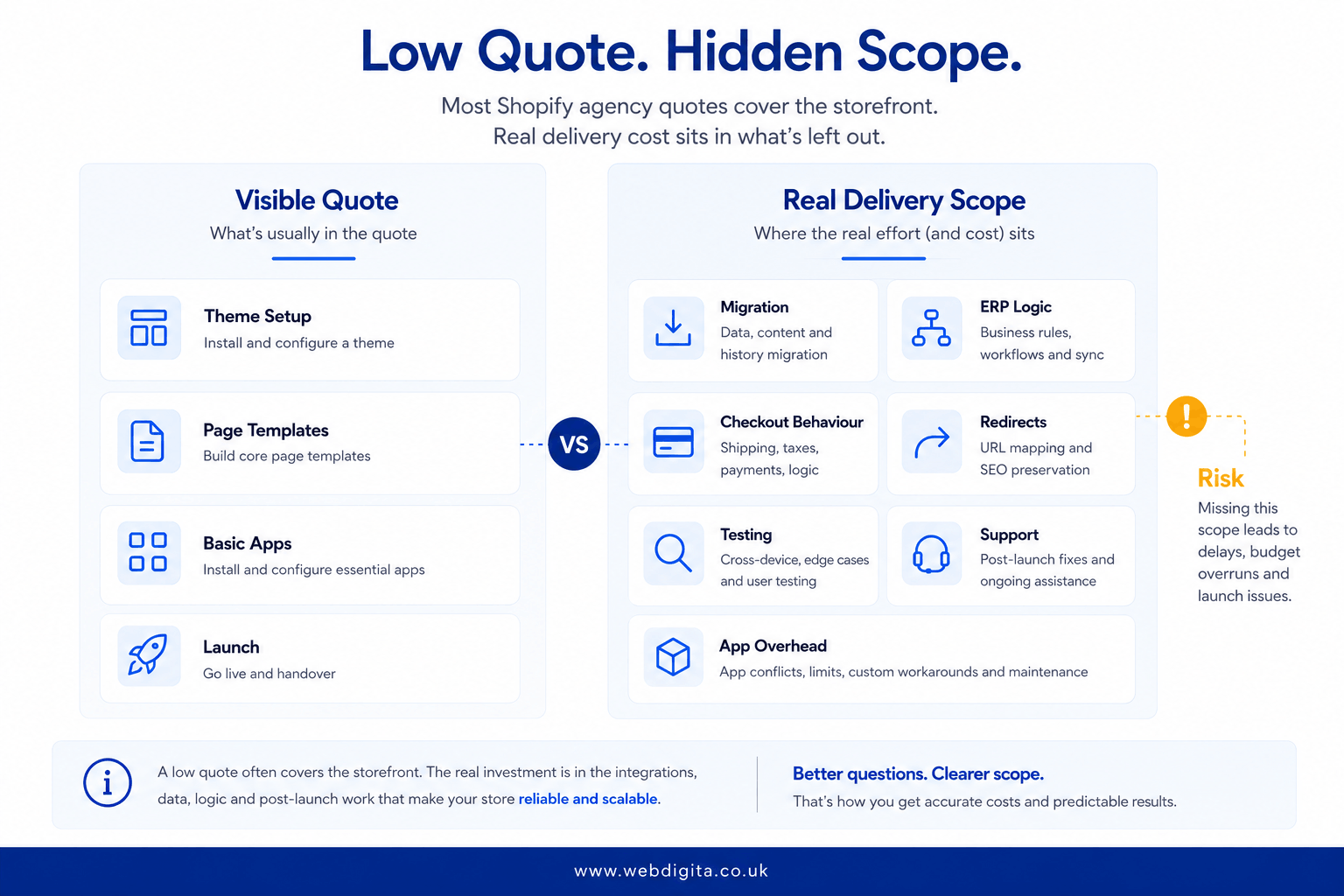
The useful exercise when comparing proposals is not to rank them by price. It is to align them on scope: same number of templates, same definition of content migration, same clarity on who handles redirects and data validation. If two agencies cannot quote to the same brief, you are not comparing prices – you are comparing interpretations of an ambiguous document. That is a different problem, and it only gets more expensive.
How UK Shopify agencies price their work – and why the model matters as much as the number
Most buyers focus on the total project fee. Few ask how that fee was calculated. That is a mistake, because the pricing model tells you as much about the risk you are carrying as the number itself.
Fixed-price contracts – Means the agency has estimated a defined scope and you pay that amount regardless of overruns on their side. They sound buyer-friendly, but a fixed price requires a complete specification. If your brief has loose edges – and most briefs do at the point of quoting – agencies handle scope creep by narrowing deliverables rather than extending cost. That is contract mechanics, not dishonesty. The result is a build that was technically delivered to spec but is not what you needed.
Time and materials – Means you pay for hours worked. It protects the agency from scope changes and gives you flexibility to adjust requirements mid-project. It also means the final invoice can be materially above the estimate if requirements evolve. Which they usually do. For buyers without strong internal project management, T&M contracts require careful oversight.
Milestone-based billing – Is the most common model for mid-size Shopify projects in the UK: a payment schedule tied to named deliverables – design signed off, development complete, UAT passed, go-live. This distributes financial risk more evenly and creates genuine checkpoints. On anything above a straightforward theme-led build, this is what I would recommend asking for.
A discovery sprint sits upstream of all of this. It typically costs a few thousand pounds and produces a properly scoped brief, clear technical architecture decisions and a quote you can actually trust. If your requirements are loosely defined – which they usually are at the point you start talking to agencies – a shopify focused project discovery workshop before you commit to a build quote is often the most cost-effective move you can make. A well-run discovery sprint reduces overrun risk far more reliably than hard negotiation on a vague fixed price.
UK Shopify agency day rates for senior development typically run from around £500 to £900 per day, with London-based agencies at the upper end of that range. A project quoted at a few thousand pounds represents roughly one to two weeks of senior development time. When you see a complex build priced at that level, it is worth asking what has been left out.
The cost drivers that change a quote most after discovery
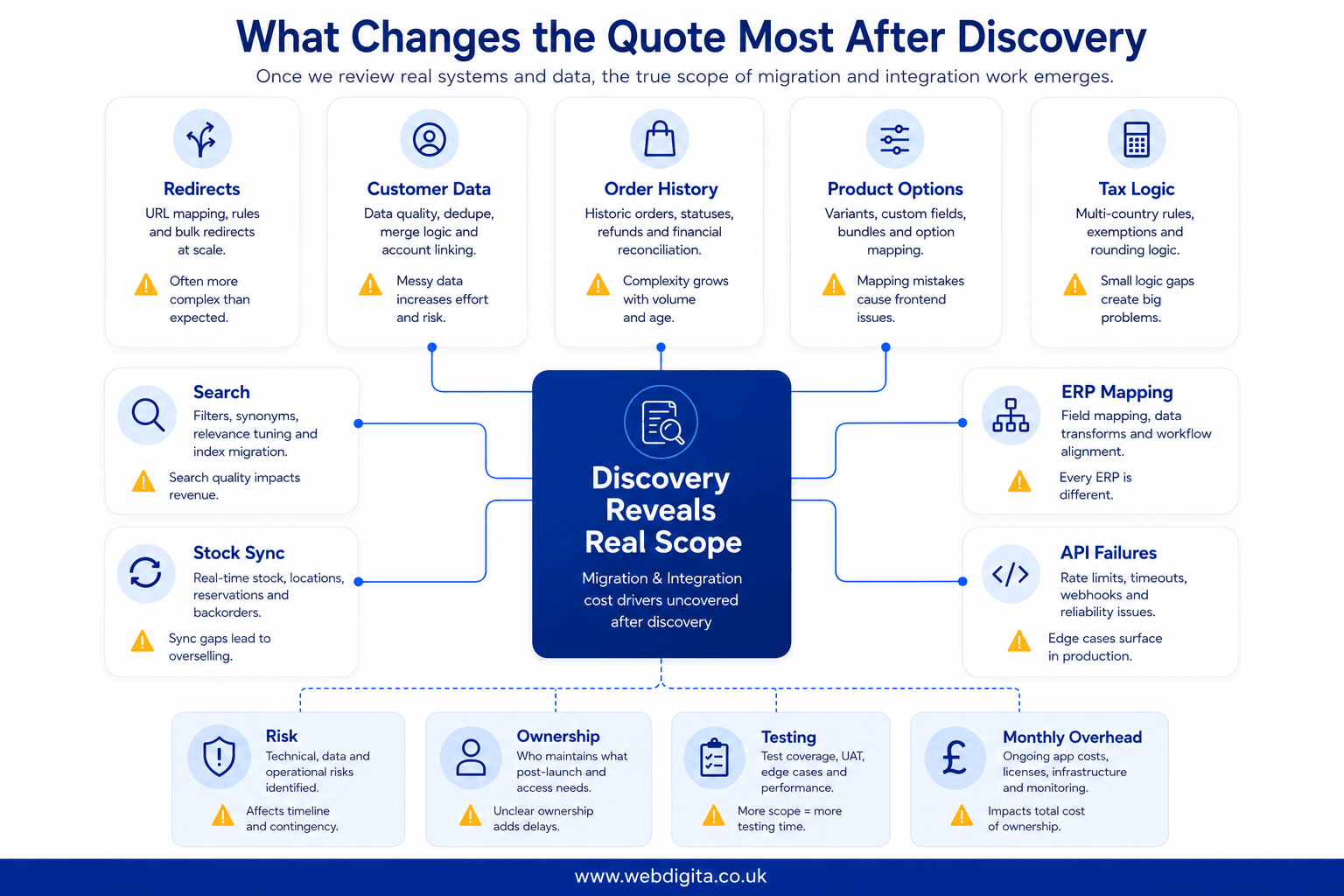
The real cost usually surfaces after discovery, when polite assumptions meet actual systems. Several of those cost drivers are predictable – if you know where to look.

Not sure what your Shopify project should actually cost?
We help UK businesses scope Shopify builds properly before the quote arrives. That means checking migration needs, integration dependencies, app overhead and support boundaries so you can compare proposals on real delivery, not just headline numbers.
No obligation. Just a clearer view of what you are actually pricing.
Platform Migration: If you are moving from Magento 2 or WooCommerce, the visible scope – products, categories, content pages – is usually the easy part. What is attached to it is where the effort goes.
Magento 2 builds around configurable products, simple products and attribute sets. Shopify builds around products and variants, with a hard limit of 100 variants per product. These data structures do not map directly. If you have products with complex attribute combinations in Magento, you need to decide how they become Shopify variants before migration begins – and in many cases that means data restructuring work before a single product moves. I have seen migration briefs that looked like a single spreadsheet turn into four weeks of data architecture work.
WooCommerce migrations are often simpler, but WooCommerce is flexible enough that stores accumulate heavy customisation in plugins and custom post types. If your store has non-standard checkout fields, custom taxonomies or heavily modified templates, assume those need rebuilding in Shopify, not migrating. The logic does not transfer.
Customer passwords cannot be migrated to Shopify. Order history can be imported, but not in a way that lets customers log in and view it natively. For B2B businesses where historical order access matters – and it usually does – that needs a custom solution, which needs a budget. Redirects are where I see the most budget surprises: a store with a few hundred products can easily have a thousand URLs that need mapping correctly. Shopify’s native redirect system caps at 10,000 entries; beyond that you need an app. If redirect mapping is not explicitly named in the quote, it is not in the budget. Read what migration typically costs as a separate budget line before assuming it is bundled into a design and build quote.
App stack economics: A mid-size Shopify store typically runs eight to fifteen apps. Reviews, loyalty, subscriptions, returns management, site search, email capture, personalisation, bundles, gift cards, size guides – each is a sensible solution to a specific problem. Together, they create a monthly bill that most buyers do not model at the point of build. App subscriptions in the £50-£200 per month range accumulate fast. A store running twelve apps at an average of £80 per month is paying close to £1,000 per month in Shopify App Store fees before any agency time. That is a meaningful part of your operating cost, and it starts on day one of trading.
Stacking apps to handle logic that should live in a single clean integration also creates compatibility risk. When an app conflicts with your theme on a Shopify update – and eventually one will – diagnosing and fixing it takes developer time you probably have not budgeted for. Ask which apps are essential to your business model, which are optional, and whether any of them are substituting for custom logic that would be cheaper and more reliable in the long run.
ERP and custom integrations: This is where quotes swing hardest. “ERP integration included” without further detail means almost nothing. Field mapping, sync direction (one-way or bidirectional), failure handling, retry logic, error notifications and ownership of data conflicts all need to be defined before a line of code is written. An ERP integration is not a feature. It is a contract between two systems, and those systems will disagree more often than the sales process suggests.
I would ask specifically: what happens when the ERP pushes a product update that Shopify rejects? Who handles the error notification? Who fixes the data? What is the agreed response time? If the proposal cannot answer those questions, the integration has not been properly scoped. I would also ask what happens when the third-party API misbehaves – because eventually it will, usually at the worst possible moment.
Shopify Plus and checkout extensibility: Shopify Plus is not expensive because of the label alone. The platform cost – around £1,500 per month or 0.25% of revenue, whichever is higher – is a real budget line that sometimes gets overlooked when agencies quote only the build cost. Beyond the platform fee, cost rises when the project requires custom checkout behaviour, B2B logic, Shopify Flow automation, Shopify Markets configuration for multiple regions, Shop Pay customisation or post-purchase logic built through checkout extensibility.
Checkout extensibility on Shopify Plus involves three distinct building blocks: Checkout UI Extensions for custom interface components within the checkout, Shopify Functions for server-side logic governing discounts, payment methods and delivery options, and Checkout Branding for visual customisation. Each has different development effort and different constraints. Shopify’s own checkout extensibility documentation makes the scope of this work clear. It is worth reading before you assess what any agency proposal says about checkout work – a vague line item for checkout extensibility will expand when the actual requirements are scoped.
Custom app development: Sometimes the Shopify App Store has exactly what you need. Sometimes it has something close enough that you spend months fighting its limitations and paying for the gaps with workarounds. Custom app and theme work built using the Shopify CLI can give you precisely the behaviour your workflow needs – but it needs maintaining, it needs documentation, and if the developer who built it moves on, it needs to be understood by whoever comes after. If your requirements are genuinely unusual, compare the long-tail cost of stacking multiple apps against a tighter custom build. The right answer depends on your volume, your growth trajectory and how frequently requirements change. The wrong answer is whichever one was not properly evaluated at the time of build.
Checks to run when a receive a shopify development project quote :
- Is migration priced separately, and does it explicitly cover redirects, customer data, order history, data restructuring and validation?
- Which apps are included, what do they cost monthly, and who owns and maintains them after launch?
- What exactly is covered in ERP or third-party integration work, including failure handling, retry logic and data conflict resolution?
- Is checkout extensibility in scope, out of scope, or deferred – and if deferred, what triggers it and at what cost?
- What has been moved to phase two, and on what basis was that decision made?
Cost driver matrix – what a UK Shopify project actually costs across different build types
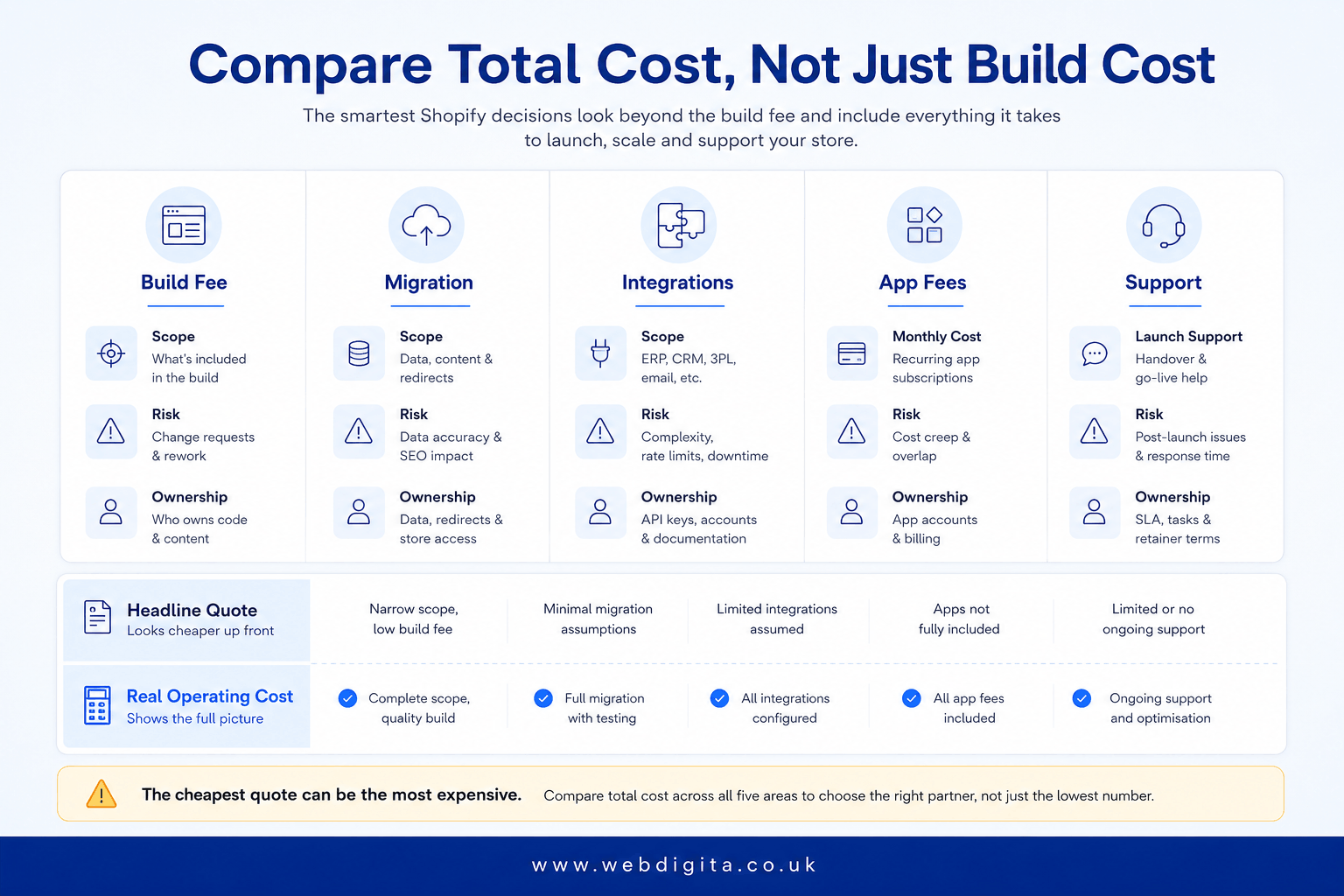
The practical way to compare proposals is total cost of ownership, not build cost. That means the project fee, platform subscription, third-party tools, migration effort, app subscriptions, support model and the items quietly parked outside the statement of work.
WEBDIGITA Shopify Quote Reality Matrix: Use this to sense-check whether a quote reflects the real delivery shape – not just the visible storefront.
| Project type | Typical complexity | Typical UK cost range | Common exclusions to check |
|---|---|---|---|
| Theme-led Shopify build | Low to moderate | A few thousand to low five figures | Content population, redirect mapping, custom Liquid work, post-launch support |
| Custom design and build | Moderate | Lower five-figure budget | UX research, content migration, QA depth, release support |
| Platform migration to Shopify | Moderate to high | Lower five figures and above, depending on data complexity and redirect volume | Data restructuring, customer records, order history, SEO redirect mapping |
| Integration-heavy or Shopify Plus project | High | Higher end of the five-figure range and above, depending on systems and checkout extensibility scope | ERP failure handling, checkout extensibility work, Shopify Markets configuration, ongoing integration support |
| Ongoing support and optimisation retainer | Low to moderate ongoing | Modest monthly budget, depending on change volume and SLA requirements | Scope of changes covered, response times, app update management |
Important: Those ranges shift when migration, ERP work, checkout extensibility, Shopify App Store subscriptions or post-launch support are excluded from the headline quote. The exclusions column is where most budget overruns begin.
What post-launch actually costs – and why it is rarely in the initial quote
The go-live invoice is not the last invoice. Most buyers know this in principle and underestimate it in practice.
In the first 90 days after launch, the most common cost drivers are: bug fixes on edge cases that did not surface in UAT, content updates as the team learns the CMS, app conflicts triggered by platform or theme updates, and change requests that were deferred during build because scope was locked. None of these are unusual. All of them take developer time that has not been budgeted.
Shopify updates its platform continuously. Theme and app updates follow, and they do not always agree with each other. A store running twelve apps across a customised Liquid theme has twelve potential sources of update-triggered issues. Without a retainer covering that maintenance, every fix becomes an ad hoc quote – slower and more expensive than planned support.
A sensible post-launch retainer covers: bug fixes, small theme changes, app updates, Liquid template adjustments, performance monitoring and release support. The right size depends on your change velocity. A relatively stable store may need only a few hours per month. An active merchandising team running seasonal campaigns, regular product changes and ongoing conversion testing needs considerably more.
Plan for regular eCommerce maintenance services as a real budget line from the outset, not an afterthought after launch. Before handover, read what post-launch support and handover should actually include, because the gaps in a handover document reliably become the source of the next unexpected invoice.
How to read a Shopify agency proposal – and the red flags most buyers miss
A strong Shopify proposal names specific deliverables, not categories. “Shopify theme development” is a category. “Development of ten custom Liquid templates including product, collection, blog, cart and four landing page variants” is a deliverable. The difference matters when you are reviewing delivery against scope six weeks into a build.
The following phrases in a proposal are flags that something has been left soft:
- “ERP integration included” with no detail on field mapping, sync direction or failure handling – this is a scope placeholder, not a scoped item
- “Content migration as required” – required by whom, defined how, validated against what standard?
- “Post-launch support available” with no SLA, no named scope and no budget – this means nothing contractually
- “Phase two items TBC” without naming what those items actually are – if they matter to the outcome, they belong in scope now
- “Shopify checkout integration” when you need checkout extensibility – these are different things at different cost levels, and an agency that uses them interchangeably has likely not built Shopify Functions or Checkout UI Extensions before
Compare agencies on the specificity of their exclusions as much as their inclusions. An agency that clearly names what is not in scope is being more honest with you than one that lists broad inclusions without naming the limits. Vague scope always resolves in the agency’s favour, not the buyer’s.
If you already have quotes, do not ask which one is cheapest. Ask which one has priced the real job. If you want a sober second opinion before you commit, bring the scope, assumptions and exclusions to a scoping review – and be honest about which parts of your brief are still loose.
Questions buyers ask before choosing a Shopify agency
Clear answers on pricing, scope, migration, integrations, and what to check before signing a quote.
1. What does a typical Shopify agency cost in the UK?
A typical Shopify agency cost in the UK ranges from a few thousand pounds for a lean theme-led build to a lower five-figure budget for a custom design, migration, or integration-heavy project. The price moves most when migration, ERP work, checkout extensibility, app dependencies, or post-launch support are added. A theme setup with light configuration sits at the lower end, while custom Liquid work, deeper UX, and complex integrations push the budget higher.
2. Is migration to Shopify included in the agency quote?
Migration is usually priced separately. A clean migration includes product data, customer records, order history, redirects, product options, tax logic, and validation. If the quote says migration is included without detailing what that covers, treat it as incomplete. Messy legacy data, redirect mapping, and customer group rules all add effort that rarely fits inside a storefront build quote.
3. What drives Shopify agency cost up after discovery?
Real cost often appears after discovery when polite assumptions meet actual systems. Migration complexity, ERP and third-party integrations, app setup and testing, checkout extensibility work, and custom app development all add effort. If your catalogue, merchandising, or conversion needs are awkward, you may also need more custom Liquid work, metafield logic, and operational testing than a standard theme allows.
4. Should I use a pre-made Shopify theme or pay for custom design?
A pre-made theme can reduce upfront spend, and sometimes that is the right call. But if your catalogue, merchandising, or conversion needs are even slightly awkward, you can end up paying later through theme workarounds, app sprawl, and slower change requests. Custom design gives you more control over UX, template logic, and long-term flexibility, but it costs more upfront.
5. What should be included in post-launch Shopify support?
A sensible post-launch retainer covers bug fixes, small theme changes, app updates, release support, and general store stability. You should ask who owns bug fixing after launch, who handles theme and app updates, and whether release support is included. If those are excluded, the cheaper quote may simply be handing you the operational mess once real orders start flowing.
6. How much do Shopify apps add to the total cost?
Apps change cost twice: once during implementation, and again every month after launch. A larger app stack means more setup, more testing, more compatibility risk, and more operational overhead. You need to ask which apps are essential, which are optional, and which are covering for missing custom logic. Monthly app fees can add up quickly, especially if you are using multiple paid apps.
7. What is the difference between Shopify and Shopify Plus pricing?
Shopify Plus is not expensive because of the label alone. Cost rises when you need custom checkout behaviour, validation, B2B logic, Shopify Flow automation, Markets complexity, or post-purchase logic. You should ask whether the quote includes checkout extensibility work or quietly leaves it for later. Plus projects often require more custom app development, deeper integrations, and stronger operational support.
8. How do I compare Shopify agency quotes properly?
Compare agencies on deliverables, exclusions, assumptions, third-party costs, app fees, support boundaries, and phase-two items. Ask who owns bug fixing after launch, who handles theme and app updates, and whether release support is included. If too many of those answers are vague, you are probably not ready for a clean fixed quote. Use total cost rather than build cost to compare proposals properly.
Conclusion
- Treat the low quote as a warning sign, not a win. If migration, integrations, and support are vague, the headline number is probably missing the hard parts.
- Ask what is included in design, content population, and change requests. Unclear scope always creates pricing noise, and the gaps become cost later.
- Compare total cost, not just build cost. That means the project fee, third-party tools, migration effort, app subscriptions, support model, and the bits quietly parked outside the statement of work.
- Plan for post-launch support before you need it. A sensible retainer covers bug fixes, theme changes, app updates, and release support without turning every small request into a negotiation.
- If too many answers are vague, start with discovery. A scoping workshop costs less than signing a quote that quietly excludes the real job.
Ready to scope your Shopify project with someone who prices the real job?
WEBDIGITA builds Shopify stores for UK businesses that need migration handled properly, integrations scoped clearly, and support boundaries defined before launch. We price delivery risk, not just the storefront demo.
See our Shopify development workOr if you want to